# Exchange Integration Source: https://docs.initia.xyz/developers/developer-guides/guides/exchange-integration This guide provides instructions for exchanges on how to integrate with Initia, from running a node to handling transactions and monitoring network activities. ## Network Details You can find the details of Initia's network, including the chain endpoints, nodes, and peer information, below. * [Initia L1 Networks](/resources/developer/initia-l1) ## Running a Node For more information on running a node, please refer to * [Running an Initia Node](/nodes-and-rollups/running-nodes/running-l1-nodes/l1-nodes-initiad) ## Creating and Managing Accounts * [Creating an Account](/developers/developer-guides/tools/sdks/initia-js/accounts) ## Sending Transactions ### Transferring Tokens * [Sending Transactions](/developers/developer-guides/tools/sdks/initia-js/transactions/sending-transactions) ### Signing Transactions Offline In cases where network security is crucial, signing transactions offline ensures safe transaction handling. * [Signing Transactions](/developers/developer-guides/tools/sdks/initia-js/transactions/signing-transactions) ### Handle Transaction Errors Learn how to handle transaction errors to ensure that your transactions are executed properly. * [Handling Errors](/developers/developer-guides/tools/sdks/initia-js/transactions/handling-errors) ## Monitoring Transactions Initia provides various tools to monitor transaction activities, including event indexing and querying network data. To keep track of transactions and blockchain events, you can use a simple indexer example: * [Simple Indexer](https://github.com/initia-labs/simple-indexer) For additional data like account balances and block details, you can use InitiaJS: * [Querying Data](/developers/developer-guides/tools/sdks/initia-js/querying-data) Additionally, you can manually monitor transactions with the following tools: * [InitiaScan](https://scan.testnet.initia.xyz/initiation-2) * [LCD Swagger](https://lcd.testnet.initia.xyz/swagger/#/Service/GetTx) # Interacting with InitiaDEX Source: https://docs.initia.xyz/developers/developer-guides/integrating-initia-apps/initiadex ## Creating New Pools InitiaDEX allows anyone to create a liquidity pool. ```move theme={null} public entry fun create_pair_script( creator: &signer, name: String, symbol: String, swap_fee_rate: Decimal128, coin_a_weight: Decimal128, coin_b_weight: Decimal128, coin_a_metadata: Object, coin_b_metadata: Object, coin_a_amount: u64, coin_b_amount: u64, ) ``` | Parameter | Description | | --------------------------------------- | ------------------------------------------------------- | | `name` | Name of the trading pair and the corresponding LP Token | | `symbol` | Symbol for the LP Token | | `swap_fee_rate` | Fee rate applied to swaps | | `coin_a_weight` and `coin_b_weight` | Balancer weights for the respective coins | | `coin_a_metadata` and `coin_b_metadata` | Metadata for each coin in the pair | | `coin_a_amount` and `coin_b_amount` | Initial amounts for each coin | *For more information on metadata, please refer to [obtaining metadata](/developers/developer-guides/vm-specific-tutorials/movevm/creating-move-coin#obtaining-metadata).* ```bash theme={null} initiad tx move execute 0x1 dex create_pair_script \ --args '["string:name", "string:symbol", "bigdecimal:0.001", "bigdecimal:0.8", "bigdecimal:0.2", "object:0x...", "object:0x...", "u64:100", "u64:100"]' \ --from [key-name] \ --gas auto --gas-adjustment 1.5 --gas-prices 0.015uinit \ --node [rpc-url]:[rpc-port] --chain-id [chain-id] ``` ```ts theme={null} import { bcs, RESTClient, MnemonicKey, MsgExecute, Wallet, } from '@initia/initia.js'; async function main() { const restClient = new RESTClient('https://rest.testnet.initia.xyz', { gasPrices: '0.015uinit', gasAdjustment: '1.5', }); const key = new MnemonicKey({ mnemonic: 'beauty sniff protect ...', }); const wallet = new Wallet(restClient, key); const msgs = [ new MsgExecute( key.accAddress, '0x1', 'dex', 'create_pair_script', [], [ bcs.string().serialize('name'), // name bcs.string().serialize('symbol'), // symbol bcs.bigdecimal().serialize('0.003'), // swap fee bcs.bigdecimal().serialize('0.2'), // coin a weight bcs.bigdecimal().serialize('0.8'), // coin b weight bcs.object().serialize('0x...'), // coin a bcs.object().serialize('0x...'), // coin b bcs.u64().serialize(7500000000000), // coin a amount bcs.u64().serialize(3000000000000), // coin b amount ].map(v => v.toBase64()) ), ]; // sign tx const signedTx = await wallet.createAndSignTx({ msgs }); // send(broadcast) tx restClient.tx.broadcastSync(signedTx).then(res => console.log(res)); // { // height: 0, // txhash: '0F2B255EE75FBA407267BB57A6FF3E3349522DA6DBB31C0356DB588CC3933F37', // raw_log: '[]' // } } main(); ``` ## How to Provide Liquidity ### Provide Liquidity `provide_liquidity` enables the users to provide liquidity of both `coin_a` and `coin_b` in the specific pair. In order to maximize the LP tokens received and minimize slippage, the user should provide liquidity in proportion with the current ratio. The Move module interface is as follows: ```bash theme={null} public entry fun provide_liquidity_script( account: &signer, pair: Object, coin_a_amount_in: u64, coin_b_amount_in: u64, min_liquidity: Option ) ``` * `pair`: The metadata or object address of pair. * `coin_a_amount_in` and `coin_b_amount_in`: Amount of token provided for `coin_a` and `coin_b`. * `min_liquidity`: Minimum amount of liquidity token to receive. In case that the actual value is smaller than `min_liquidity`, the transaction will fail. ```bash theme={null} initiad tx move execute 0x1 dex provide_liquidity_script \ --args '["object:0x...", "u64:100", "u64:100", "option:100"]' \ --from [key-name] \ --gas auto --gas-adjustment 1.5 --gas-prices 0.015uinit \ --node [rpc-url]:[rpc-port] --chain-id [chain-id] ``` ```ts theme={null} import { bcs, RESTClient, MnemonicKey, MsgExecute, Wallet, } from '@initia/initia.js'; async function main() { const restClient = new RESTClient('https://rest.testnet.initia.xyz', { gasPrices: '0.015uinit', gasAdjustment: '1.5', }); const key = new MnemonicKey({ mnemonic: 'beauty sniff protect ...', }); const wallet = new Wallet(restClient, key); const msgs = [ new MsgExecute( key.accAddress, '0x1', 'dex', 'provide_liquidity_script', [], [ bcs.object().serialize('0x...'), // pair object bcs.u64().serialize(7500000000000), // coin a amount bcs.u64().serialize(3000000000000), // coin b amount bcs.option(bcs.u64()).serialize(100000000), // min liquidity amount ].map(v => v.toBase64()) ), ]; // sign tx const signedTx = await wallet.createAndSignTx({ msgs }); // send(broadcast) tx restClient.tx.broadcastSync(signedTx).then(res => console.log(res)); // { // height: 0, // txhash: '0F2B255EE75FBA407267BB57A6FF3E3349522DA6DBB31C0356DB588CC3933F37', // raw_log: '[]' // } } main(); ``` ### Single Asset Provide Liquidity Instead of providing both tokens in a pair, the user can provide liquidity using only one token. Internally, half of the token will be swapped to the other token in the pair to provide liquidity, which may result in fees and slippage. The Move function interface is as follows: ```move theme={null} public entry fun single_asset_provide_liquidity_script( account: &signer, pair: Object, provide_coin: Object, amount_in: u64, min_liquidity: Option ) ``` * `pair`: The metadata or object address of pair. * `provide_coin`: The metadata of the provided coin. * `amount_in`: The amount of provided coin. * `min_liquidity`: Minimum amount of liquidity token to receive. In case that the actual value is smaller than `min_liquidity`, the transaction will fail. ```bash theme={null} initiad tx move execute 0x1 dex single_asset_provide_liquidity_script \ --args '["object:0x...", "object:0x..", "u64:100", "option:100"]' \ --from [key-name] \ --gas auto --gas-adjustment 1.5 --gas-prices 0.015uinit \ --node [rpc-url]:[rpc-port] --chain-id [chain-id] ``` ```ts theme={null} import { bcs, RESTClient, MnemonicKey, MsgExecute, Wallet, } from '@initia/initia.js'; async function main() { const restClient = new RESTClient('https://rest.testnet.initia.xyz', { gasPrices: '0.015uinit', gasAdjustment: '1.5', }); const key = new MnemonicKey({ mnemonic: 'beauty sniff protect ...', }); const wallet = new Wallet(restClient, key); const msgs = [ new MsgExecute( key.accAddress, '0x1', 'dex', 'single_asset_provide_liquidity_script', [], [ bcs.object().serialize('0x...'), // pair object bcs.object().serialize('0x...'), // provide asset metadata bcs.u64().serialize(3000000000000), // provide amount bcs.option(bcs.u64()).serialize(100000000), // min liquidity amount ].map(v => v.toBase64()) ), ]; // sign tx const signedTx = await wallet.createAndSignTx({ msgs }); // send(broadcast) tx restClient.tx.broadcastSync(signedTx).then(res => console.log(res)); // { // height: 0, // txhash: '0F2B255EE75FBA407267BB57A6FF3E3349522DA6DBB31C0356DB588CC3933F37', // raw_log: '[]' // } } main(); ``` ## How to Withdraw Liquidity ### Withdraw Liquidity `withdraw_liquidity` allows users to provide liquidity tokens and receive `coin_a` and `coin_b`. The Move module interface is as follows: ```bash theme={null} public entry fun withdraw_liquidity_script( account: &signer, pair: Object, liquidity: u64, min_coin_a_amount: Option, min_coin_b_amount: Option, ) ``` * `pair`: The metadata or object address of pair. * `liquidity`: Amount of liquidity token. * `min_coin_a_amount` and `min_coin_b_amount` : Minimum amount of `coin_a` or `coin_b` to receive. In case that the actual value is smaller than `min_coin_a_amount` or `min_coin_b_amount`, the transaction will fail. ```bash theme={null} initiad tx move execute 0x1 dex withdraw_liquidity_script \ --args '["object:0x...", "u64:100", "option:100", "option:100"]' \ --from [key-name] \ --gas auto --gas-adjustment 1.5 --gas-prices 0.015uinit \ --node [rpc-url]:[rpc-port] --chain-id [chain-id] ``` ```ts theme={null} import { bcs, RESTClient, MnemonicKey, MsgExecute, Wallet, } from '@initia/initia.js'; async function main() { const restClient = new RESTClient('https://rest.testnet.initia.xyz', { gasPrices: '0.015uinit', gasAdjustment: '1.5', }); const key = new MnemonicKey({ mnemonic: 'beauty sniff protect ...', }); const wallet = new Wallet(restClient, key); const msgs = [ new MsgExecute( key.accAddress, '0x1', 'dex', 'withdraw_liquidity_script', [], [ bcs.object().serialize('0x...'), // pair object bcs.u64().serialize(100000000), // liquidity bcs.option(bcs.u64()).serialize(100000000), // min coin a amount bcs.option(bcs.u64()).serialize(100000000), // min coin b amount ].map(v => v.toBase64()) ), ]; // sign tx const signedTx = await wallet.createAndSignTx({ msgs }); // send(broadcast) tx restClient.tx.broadcastSync(signedTx).then(res => console.log(res)); // { // height: 0, // txhash: '0F2B255EE75FBA407267BB57A6FF3E3349522DA6DBB31C0356DB588CC3933F37', // raw_log: '[]' // } } main(); ``` ## How to Swap Pair ### Swap Simulation `swap_simulation` is a view function to estimate the return value of said swap. ```move theme={null} #[view] /// Return swap simulation result public fun get_swap_simulation( pair: Object, offer_metadata: Object, offer_amount: u64, ): u64 // return amount ``` * `pair`: The metadata or object address of pair. * `offer_metadata`: Metadata of offered coin. * `offer_amount`: Amount of offered coin. ```bash theme={null} curl -X POST "https://rest.testnet.initia.xyz/initia/move/v1/accounts/0x1/modules/dex/view_functions/get_swap_simulation" \ -H "accept: application/json" \ -H "Content-Type: application/json" \ -d "{ \"args\": [ \"[BCS_ENCODED_OBJECT, BCS_ENCODED_OBJECT, BCS_ENCODED_OFFER_AMOUNT]\" ]}" #{ # "data": "\"100\"", # "events": [], # "gas_used": "5699" #} ``` ```bash theme={null} initiad query move view 0x1 dex get_swap_simulation \ --args '["object:0x...", "object:0x...", "u64:123"]' \ --node [rpc-url]:[rpc-port] # data: '"123"' # events: [] # gas_used: "5699" ``` ```ts theme={null} import { RESTClient, bcs } from '@initia/initia.js'; const restClient = new RESTClient('https://rest.testnet.initia.xyz', { gasPrices: '0.015uinit', gasAdjustment: '1.5', }); restClient.move .view( '0x1', 'dex', 'get_swap_simulation', [], [ bcs.object().serialize('0x...').toBase64(), bcs.object().serialize('0x...').toBase64(), bcs.u64().serialize(100).toBase64(), ] ) .then(console.log); // { data: '"100"', events: [], gas_used: '21371' } ``` ### Swap The Move module interface for swap function is as follows: ```move theme={null} public entry fun swap_script( account: &signer, pair: Object, offer_coin: Object, offer_coin_amount: u64, min_return: Option, ) ``` * `pair`: The metadata or object address of pair. * `offer_coin`: Metadata of offered coin. * `offer_coin_amount`: Amount of offered coin. * `min_return`: Minimum return amount of coin. In case that the actual value is smaller than `min_return`, the transaction will fail. ```bash theme={null} initiad tx move execute 0x1 dex swap_script \ --args '["object:0x...", "object:0x...", "u64:100", "option:100"]' \ --from [key-name] \ --gas auto --gas-adjustment 1.5 --gas-prices 0.015uinit \ --node [rpc-url]:[rpc-port] --chain-id [chain-id] ``` ```ts theme={null} import { bcs, RESTClient, MnemonicKey, MsgExecute, Wallet, } from '@initia/initia.js'; async function main() { const restClient = new RESTClient('https://rest.testnet.initia.xyz', { gasPrices: '0.015uinit', gasAdjustment: '1.5', }); const key = new MnemonicKey({ mnemonic: 'beauty sniff protect ...', }); const wallet = new Wallet(restClient, key); const msgs = [ new MsgExecute( key.accAddress, '0x1', 'dex', 'swap_script', [], [ bcs.object().serialize('0x...'), // pair object bcs.object().serialize('0x...'), // offer asset metadata bcs.u64().serialize(100000000), // offer amount bcs.option(bcs.u64()).serialize(100000000), // min return amount ].map(v => v.toBase64()) ), ]; // sign tx const signedTx = await wallet.createAndSignTx({ msgs }); // send(broadcast) tx restClient.tx.broadcastSync(signedTx).then(res => console.log(res)); // { // height: 0, // txhash: '0F2B255EE75FBA407267BB57A6FF3E3349522DA6DBB31C0356DB588CC3933F37', // raw_log: '[]' // } } main(); ``` ## How to Delegate LP Tokens ### Whitelist a Pair To delegate your LP tokens to a validator, you need to whitelist the LP token first. We can use [MsgWhitelist](https://github.com/initia-labs/initia/blob/30d4e297f127c450626ebc06e99be0f263463cc8/proto/initia/move/v1/tx.proto#L299-L313) to whitelist the LP token. ```json proposal.json theme={null} { "messages": [ { "@type": "/initia.move.v1.MsgWhitelist", "authority": "init10d07y265gmmuvt4z0w9aw880jnsr700j55nka3", "metadata_lp": "init1law8gy5hj9mvtelssjnvg0amudfyn0y42kv4v04q4yl30pevmm2qhvvk8v", "reward_weight": "1000000000000000000" } ], "deposit": "100000000uinit", "metadata": "uinit", "summary": "it is awesome", "title": "awesome proposal" } ``` ```bash theme={null} initiad tx gov submit-proposal proposal.json \ --from [key-name] \ --gas auto --gas-adjustment 1.5 --gas-prices 0.015uinit \ --node [rpc-url]:[rpc-port] --chain-id [chain-id] ``` ```ts theme={null} async function getLastProposalId(restClient: RESTClient): Promise { const [proposals, pagination] = await restClient.gov.proposals() if (proposals.length === 0) return 0 return proposals[proposals.length - 1].id } async function whitelistLP(lpMetadata: string) { const msgWhiteList = new MsgWhitelist( 'init10d07y265gmmuvt4z0w9aw880jnsr700j55nka3', // authority AccAddress.fromHex(lpMetadata), // metadata '1000000000000000000' // weight for reward (10^18) ) const proposal = new MsgSubmitProposal( [msgWhiteList], '100000000uinit', // deposit user.key.accAddress, // proposer 'uinit', // metadata 'awesome proposal', // title 'it is awesome', // summary false // expedited ) const proposalId = (await getLastProposalId(user.rest)) + 1 // if there's only one validator, it will exceed the quorum (cause we set as user = validator) const vote = new MsgVote(proposalId, user.key.accAddress, VoteOption.VOTE_OPTION_YES, '') const signedTx = await user.createAndSignTx({ msgs: [proposal, vote]}) await user.rest.tx.broadcast(signedTx).catch(console.log) } ``` ### Delegate LP Tokens After whitelisting the LP token, you can delegate your LP tokens to a validator. We can use `MsgDelegate` to delegate LP tokens. ```bash theme={null} # initiad tx mstaking delegate [validator-addr] [amount] initiad tx mstaking delegate initvaloper1.... 100move/ff5c7412979 \ --from [key-name] \ --gas auto --gas-adjustment 1.5 --gas-prices 0.015uinit \ --node [rpc-url]:[rpc-port] --chain-id [chain-id] ``` ```ts theme={null} async function delegateLP( lpMetadata: string, amount: number ) { // we can get lp denom from lp metadata by adding 'move/' prefix // if lp metadata is ff5c7412979... // then lp denom is move/ff5c7412979... const msg = new MsgDelegate( user.key.accAddress, // delegator validator.key.valAddress, // validator `${amount}move/${lpMetadata}` // lp token ) const signedTx = await user.createAndSignTx({ msgs: [msg] }) await user.rest.tx.broadcast(signedTx).catch(console.log) } ``` ## Example Code The following example demonstrates the above functions in a single script using InitiaJS. The script includes the following steps: 1. Create a pair 2. Provide liquidity 3. Whitelist LP 4. Delegate LP tokens to the validator 5. Withdraw rewards from the validator To run the script, you need to install the following packages: ```bash theme={null} npm install @initia/initia.js @initia/initia.proto @noble/hashes @cosmjs/encoding bluebird ``` Also, we assume: * Local Initia node is running on `http://localhost:1317`. * The user and validator share the same mnemonic for simplicity. ```ts create-and-provide-liquidity.ts theme={null} // NOTE: In this example, we use the same mnemonic for both user and validator. // The reason is that we want to simplify the example. // This will make it easier to whitelist during the proposal. // It takes a bit of time to whitelist, so you can skip this step 3 and do it manually. // Some possible errors: // location=0000000000000000000000000000000000000000000000000000000000000001::object, code=524289 -> The object (pair) is already created, skip step 1 // location=0000000000000000000000000000000000000000000000000000000000000001::object, code=393218 -> The object (pair) is not created yet, retry step 1 import { AccAddress, bcs, RESTClient, MnemonicKey, MsgDelegate, MsgExecute, MsgSubmitProposal, MsgVote, MsgWhitelist, MsgWithdrawDelegatorReward, Wallet, } from '@initia/initia.js' import { ProposalStatus, VoteOption, } from '@initia/initia.proto/cosmos/gov/v1/gov' import { delay } from 'bluebird' import { sha3_256 } from '@noble/hashes/sha3' import { concatBytes, toBytes } from '@noble/hashes/utils' import { toHex } from '@cosmjs/encoding' import { MsgUndelegate } from 'vm/move/msgs/staking' const user = new Wallet( new RESTClient('http://localhost:1317', { gasPrices: '0.015uinit', gasAdjustment: '1.75', }), new MnemonicKey({ // TODO: put your mnemonic here mnemonic: 'mimic exist actress ...', }), ) const validator = new Wallet( new RESTClient('http://localhost:1317', { gasPrices: '0.015uinit', gasAdjustment: '1.75', }), new MnemonicKey({ // TODO: put your mnemonic here mnemonic: 'mimic exist actress ...', }), ) function coinMetadata(creator: string, symbol: string) { const OBJECT_FROM_SEED_ADDRESS_SCHEME = 0xfe const addrBytes = bcs.address().serialize(creator).toBytes() const seed = toBytes(symbol) const bytes = new Uint8Array([ ...concatBytes(addrBytes, seed), OBJECT_FROM_SEED_ADDRESS_SCHEME, ]) const sum = sha3_256.create().update(bytes).digest() return toHex(sum) } async function getLastProposalId( restClient: RESTClient, ): Promise { const [proposals, pagination] = await restClient.gov.proposals() if (proposals.length === 0) return 0 return proposals[proposals.length - 1].id } async function getProposalStatus( restClient: RESTClient, proposalId: number, ): Promise { const proposal = await restClient.gov.proposal(proposalId) return proposal ? proposal.status : null } async function checkProposalPassed( restClient: RESTClient, proposalId: number, ): Promise { for (;;) { console.log( `checking proposal ${proposalId} status... in ${restClient.URL}/cosmos/gov/v1/proposals/${proposalId}`, ) const status = await getProposalStatus(restClient, proposalId) if (status === ProposalStatus.PROPOSAL_STATUS_PASSED) return if (status === ProposalStatus.PROPOSAL_STATUS_REJECTED) throw new Error(`proposal ${proposalId} rejected`) if (status === ProposalStatus.PROPOSAL_STATUS_FAILED) throw new Error(`proposal ${proposalId} failed`) await delay(5_000) } } async function provideLiquidity( lp_metadata: string, coin_a_amount: number, coin_b_amount: number, min_liquidity: number | null, ) { const msg = new MsgExecute( user.key.accAddress, '0x1', 'dex', 'provide_liquidity_script', [], [ bcs.string().serialize(lp_metadata).toBase64(), bcs.u64().serialize(coin_a_amount).toBase64(), bcs.u64().serialize(coin_b_amount).toBase64(), bcs.option(bcs.u64()).serialize(min_liquidity).toBase64(), ], ) const signedTx = await user.createAndSignTx({ msgs: [msg] }) await user.rest.tx.broadcast(signedTx).catch(console.log) } async function createPairScript( sender: Wallet, name: string, symbol: string, swap_fee_rate: number, coin_a_weight: number, coin_b_weight: number, coin_a_metadata: string, coin_b_metadata: string, coin_a_amount: number, coin_b_amount: number, ) { const msg = new MsgExecute( sender.key.accAddress, '0x1', 'dex', 'create_pair_script', [], [ bcs.string().serialize(name).toBase64(), bcs.string().serialize(symbol).toBase64(), bcs.bigdecimal().serialize(swap_fee_rate).toBase64(), bcs.bigdecimal().serialize(coin_a_weight).toBase64(), bcs.bigdecimal().serialize(coin_b_weight).toBase64(), bcs.object().serialize(coin_a_metadata).toBase64(), bcs.object().serialize(coin_b_metadata).toBase64(), bcs.u64().serialize(coin_a_amount).toBase64(), bcs.u64().serialize(coin_b_amount).toBase64(), ], ) const signedTx = await sender.createAndSignTx({ msgs: [msg] }) await sender.rest.tx.broadcast(signedTx).catch(console.log) } async function whitelistLP(lpMetadata: string) { const msgWhiteList = new MsgWhitelist( 'init10d07y265gmmuvt4z0w9aw880jnsr700j55nka3', // authority AccAddress.fromHex(lpMetadata), // metadata '1000000000000000000', // weight for reward (10^18) ) const proposal = new MsgSubmitProposal( [msgWhiteList], '100000000uinit', // deposit user.key.accAddress, // proposer 'uinit', // metadata 'awesome proposal', // title 'it is awesome', // summary false, // expedited ) const proposalId = (await getLastProposalId(user.rest)) + 1 // if there's only one validator, it will exceed the quorum (cause we set as // user = validator) const vote = new MsgVote( proposalId, user.key.accAddress, VoteOption.VOTE_OPTION_YES, '', ) const signedTx = await user.createAndSignTx({ msgs: [proposal, vote] }) await user.rest.tx.broadcast(signedTx).catch(console.log) await checkProposalPassed(user.rest, proposalId) } async function delegateLP(lpMetadata: string, amount: number) { // we can get lp denom from lp metadata by adding 'move/' prefix // if lp metadata is ff5c7412979... // then lp denom is move/ff5c7412979... const msg = new MsgDelegate( user.key.accAddress, // delegator validator.key.valAddress, // validator `${amount}move/${lpMetadata}`, // lp token ) const signedTx = await user.createAndSignTx({ msgs: [msg] }) await user.rest.tx.broadcast(signedTx).catch(console.log) } async function withdrawRewards() { const msg = new MsgWithdrawDelegatorReward( user.key.accAddress, validator.key.valAddress, ) const signedTx = await user.createAndSignTx({ msgs: [msg] }) await user.rest.tx.broadcast(signedTx).catch(console.log) } // NOTE: if you uncomment step 2, there will be an error // because it takes a bit of time to create a pair async function main() { console.log('user:', user.key.accAddress) console.log('validator:', validator.key.valAddress) // step 1: create pair script await createPairScript( user, 'init-usdc', 'init-usdc', 0.003, 0.5, 0.5, coinMetadata('0x1', 'uinit'), coinMetadata('0x1', 'uusdc'), 100_000_000, 100_000_000, ) const lpMetadata = coinMetadata(user.key.accAddress, 'init-usdc') // // ff5c7412979176c5e7f084a6... console.log('step 1 done, lp metadata:', lpMetadata) // step 2 (optional): provide liquidity // you will get LP tokens when you create a pair, so you can skip this step // await provideLiquidity( // lpMetadata, // 100_000_000, // 100_000_000, // 100_000 // ) // console.log('step 2 provide liquidity done') // step 3: whitelist LP // this step could take a while (check your 'expedited_voting_period' time in // genesis.json) await whitelistLP(lpMetadata) console.log('step 3 whitelist done') // step 4: delegate LP tokens to the validator await delegateLP(lpMetadata, 100_000) console.log('step 4 delegate done') // step 5: withdraw rewards // await withdrawRewards() // console.log('step 5 withdraw done') } if (require.main === module) { main() } ``` ``` ``` # Introduction Source: https://docs.initia.xyz/developers/developer-guides/integrating-initia-apps/registry/introduction For an asset or rollup to be supported by all of Initia's apps, including App, Bridge, Scan, and Wallet, it must be registered in the [Initia Registry](http://github.com/initia-labs/initia-registry). Currently, registration is done via a GitHub pull request to the registry repository. The file and directory that need to be updated in the PR vary depending on the type of information being added. ## Adding Profiles For an application's information including logo, name, description, and more to show up on Initia's [ecosystem page](https://initia.xyz/ecosystem), it must be registered in the [Initia Registry](https://github.com/initia-labs/initia-registry). In the registration PR, create a new file in the `profiles` directory with the structure that follows [this schema](https://github.com/initia-labs/initia-registry/blob/main/profile.schema.json). The JSON file name should be the name of the application. This step can be completed at anytime before your rollup is live and public. ## Adding Rollups Once your rollup is live, you also then need to register it in the registry for it to supported on the Bridge, Scan, and Wallet pages. For this, navigate to the corresponding network directory in the registry repository and create a new folder. The folder name should be the same as the profile JSON file name you created in the previous step. You then need to create two files in the folder: 1. [chain.json](https://github.com/initia-labs/initia-registry/blob/main/chain.schema.json) - Contains key information about the rollup including the chain ID, name, API endpoints, and more. 2. [assetlist.json](https://github.com/initia-labs/initia-registry/blob/main/assetlist.schema.json) - A file containing all of the major assets on the rollup such as symbol, logo, and decimal precision. You can create a PR to add both a profile and rollup at the same time, but the profile file is required for the rollup to be fully supported. ## Adding Assets When creating new assets, teams and developers should also register the asset information in the registry. This will allow the assets to be displayed in the user's balances, selectable on bridge and swap pages, and more. To do so, modify the corresponding rollup's and Initia L1's `assetlist.json` file in the registry repository with the new asset information. # Querying Initia Usernames Source: https://docs.initia.xyz/developers/developer-guides/integrating-initia-apps/usernames ## Module Addresses | Network | Address | | ---------------------- | ------------------------------------------------------------------------------------------------------------------------------------------------------------------------------------------------------- | | Testnet (initiation-2) | [0x42cd8467b1c86e59bf319e5664a09b6b5840bb3fac64f5ce690b5041c530565a](https://scan.testnet.initia.xyz/initiation-2/modules/0x42cd8467b1c86e59bf319e5664a09b6b5840bb3fac64f5ce690b5041c530565a/usernames) | ## Tutorials ### Getting Address from Usernames To retrieve an address from a username, we use the `get_address_from_name` function. The function interface is as follows: ```move theme={null} #[view] public fun get_address_from_name(name: String): Option
``` ```js InitiaJS theme={null} const { RESTClient, bcs } = require('@initia/initia.js') const moduleAddress = '0x...' const name = 'initia' const restClient = new RESTClient('https://rest.testnet.initia.xyz', { gasPrices: '0.015uinit', gasAdjustment: '1.5', }) restClient.move .view( moduleAddress, 'usernames', 'get_address_from_name', [], [bcs.string().serialize(name).toBase64()], ) .then(console.log) // Response: // { // data: '"0x.."', // events: [], // gas_used: '5699' // } ``` ### Getting Usernames from Address To retrieve a username from an address, we use the `get_name_from_address` function. ```move theme={null} #[view] public fun get_name_from_address(addr: address): Option ``` ```js InitiaJS theme={null} const { RESTClient, bcs } = require('@initia/initia.js') const moduleAddress = '0x...' const address = 'init1...' const restClient = new RESTClient('https://rest.testnet.initia.xyz', { gasPrices: '0.015uinit', gasAdjustment: '1.5', }) restClient.move .view( moduleAddress, 'usernames', 'get_name_from_address', [], [bcs.address().serialize(address).toBase64()], ) .then(console.log) // Response: // { // data: '"abc..."', // events: [], // gas_used: '5699' // } ``` # Integrating VIP Source: https://docs.initia.xyz/developers/developer-guides/integrating-initia-apps/vip/integrate-vip This guide explains how a rollup can prepare for and integrate Initia's [VIP](/home/core-concepts/vip). ## Prerequisites * [Weave CLI](/developers/developer-guides/tools/clis/weave-cli/rollup/introduction) * [Minitiad CLI](/developers/developer-guides/tools/clis/minitiad-cli/introduction) First, launch your rollup. For local deployments, you can use the [Weave CLI](/developers/developer-guides/tools/clis/weave-cli/rollup/introduction) to launch a rollup. Once your rollup is running, we need to fetch the rollup's version. To do so, run the following command: ```bash theme={null} export RPC_URL={YOUR_ROLLUP_RPC_URL} curl -X POST $RPC_URL/abci_info ``` The output will be in the format below. The `version` field is the rollup's version. ```json highlight={7} theme={null} { "jsonrpc": "2.0", "id": -1, "result": { "response": { "data": "minitia", "version": "v1.0.2", "last_block_height": "10458738", "last_block_app_hash": "lS/hN6BDFU45Z0Oee04MZm15TS49yx+//SQJsXSSfms=" } } } ``` We then need to install the `minitiad` CLI that matches the rollup's version. ```bash theme={null} export MINIEVM_VERSION=1.1.7 # Replace with your rollup's version git clone https://github.com/initia-labs/minievm.git cd minievm git checkout $MINIEVM_VERSION make install ``` ```bash theme={null} export MINIMOVE_VERSION=1.0.6 git clone https://github.com/initia-labs/minimove.git cd minimove git checkout $MINIMOVE_VERSION # Replace with your rollup's version make install ``` ```bash theme={null} export MINIWASM_VERSION=1.0.6 # Replace with your rollup's version git clone https://github.com/initia-labs/miniwasm.git cd miniwasm git checkout $MINIWASM_VERSION make install ``` Next, we will create a VIP operator account and a VIP contract deployer account to deploy the VIP scoring contract. * The VIP operator account will receive the VIP operator rewards * The VIP contract deployer account will handle the deployment of the VIP scoring contract. If you have an existing account you want to use for these roles, you can use the `--recover` option to recover it using a BIP39 mnemonic phrase. If you do not have a mnemonic phrase, you can create a new account without this option. ```bash theme={null} export OPERATOR_KEY_NAME=operator export DEPLOYER_KEY_NAME=deployer minitiad keys add $OPERATOR_KEY_NAME --recover # > Enter your bip39 mnemonic # glare boil shallow hurt distance grant rose pledge begin main stage affair alpha garlic tornado enemy enable swallow unusual foster maid pelican also bus minitiad keys add $DEPLOYER_KEY_NAME --recover # > Enter your bip39 mnemonic # room fruit chalk buyer budget wisdom theme sound north square regular truck deal anxiety wrestle toy flight release actress critic saddle garment just found ``` Alternatively, if you want to use a Ledger hardware wallet, you can use the `--ledger` option to create an account that uses Ledger for signing transactions. ```bash theme={null} minitiad keys add $OPERATOR_KEY_NAME --ledger ``` In this step, you will deploy the VIP scoring contract that tracks addresses and scores. To do so, follow the steps based on your rollup's VM. The VIP scoring contract must specify the stage at which the rollup participates in VIP when deployed. To retrieve the current VIP stage, choose the example for your network and run either the curl request or the TypeScript example. Both will query the VIP module store on L1 and return the current VIP stage information. ```bash curl theme={null} curl https://rest.initia.xyz/initia/move/v1/accounts/0x3a886b32a802582f2e446e74d4a24d1d7ed01adf46d2a8f65c5723887e708789/resources/by_struct_tag?struct_tag=0x3a886b32a802582f2e446e74d4a24d1d7ed01adf46d2a8f65c5723887e708789%3A%3Avip%3A%3AModuleStore ``` ```ts initia.js theme={null} import { RESTClient } from '@initia/initia.js' const L1_VIP_CONTRACT = '0x3a886b32a802582f2e446e74d4a24d1d7ed01adf46d2a8f65c5723887e708789' const L1_REST_URL = 'https://rest.initia.xyz' async function getCurrentStage(): Promise { const rest = new RESTClient(L1_REST_URL) return rest.move.resource(L1_VIP_CONTRACT, `${L1_VIP_CONTRACT}::vip::ModuleStore`).then((res) => res.data.stage) } ``` ```bash curl theme={null} curl https://rest.testnet.initia.xyz/initia/move/v1/accounts/0xe55cc823efb411bed5eed25aca5277229a54c62ab3769005f86cc44bc0c0e5ab/resources/by_struct_tag?struct_tag=0xe55cc823efb411bed5eed25aca5277229a54c62ab3769005f86cc44bc0c0e5ab%3A%3Avip%3A%3AModuleStore ``` ```ts initia.js theme={null} import { RESTClient } from '@initia/initia.js' const L1_VIP_CONTRACT = '0xe55cc823efb411bed5eed25aca5277229a54c62ab3769005f86cc44bc0c0e5ab' const L1_REST_URL = 'https://rest.testnet.initia.xyz' async function getCurrentStage(): Promise { const rest = new RESTClient(L1_REST_URL) return rest.move.resource(L1_VIP_CONTRACT, `${L1_VIP_CONTRACT}::vip::ModuleStore`).then((res) => res.data.stage) } ``` Clone the [`vip-score-evm`](https://github.com/initia-labs/vip-score-evm) repository. ```bash theme={null} git clone https://github.com/initia-labs/vip-score-evm.git ``` Compile the `VIPScore.sol` contract. If you do not have [Foundry](https://github.com/foundry-rs/foundry) installed, follow the [Foundry installation instructions](https://getfoundry.sh). ```bash theme={null} forge build ``` Deploy the contract. Make sure to set the `JSON_RPC_URL`, `PRIVATE_KEY`, and `INIT_STAGE` environment variables before running the script. Set `JSON_RPC_URL` to your rollup’s RPC endpoint, `PRIVATE_KEY` to the VIP contract deployer key, and `INIT_STAGE` to the starting VIP stage number. To get `INIT_STAGE`, you can check the current VIP stage by using the curl request or the TypeScript example provided in the previous note. ```bash theme={null} export JSON_RPC_URL=https://jsonrpc-evm-1.anvil.asia-southeast.initia.xyz # Replace with your rollup's JSON_RPC endpoint export PRIVATE_KEY=0xabcd1234... # Replace with your deployer's private key export INIT_STAGE=1 # Replace with the starting stage number for scoring. forge script script/VipScore.s.sol:DeployVipScore --rpc-url $JSON_RPC_URL --broadcast # ... # ✅ [Success] Hash: 0xd55beed5a745b203b56dc68c9e9141fcfd433c4c47587ce50655a99f5c449abc # Contract Address: 0x1F00dfc319F1B74462B2Ef301c3978ee71f0d0E2 # Block: 238 # Paid: 0.000000000000525763 ETH (525763 gas * 0.000000001 gwei) # ✅ Sequence #1 on 1982194020580198 | Total Paid: 0.000000000000525763 ETH (525763 gas * avg 0.000000001 gwei) # ... ``` Clone the [`vip-score-move`](https://github.com/initia-labs/vip-score-move) repository. ```bash theme={null} git clone https://github.com/initia-labs/vip-score-move.git ``` Set the `vip_score.move` deployer address in the `Move.toml` file. This address will be used to deploy the contract and interact with it. ```toml theme={null} [addresses] vip_score = "0x1234..." # Replace with your deployer address ``` Compile the Move package. ```bash theme={null} cd vip-score-move minitiad move build ``` Deploy the contract. Make sure to set the `GAS_PRICES`, `RPC_NODE_URL`, and `CHAIN_ID` environment variables before running the command. ```bash theme={null} export GAS_PRICES=0.015l2/07b129ceb9c4b0bdef7db171ce1e22f90d34bc930058b23e21adf8cc938d8145 # Replace with your roll gas prices export RPC_NODE_URL=https://rpc-move-1.anvil.asia-southeast.initia.xyz # Replace with your rollup's RPC endpoint export CHAIN_ID=move-1 # Replace with your rollup's chain ID minitiad move deploy \ --from $DEPLOYER_KEY_NAME \ --gas auto \ --gas-prices $GAS_PRICES \ --node $RPC_NODE_URL \ --chain-id $CHAIN_ID ``` Clone the [`vip-score-wasm`](https://github.com/initia-labs/vip-score-wasm) repository. ```bash theme={null} git clone https://github.com/initia-labs/vip-score-wasm.git ``` Compile the Wasm package. If you don't have [Rust](https://www.rust-lang.org/), follow the [Rust and Cargo installation instructions](https://doc.rust-lang.org/cargo/getting-started/installation.html). ```bash theme={null} cd vip-score-wasm cargo build --release --target wasm32-unknown-unknown ``` Upload the contract. Make sure to set the `GAS_PRICES`, `RPC_NODE_URL`, and `CHAIN_ID` environment variables before running the command. ```bash theme={null} export GAS_PRICES=0.015l2/8b3e1fc559b327a35335e3f26ff657eaee5ff8486ccd3c1bc59007a93cf23156 # Replace with your rollup gas prices export RPC_NODE_URL=https://rpc-wasm-1.anvil.asia-southeast.initia.xyz # Replace with your rollup's RPC endpoint export CHAIN_ID=wasm-1 # Replace with your rollup's chain ID minitiad tx wasm store ./target/wasm32-unknown-unknown/release/vip_score.wasm \ --from $DEPLOYER_KEY_NAME \ --gas auto \ --gas-prices $GAS_PRICES \ --node $RPC_NODE_URL \ --chain-id $CHAIN_ID ``` To instantiate the contract, you need to fetch the code ID from the transaction output. You'll need [`jq`](https://jqlang.org/download/) to parse the JSON output. ```bash theme={null} TX_HASH=4CDCE81C5D0FFBCB92683E64198B4DA9F449707BB4F87FCFD8E3F02EBCE042CF RESP=$(minitiad q tx $TX_HASH -o json --node $RPC_NODE_URL) echo "$RESP" | jq -r '.events[]| select(.type=="store_code").attributes[]| select(.key=="code_id").value' ``` The output will be the code ID of the uploaded contract, which you will use to instantiate the contract. To get `INIT_STAGE`, you can check the current VIP stage by using the curl request or the TypeScript example provided in the previous note. ```bash theme={null} export ADDRESS=$(minitiad keys show $KEY_NAME -a) export CODE_ID=100 # Replace with the actual code ID from the previous step export INIT_STAGE=1 # Set the initial stage number export LABEL="vip_score" # Set the label for the contract export INIT_MSG='{"allow_list":["'"$ADDRESS"'"],"init_stage":'"$INIT_STAGE"'}' minitiad tx wasm instantiate "$CODE_ID" "$INIT_MSG" \ --admin $ADDRESS \ --from $KEY_NAME \ --label $LABEL \ --gas auto \ --gas-prices $GAS_PRICES \ --node $RPC_NODE_URL \ --chain-id $CHAIN_ID ``` Save the deployed contract address. It will be required for the VIP whitelist proposal. Clone the Initia Registry repository. ```bash theme={null} git clone https://github.com/initia-labs/initia-registry.git ``` Then, add your rollup information to the registry repo before submitting a pull request. For detailed instructions, see the [Initia Registry page](/developers/developer-guides/integrating-initia-apps/registry/introduction). Draft a forum post with the whitelist template and include your operator address, scoring policy, and VIP score contract address. The full procedure is described in the [Whitelisting Rollup for VIP](/developers/developer-guides/integrating-initia-apps/vip/whitelist-rollup-for-vip) guide. This proposal is required only for mainnet rollups. For testnet deployments, contact the Initia team directly to have your rollup whitelisted. Each VIP stage follows the same sequence of steps. Use the methods below to update scores and finalize each stage. | Action | Method | Description | | -------------- | ----------------------------------------- | ------------------------------------------------------------------------------------------------- | | Update scores | `updateScores(stage, addrs[], amounts[])` | Update the scores for a list of addresses in the specified stage | | Finalize stage | `finalizeStage(uint64 stage)` | Finalize the given stage, preventing further changes and prepares the contract for the next stage | This code snippet shows how to use the [viem](https://viem.sh/) library to interact with the VIP scoring contract: ```ts vip-score-evm-tutorial.ts theme={null} import { createPublicClient, createWalletClient, http, parseAbi, encodeFunctionData, Hash, defineChain } from 'viem'; import { privateKeyToAccount } from 'viem/accounts'; import { RESTClient } from '@initia/initia.js'; /* -------------------------------------------------------- * * Environment variables * * -------------------------------------------------------- */ const JSON_RPC_URL = process.env.JSON_RPC_URL || 'https://jsonrpc-evm-1.anvil.asia-southeast.initia.xyz'; // Your rollup's JSON RPC endpoint const PRIVATE_KEY = process.env.PRIVATE_KEY || '0xabcd1234...'; // Your contract deployer's private key. Do not hardcode it in production const SCORE_CONTRACT = process.env.SCORE_CONTRACT || '0x12345...'; // The deployed VIP scoring contract address const EVM_CHAIN_ID = process.env.EVM_CHAIN_ID || '1982194020580198'; // Your rollup's chain ID const TARGET_STAGE = process.env.TARGET_STAGE || '1'; // The stage number you want to update scores for /* -------------------------------------------------------- * * Update addresses and scores (Mock Implementation) * * Replace these with actual addresses and scores * * -------------------------------------------------------- */ // ADDRESSES and SCORES should be arrays of the same length. const ADDRESSES = [ '0x1111111111111111111111111111111111111111', '0x2222222222222222222222222222222222222222', ] as `0x${string}`[]; const SCORES = [100n, 250n]; const chain = defineChain({ id: parseInt(EVM_CHAIN_ID), name: 'MiniEVM', nativeCurrency: { decimals: 18, name: 'Gas Token', symbol: 'GAS', }, rpcUrls: { default: { http: [JSON_RPC_URL], }, }, }) const publicClient = createPublicClient({ chain, transport: http(JSON_RPC_URL) }); const account = privateKeyToAccount(PRIVATE_KEY as `0x${string}`); const walletClient = createWalletClient({ chain, transport: http(JSON_RPC_URL), account }); const vipAbi = parseAbi([ 'function updateScores(uint64 stage, address[] addrs, uint64[] amounts)', 'function finalizeStage(uint64 stage)', ]); async function send(txData: Hash) { const receipt = await publicClient.waitForTransactionReceipt({ hash: txData }); if (receipt.status !== 'success') throw new Error(`Tx failed: ${txData}`); return receipt; } async function run() { const stage = TARGET_STAGE; // or await getCurrentStage(); /* update scores ---------------------------------- */ const tx1 = await walletClient.sendTransaction({ to: SCORE_CONTRACT as `0x${string}`, data: encodeFunctionData({ abi: vipAbi, functionName: 'updateScores', args: [BigInt(stage), ADDRESSES, SCORES], }), }); await send(tx1); console.log('Scores updated successfully.'); /* finalize stage --------------------------------- */ const tx2 = await walletClient.sendTransaction({ to: SCORE_CONTRACT as `0x${string}`, data: encodeFunctionData({ abi: vipAbi, functionName: 'finalizeStage', args: [BigInt(stage)] }), }); await send(tx2); console.log('Stage finalized successfully.'); } run().catch(console.error); ``` To get the EVM chain ID, call the `eth_chainId` JSON-RPC method. For example, using `curl`: ```bash theme={null} curl -X POST https://jsonrpc-evm-1.anvil.asia-southeast.initia.xyz/ \ -H "Content-Type: application/json" \ -d '{"jsonrpc":"2.0","method":"eth_chainId","params":[],"id":1}' ``` | Action | Method | Description | | -------------- | -------------------------------------------------------- | ----------------------------------------------------------------------------------------------------------------------------------------------------------------- | | Add deployer | `add_deployer_script(signer, stage)` | Add the deployer to the VIP scoring contract for the specified stage. This ensures that the deployer has the necessary permissions to interact with the contract. | | Set init stage | `set_init_stage(signer, stage)` | Set the initial stage for the VIP process | | Update scores | `update_score_script(signer, stage, addrs[], amounts[])` | Update the scores for a list of addresses in the specified stage | | Finalize stage | `finalize_script(signer, stage)` | Finalize the given stage, preventing further changes and prepares the contract for the next stage | ```ts vip-score-move-tutorial.ts theme={null} import { bcs, isTxError, MnemonicKey, Msg, MsgExecute, RESTClient, Wallet } from '@initia/initia.js' /* -------------------------------------------------------- * * Environment variables * * -------------------------------------------------------- */ const REST_URL = process.env.REST_URL || 'https://rest-move-1.anvil.asia-southeast.initia.xyz'; // Your rollup's REST endpoint const MNEMONIC_KEY = process.env.MNEMONIC_KEY || 'castle lung ...'; // Your contract deployer's mnemonic key. Do not hardcode it in production const SCORE_CONTRACT = process.env.SCORE_CONTRACT || '0x12345...'; // The deployed VIP scoring contract address const TARGET_STAGE = process.env.TARGET_STAGE || '1'; // The stage number you want to update scores for /* -------------------------------------------------------- * * Update addresses and scores (Mock Implementation) * * Replace these with actual addresses and scores * * -------------------------------------------------------- */ // ADDRESSES and SCORES should be arrays of the same length. const ADDRESSES = [ '0x1111111111111111111111111111111111111111', '0x2222222222222222222222222222222222222222' ] as `0x${string}`[] const SCORES = [100n, 250n] const restClient = new RESTClient(REST_URL) const wallet = new Wallet( restClient, new MnemonicKey({ mnemonic: MNEMONIC_KEY }) ) async function send(msgs: Msg[]) { const tx = await wallet.createAndSignTx({ msgs }) const broadcastRes = await wallet.rest.tx.broadcast(tx) if (isTxError(broadcastRes)) { throw new Error(`Error while sending tx: ${broadcastRes.code} ${broadcastRes.raw_log}`) } } async function run() { const stage = TARGET_STAGE // or await getCurrentStage(); /* add deployer ------------------------------ */ const msgs0 = [ new MsgExecute( wallet.key.accAddress, SCORE_CONTRACT, 'vip_score', 'add_deployer_script', [], [ bcs.address().serialize(wallet.key.accAddress).toBase64() ] ) ] await send(msgs0) console.log('Deployer added successfully.') /* set initial stage ---------------------------- */ const msgs1 = [ new MsgExecute( wallet.key.accAddress, SCORE_CONTRACT, 'vip_score', 'set_init_stage', [], [ bcs.u64().serialize(TARGET_STAGE).toBase64() ] ) ] await send(msgs1) console.log('Initial stage set successfully.') /* update scores --------------------------------- */ const msgs2 = [ new MsgExecute( wallet.key.accAddress, SCORE_CONTRACT, 'vip_score', 'update_score_script', [], [ bcs.u64().serialize(stage).toBase64(), bcs.vector(bcs.address()).serialize(ADDRESSES).toBase64(), bcs.vector(bcs.u64()).serialize(SCORES).toBase64() ] ) ] await send(msgs2) console.log('Scores updated successfully.') /* finalize stage --------------------------------- */ const msgs3 = [ new MsgExecute( wallet.key.accAddress, SCORE_CONTRACT, 'vip_score', 'finalize_script', [], [ bcs.u64().serialize(stage).toBase64() ] ) ] await send(msgs3) console.log('Stage finalized successfully.') } run().catch(console.error) ``` | Action | Method | Description | | -------------- | -------------------------------------------------- | ------------------------------------------------------------------------------------------------- | | Update scores | `update_scores(signer, stage, addrs[], amounts[])` | Update the scores for a list of addresses in the specified stage | | Finalize stage | `finalize_stage(stage)` | Finalize the given stage, preventing further changes and prepares the contract for the next stage | ```ts vip-score-wasm-tutorial.ts theme={null} import { Coins, isTxError, MnemonicKey, Msg, MsgExecuteContract, RESTClient, Wallet } from '@initia/initia.js' /* -------------------------------------------------------- * * Environment variables * * -------------------------------------------------------- */ const RPC_URL = process.env.REST_URL || 'https://rest-wasm-1.anvil.asia-southeast.initia.xyz'; // Your rollup's REST endpoint const MNEMONIC_KEY = process.env.MNEMONIC_KEY || 'castle ping ...'; // Your contract deployer's mnemonic key. Do not hardcode it in production const SCORE_CONTRACT = process.env.SCORE_CONTRACT || 'init1ga1g...'; // The deployed VIP scoring contract address const TARGET_STAGE = process.env.TARGET_STAGE || '1'; // The stage number you want to update scores for /* -------------------------------------------------------- * * Update addresses and scores (Mock Implementation) * * Replace these with actual addresses and scores * * -------------------------------------------------------- */ // ADDRESSES and SCORES should be arrays of the same length. const ADDRESSES = [ 'init1lf0swvvhy3vqautdemmvunfmp0grfrjgzznx9s', 'init1qqqqqqqqqqqqqqqqqqqqqqqqqqqqqqqpqr5e3d' ] const SCORES = [100, 250] const restClient = new RESTClient(RPC_URL) const wallet = new Wallet( restClient, new MnemonicKey({ mnemonic: MNEMONIC_KEY }) ) async function send(msgs: Msg[]) { const tx = await wallet.createAndSignTx({ msgs }) const broadcastRes = await wallet.rest.tx.broadcast(tx) if (isTxError(broadcastRes)) { throw new Error(`Error while sending tx: ${broadcastRes.code} ${broadcastRes.raw_log}`) } } async function run() { const stage = Number(TARGET_STAGE) // or await getCurrentStage(); /* update scores ----------------------------- */ const msgs1 = [ new MsgExecuteContract( wallet.key.accAddress, SCORE_CONTRACT, Buffer.from( JSON.stringify({ update_scores: { stage, scores: [ ...ADDRESSES.map((addr, i) => ([addr, SCORES[i]])) ] } }) ).toString('base64'), new Coins() ) ] await send(msgs1) console.log('Scores updated successfully.') /* finalize stage --------------------------------- */ const msgs2 = [ new MsgExecuteContract( wallet.key.accAddress, SCORE_CONTRACT, Buffer.from( JSON.stringify({ finalize_stage: { stage, }, }) ).toString('base64'), new Coins() ) ] await send(msgs2) console.log('Stage finalized successfully.') } run().catch(console.error) ``` # Managing Operator Settings Source: https://docs.initia.xyz/developers/developer-guides/integrating-initia-apps/vip/manage-operator-settings ## Prerequisites * [Initiad CLI](/developers/developer-guides/tools/clis/initiad-cli) ## Updating Operator Address The operator is the account you specify during VIP whitelisting that will receive your rollup's operator commission rewards. To learn more about the VIP operator rewards, see [this section](/home/core-concepts/vip/architecture#distribution-to-rollup-operators). To replace the operator address, call `update_operator` on the VIP contract and pass two arguments in order: the rollup bridge ID and the new operator address. The bridge ID uniquely identifies your rollup bridge and can be retrieved from `${REST_URL}/opinit/opchild/v1/bridge_info`. ```bash theme={null} export BRIDGE_ID=29 # Replace with your rollup bridge ID. You can get it from `${REST_URL}/opinit/opchild/v1/bridge_info` export NEW_OPERATOR_ADDRESS=init14zmga05vl324ddaw7wqwdqt9pcvjeeyae3jn2k # Replace with the new operator address export OPERATOR_KEY_NAME=operator # Replace with your operator key. Check `initiad keys list` for the list of your keys export VIP_CONTRACT='init182yxkv4gqfvz7tjyde6dfgjdr4ldqxklgmf23aju2u3cslnss7ys6dy6w8' export RPC_URL='https://rpc.initia.xyz' export CHAIN_ID='interwoven-1' initiad tx move execute-json $VIP_CONTRACT vip update_operator \ --args '["'${BRIDGE_ID}'", "'${NEW_OPERATOR_ADDRESS}'"]' \ --from $OPERATOR_KEY_NAME \ --node $RPC_URL \ --chain-id $CHAIN_ID \ --gas-prices 0.015uinit \ --gas auto ``` ```bash theme={null} export BRIDGE_ID=29 # Replace with your rollup bridge ID. You can get it from `${REST_URL}/opinit/opchild/v1/bridge_info` export NEW_OPERATOR_ADDRESS=init14zmga05vl324ddaw7wqwdqt9pcvjeeyae3jn2k # Replace with the new operator address export OPERATOR_KEY_NAME=operator # Replace with your operator key. Check `initiad keys list` for the list of your keys export VIP_CONTRACT='init1u4wvsgl0ksgma40w6fdv55nhy2d9f332kdmfqp0cdnzyhsxquk4swhuwfz' export RPC_URL='https://rpc.testnet.initia.xyz' export CHAIN_ID='initiation-2' initiad tx move execute-json $VIP_CONTRACT vip update_operator \ --args '["'${BRIDGE_ID}'", "'${NEW_OPERATOR_ADDRESS}'"]' \ --from $OPERATOR_KEY_NAME \ --node $RPC_URL \ --chain-id $CHAIN_ID \ --gas-prices 0.015uinit \ --gas auto ``` ## Updating Operator Commission Operator commissions can be adjusted based on the `operator_commission_max_rate` and `operator_commission_max_change_rate` settings established during VIP whitelisting. Note that the commission value can be modified only once per stage, and any updated rate will take effect starting from the next stage. To update the operator commission, call `update_operator_commission` on the VIP contract. This function takes three arguments: 1. the rollup bridge ID 2. the version number 3. the new commission rate Use version value `1` when the rollup is listed for the first time. If the rollup is delisted and later relisted, set the version to the previous value plus 1. ```bash theme={null} export BRIDGE_ID=29 # Replace with your actual bridge ID. You can get it from `${REST_URL}/opinit/opchild/v1/bridge_info` export VERSION=1 # Use 1 unless your rollup has been delisted before export NEW_COMMISSION_RATE=0.05 # Replace with the new commission rate (e.g., 0.05 for 5%) export OPERATOR_KEY_NAME=operator # Replace with your operator key name. Check `initiad keys list` for the list of your keys export VIP_CONTRACT='init182yxkv4gqfvz7tjyde6dfgjdr4ldqxklgmf23aju2u3cslnss7ys6dy6w8' export RPC_URL='https://rpc.initia.xyz' export CHAIN_ID='interwoven-1' initiad tx move execute-json $VIP_CONTRACT vip update_operator_commission \ --args '["'${BRIDGE_ID}'", "'${VERSION}'", "'${NEW_COMMISSION_RATE}'"]' \ --from $OPERATOR_KEY_NAME \ --node $RPC_URL \ --chain-id $CHAIN_ID \ --gas-prices 0.015uinit \ --gas auto ``` ```bash theme={null} export BRIDGE_ID=29 # Replace with your actual bridge ID. You can get it from `${REST_URL}/opinit/opchild/v1/bridge_info` export VERSION=1 # Use 1 unless your rollup has been delisted before export NEW_COMMISSION_RATE=0.05 # Replace with the new commission rate (e.g., 0.05 for 5%) export OPERATOR_KEY_NAME=operator # Replace with your operator key name. Check `initiad keys list` for the list of your keys export VIP_CONTRACT='init1u4wvsgl0ksgma40w6fdv55nhy2d9f332kdmfqp0cdnzyhsxquk4swhuwfz' export RPC_URL='https://rpc.testnet.initia.xyz' export CHAIN_ID='initiation-2' initiad tx move execute-json $VIP_CONTRACT vip update_operator_commission \ --args '["'${BRIDGE_ID}'", "'${VERSION}'", "'${NEW_COMMISSION_RATE}'"]' \ --from $OPERATOR_KEY_NAME \ --node $RPC_URL \ --chain-id $CHAIN_ID \ --gas-prices 0.015uinit \ --gas auto ``` # Updating VIP Scoring Criteria Source: https://docs.initia.xyz/developers/developer-guides/integrating-initia-apps/vip/update-vip-scoring-criteria This guide explains how to update the VIP scoring criteria for a rollup. Use the provided [proposal template](https://forum.initia.xyz/t/epoch-x-rollup-vip-update/263) to submit forum proposal on the [Initia Forum](https://forum.initia.xyz) outlining the new scoring criteria and the changes. This proposal should be submitted at least one week before the VIP scoring criteria update date to allow the community to review and discuss it. In your original VIP whitelist proposal forum post, add a comment that links to the new draft so community members can follow the discussion. Inform the Initia team about your new criteria and share the link to the corresponding forum post so the VIP Committee can review it. The VIP committee will verify that your new criteria follow the [scoring policy](/home/core-concepts/vip/scoring#scoring-criteria) and is logically sound. If the new scoring criteria meet the requirements, the VIP committee will approve them and notify you. After the VIP committee approves the new scoring criteria, announce the changes at least one week before it is implemented to your community. Examples include posting on Discord, X (Twitter), and your other communication channels. The announcement must clearly explain every change, giving the exact date and time when the new criteria take effect. It should also link to the forum post and list any actions users must take so they have enough time to prepare. # Whitelisting Rollup for VIP Source: https://docs.initia.xyz/developers/developer-guides/integrating-initia-apps/vip/whitelist-rollup-for-vip A rollup must be whitelisted before it can participate in the Vested Interest Program (VIP). The following steps are for whitelisting a rollup for VIP on Mainnet. For testnet rollups, please contact the Initia team. This section also assumes you have already added your rollup to the [Initia Registry](/developers/developer-guides/integrating-initia-apps/registry/introduction). If not, please follow the guide in the [previous section](/developers/developer-guides/integrating-initia-apps/vip/integrate-vip). Deploy the appropriate VIP scoring contract for your rollup’s VM. * EVM: [https://github.com/initia-labs/vip-score-evm](https://github.com/initia-labs/vip-score-evm) * Wasm: [https://github.com/initia-labs/vip-score-wasm](https://github.com/initia-labs/vip-score-wasm) * Move: [https://github.com/initia-labs/vip-score-move](https://github.com/initia-labs/vip-score-move) Before your rollup can be whitelisted, you must create a proposal in the [Initia Forum](https://forum.initia.xyz). See the [template](https://forum.initia.xyz/t/whitelist-new-rollup-on-vip/146) for the necessary information. After creating the forum proposal, you finally need to submit a governance proposal on the Initia L1. The script below shows how to do so. ```ts vip-l1-gov-proposal.ts expandable theme={null} import { MnemonicKey, RESTClient, Wallet, bcs, MsgSubmitProposal, MsgGovExecute } from '@initia/initia.js' const MNEMONIC_KEY = process.env.MNEMONIC_KEY || 'castle lung ...' // Your wallet's mnemonic key const REST_URL = process.env.REST_URL || 'https://rest.initia.xyz' // Initia L1 REST endpoint // Core parameters const VIP_CONTRACT_ADDRESS = process.env.VIP_CONTRACT || 'init182yxkv4gqfvz7tjyde6dfgjdr4ldqxklgmf23aju2u3cslnss7ys6dy6w8' // Rollup's VIP contract address const OPERATOR_ADDRESS = process.env.OPERATOR_ADDRESS || '0x68b8295438b3d50f81679db88260a596b8ab1f4be1caa94af87c6b853baf7b20' // Rollup's VIP operator address const BRIDGE_ID = process.env.BRIDGE_ID || '16' // Bridge ID const BRIDGE_ADDRESS = process.env.BRIDGE_ADDRESS || 'init1y3avrs2r9q3ggj5xs2q5zg4mmpqvr2necwl6s6fhfergtyp93ueq5270ht' // Bridge address const L2_SCORE_CONTRACT_ADDRESS = process.env.L2_SCORE_CONTRACT_ADDRESS || '0x668dc438bd71f365d1e9ae39ac92f35d5ccde03d' // L2 score contract address // Operator commission settings const OPERATOR_COMMISSION_MAX_RATE = process.env.OPERATOR_COMMISSION_MAX_RATE || '0.2' // Operator commission max rate, e.g., 0.2 for 20% const OPERATOR_COMMISSION_MAX_CHANGE_RATE = process.env.OPERATOR_COMMISSION_MAX_CHANGE_RATE || '0.2' // Operator commission max change rate, e.g., 0.2 for 20% const OPERATOR_COMMISSION_RATE = process.env.OPERATOR_COMMISSION_RATE || '0.2' // Operator commission rate, e.g., 0.2 for 20% // Proposal parameters const PROPOSAL_METADATA = process.env.PROPOSAL_METADATA || 'https://forum.initia.xyz' // VIP proposal forum URL const PROPOSAL_TITLE = process.env.PROPOSAL_TITLE || 'Whitelist Rollup on VIP' // VIP proposal title const PROPOSAL_SUMMARY = process.env.PROPOSAL_SUMMARY || 'This proposal is to whitelist Rollup on Initia VIP program.' // VIP proposal summary const ROLLUP_VM_TYPE = process.env.ROLLUP_VM_TYPE || 0 // Rollup VM type, 0 for MoveVM, 1 for WasmVM, 2 for EVM async function main() { const key = new MnemonicKey({ mnemonic: MNEMONIC_KEY }) const rest = new RESTClient(REST_URL, { gasPrices: `0.015uinit` }) const wallet = new Wallet(rest, key) const msg = new MsgSubmitProposal( [ new MsgGovExecute( 'init10d07y265gmmuvt4z0w9aw880jnsr700j55nka3', VIP_CONTRACT_ADDRESS, VIP_CONTRACT_ADDRESS, 'vip', 'register', [], [ bcs.address().serialize(OPERATOR_ADDRESS).toBase64(), bcs.u64().serialize(BRIDGE_ID).toBase64(), bcs.address().serialize(BRIDGE_ADDRESS).toBase64(), bcs.string().serialize(L2_SCORE_CONTRACT_ADDRESS).toBase64(), bcs.bigdecimal().serialize(OPERATOR_COMMISSION_MAX_RATE).toBase64(), bcs.bigdecimal().serialize(OPERATOR_COMMISSION_MAX_CHANGE_RATE).toBase64(), bcs.bigdecimal().serialize(OPERATOR_COMMISSION_RATE).toBase64(), bcs.u64().serialize(ROLLUP_VM_TYPE).toBase64() ] ) ], '100000000uinit', wallet.key.accAddress, PROPOSAL_METADATA, PROPOSAL_TITLE, PROPOSAL_SUMMARY, false ) const tx = await wallet.createAndSignTx({ msgs: [msg] }) const result = await rest.tx.broadcast(tx) console.log('Transaction result:', result) } main().catch(console.error) ``` Once the proposal is submitted, it will enter a voting period of 7 days. Finally, if the proposal passes, the rollup will be whitelisted and active for VIP. # Account Source: https://docs.initia.xyz/developers/developer-guides/tools/clis/initiad-cli/accounts ## Creating an Account Before you can start building and transacting, you'll need to create an account. ```bash theme={null} export ACCOUNT_NAME=test-account initiad keys add $ACCOUNT_NAME # - address: init17exjfvgtpn5ne4pgmuatjg52mvvtj08773tgfx # name: test-account # pubkey: '{"@type":"/cosmos.crypto.secp256k1.PubKey","key":"Ap+WnRzOsJGgfgsrgc4APi/EiTzl3t52ruiKGev7X9LW"}' # type: local # **Important** write this mnemonic phrase in a safe place. # It is the only way to recover your account if you ever forget your password. # glass easy miracle sign tent anchor position cluster shift calm march elite menu must nose inform antique reason meadow relief layer term crush gesture ``` The mnemonic key is the only way to recover your account if you forget your password. If you want to create an EVM account, you can use the following command: ```bash theme={null} export ETH_KEY_TYPE=eth_secp256k1 export ETH_COIN_TYPE=60 initiad keys add $ACCOUNT_NAME --key-type $ETH_KEY_TYPE --coin-type $ETH_COIN_TYPE ``` Even with the same mnemonic phrase, the derived addresses differ because the method of generating the public key varies, leading to each account being treated separately. ## Importing an Account You can import an account by providing a mnemonic phrase. ```bash theme={null} initiad keys add $ACCOUNT_NAME --recover > Enter your bip39 mnemonic glass easy miracle sign tent anchor position cluster shift calm march elite menu must nose inform antique reason meadow relief layer term crush gesture # - address: init1x7jl4cx6pq4urdppmnhwtyzfdtn5w7ssw4hjfm # name: test-account # pubkey: '{"@type":"/cosmos.crypto.secp256k1.PubKey","key":"Am9tmvRft+pcol+h/unlMB9gRbKAZF/7Y8K3iWOtr9Dw"}' # type: local ``` To export the account's private key, run: ```bash theme={null} initiad keys export $ACCOUNT_NAME > key.json >Enter passphrase to encrypt the exported key: # key.json # -----BEGIN TENDERMINT PRIVATE KEY----- # kdf: argon2 # salt: BE84B59652876BFBEEB0E01CA2AA753C # type: secp256k1 # edch8EcPYgSQrWHdJlmRMZGmh7gqOLYvAHsynbovXonq2reSeP+eEgtvwNYEnrQu # 2MZwMIs= # =ObmR # -----END TENDERMINT PRIVATE KEY----- ``` The exported private key is encrypted with a passphrase. So, you can only import it using `initiad` CLI. It is not possible to import it directly on Wallet Apps. To import the account using the exported private key, run: ```bash theme={null} export NEW_ACCOUNT_NAME=test-account2 initiad keys import $NEW_ACCOUNT_NAME key.json ``` ## Retrieving Account Data You can retrieve account data stored in the keyring. ```bash theme={null} initiad keys list # - address: init1x7jl4cx6pq4urdppmnhwtyzfdtn5w7ssw4hjfm # name: test-account # pubkey: '{"@type":"/cosmos.crypto.secp256k1.PubKey","key":"Am9tmvRft+pcol+h/unlMB9gRbKAZF/7Y8K3iWOtr9Dw"}' # type: local ``` ## Validator Address If you run a validator node, you can get the validator address by running: ```bash theme={null} initiad comet show-address # initvalcons1kknrtmntc39v3z4hgv84hddeclyfsxdgzdtn3q ``` To get validator consensus public key, run: ```bash theme={null} initiad comet show-validator # {"@type":"/cosmos.crypto.ed25519.PubKey","key":"lusuUL6CKywnZDPul5COzCFKLPLDGEMbLEIZIZlDp44="} ``` # Introduction Source: https://docs.initia.xyz/developers/developer-guides/tools/clis/initiad-cli/introduction Learn how to install and get started with the initiad command-line interface for interacting with Initia L1 The [initiad CLI](https://github.com/initia-labs/initia) is a command-line interface for interacting with the Initia L1. This tool provides comprehensive functionality for developers and users to manage accounts, query blockchain data, submit transactions, and perform other operations. ## Overview With initiad, you can: * **Account Management**: Create, import, and manage blockchain accounts * **Transaction Operations**: Send transactions, delegate tokens, and interact with smart contracts * **Data Queries**: Query blockchain state, account balances, and transaction history * **Validator Operations**: Create validators, delegate stakes, and manage governance proposals * **Network Interaction**: Connect to different networks (mainnet, testnet, local) initiad is built using the Cosmos SDK and provides a familiar interface for users of other Cosmos-based chains. ## Prerequisites Before installing initiad, ensure you have the following requirements: * **Go**: Version 1.21 or higher * **Git**: For cloning the repository * **Make**: For building the binary You can verify your Go installation by running `go version` in your terminal. ## Installation First, clone the initiad repository from GitHub: ```bash theme={null} git clone https://github.com/initia-labs/initia.git cd initia ``` Fetch the current network version and checkout the corresponding tag. Choose the network that matches your intended use case: ```bash theme={null} # Get the current mainnet version and checkout export VERSION=$(curl -s https://rest.initia.xyz/cosmos/base/tendermint/v1beta1/node_info | jq -r '.application_version.version' | grep -oE 'v[0-9]+\.[0-9]+\.[0-9]+') echo "Checking out version: $VERSION" git checkout $VERSION ``` ````bash # Get the current testnet version and checkout export VERSION=$(curl theme={null} -s https://rest.testnet.initia.xyz/cosmos/base/tendermint/v1beta1/node_info | jq -r '.application_version.version' | grep -oE 'v[0-9]+\.[0-9]+\.[0-9]+') echo "Checking out version: $VERSION" git checkout $VERSION ``` ```bash # Manually set a specific version and checkout export VERSION=v0.5.7 echo "Checking out version: $VERSION" git checkout $VERSION ```` Always use a specific version tag rather than the main branch for production environments to ensure stability. Mainnet and testnet may run different versions, so choose the appropriate network endpoint. Compile and install the initiad binary: ```bash theme={null} make install ``` This will build the binary and install it to your `$GOPATH/bin` directory. ## Verification After installation, verify that initiad is correctly installed and accessible: ### Check CLI Version ```bash theme={null} initiad version # Output: v0.5.7 ``` ### Verify Installation Path ```bash theme={null} which initiad # Output: /Users/username/go/bin/initiad (or your $GOPATH/bin path) ``` ### Check Available Commands ```bash theme={null} initiad --help ``` ## Network Configuration By default, initiad connects to the Initia mainnet. You can configure it to connect to different networks: ```bash theme={null} initiad config chain-id initia-1 initiad config node https://rpc.initia.xyz:443 ``` ````bash initiad config chain-id initiation-1 initiad config node theme={null} https://rpc.testnet.initia.xyz:443 ``` ```bash initiad config chain-id local-initia initiad config node tcp://localhost:26657 ```` ## Next Steps Now that you have initiad installed and configured, you can: Set up accounts for sending transactions and managing assets Learn how to query balances, transactions, and network information Execute transactions, transfers, and smart contract interactions # Querying Data Source: https://docs.initia.xyz/developers/developer-guides/tools/clis/initiad-cli/querying-data The initiad CLI offers a range of commands for querying data from Initia L1. This guide walks you through using these commands to retrieve blockchain data. `initiad query` command enables you to query data from the blockchain. Each module provides a client-facing query interface. The general syntax for querying data is: ```bash theme={null} initiad query [module-name] [query-name] [args] [flags] ``` ## Querying Account Balance After receiving tokens to your address, you can view your account's balance like: ```bash theme={null} export ADDRESS=init1x7jl4cx6pq4urdppmnhwtyzfdtn5w7ssw4hjfm export NODE_URL=https://rpc.testnet.initia.xyz initiad query bank balances $ADDRESS --node $NODE_URL # - amount: "100000000" # denom: uinit ``` ## Querying Blocks You can query a single block by its height or hash using the following command: ```bash theme={null} export BLOCK_HEIGHT=1000 export BLOCK_HASH=04B7658B40508B290B04C61A0021EB5E9354F1E8C70DF5D6AE2A9B1F0B8D32A3 initiad query block --type=height $BLOCK_HEIGHT --node $NODE_URL initiad query block --type=hash $BLOCK_HASH --node $NODE_URL ``` ## Querying Transactions You can query a single transaction by its hash using the following command: ```bash theme={null} export TX_HASH=6DFEE8E4BFC38341E8AADBD74A23588D8DE94FA38052CB5721DDA780A24F8B1D initiad query tx $TX_HASH --node $NODE_URL # code: 0 # codespace: "" # data: 12240A222F696E697469612E6D6F76652E76312E4D736745786563757465526573706F6E7365 # events: # - attributes: # - index: true # key: sender # value: 0x1,0x512536dfca0b50144483dab26790912ad85b17fe # ... ``` ## Querying Params You can query the module parameters using the following command: ```bash theme={null} initiad query mstaking params --node $NODE_URL # bond_denoms: # - uinit # - move/dbf06c48af3984ec6d9ae8a9aa7dbb0bb1e784aa9b8c4a5681af660cf8558d7d # - move/a2b0d3c8e53e379ede31f3a361ff02716d50ec53c6b65b8c48a81d5b06548200 # - move/b134ae6786f10ef74294e627d2519b63b7c742a6735f98682929fea9a84744d2 # historical_entries: 10000 # max_entries: 7 # max_validators: 100 # min_commission_rate: "0.000000000000000000" # min_voting_power: "1000000" # unbonding_time: 1814400s initiad query move params --node $NODE_URL # allowed_publishers: [] # base_denom: uinit # base_min_gas_price: "0.015000000000000000" # contract_shared_revenue_ratio: "0.000000000000000000" # script_enabled: true ``` ## Querying Oracle If node has oracle module enabled, you can query the currency pairs and price using the following commands: ```bash theme={null} initiad query oracle currency-pairs --node $NODE_URL # currency_pairs: # - Base: AAVE # Quote: USD # - Base: ADA # Quote: USD # - Base: AEVO # Quote: USD initiad query oracle price AAVE USD --node $NODE_URL # decimals: "8" # id: "19" # nonce: "1233969" # price: # block_height: "1237222" # block_timestamp: "2024-10-30T05:36:59.810774835Z" # price: "15143771245" ``` # Transactions Source: https://docs.initia.xyz/developers/developer-guides/tools/clis/initiad-cli/transactions `initiad tx` command enables you to modify the chain state by submitting a transaction. Each module provides a client-facing transaction interface. The general syntax for submitting a transaction is: ```bash theme={null} initiad tx [module-name] [action-name] [args] [flags] ``` ## Send Tokens To send tokens from one account to another, you can use the following command: ```bash theme={null} export NODE_URL=https://rpc.testnet.initia.xyz export ACCOUNT_NAME=test-account export RECIPIENT_ADDRESS=init1x7jl4cx6pq4urdppmnhwtyzfdtn5w7ssw4hjfm export CHAIN_ID=initiation-2 initiad tx bank send $ACCOUNT_NAME $RECIPIENT_ADDRESS 1000uinit \ --node $NODE_URL \ --from $ACCOUNT_NAME \ --chain-id $CHAIN_ID \ --gas auto \ --gas-adjustment 1.4 ``` ## Deploy Move module First, clone the initia-tutorials repository, which contains the read\_write module we'll be using. ```bash theme={null} git clone git@github.com:initia-labs/initia-tutorials.git ``` Before building the module, you need to update the module owner's address to your own address in the `Move.toml` configuration file located in `./initia-tutorials/move/read_write`. Use the following command to parse your Initia address into bytes format, which is your HEX address. ```bash theme={null} initiad keys parse init138ntr4czqvrfzz8vvfsmdz0a36u8h6g5ct5cna # bytes: 89E6B1D70203069108EC6261B689FD8EB87BE914 # human: init ``` Now, modify the `Move.toml` file to include your HEX address: ```toml theme={null} [package] name = "read_write" version = "0.0.0" [dependencies] InitiaStdlib = { git = "https://github.com/initia-labs/movevm.git", subdir = "precompile/modules/initia_stdlib", rev = "main" } [addresses] std = "0x1" your_address = "0x89E6B1D70203069108EC6261B689FD8EB87BE914" ``` Build the module using either CLI: ```bash theme={null} initiad move build --path ./initia-tutorials/move/read_write ``` Then, publish the module to the Initia blockchain: ```bash theme={null} initiad move deploy \ --path ./initia-tutorials/move/read_write \ --upgrade-policy COMPATIBLE \ --from $ACCOUNT_NAME \ --gas auto --gas-adjustment 1.5 \ --gas-prices 0.015uinit \ --node $NODE_URL \ --chain-id $CHAIN_ID ``` **About the upgrade policy:** | Policy | Description | | -------------- | --------------------------------------------------------------------------------------------------------------------- | | **COMPATIBLE** | Performs a compatibility check during upgrades, ensuring no public function changes or resource layout modifications. | | **IMMUTABLE** | Marks the modules as immutable, preventing any future upgrades. | To interact with the module, you can use the following command: ```bash theme={null} export MODULE_ADDRESS=0x89E6B1D70203069108EC6261B689FD8EB87BE914 initiad query move view $MODULE_ADDRESS read_write read \ --node $NODE_URL # data: '"initial content"' # events: [] # gas_used: "1166" initiad tx move execute $MODULE_ADDRESS read_write write \ --args '["string:new_string"]' \ --from $ACCOUNT_NAME \ --gas auto --gas-adjustment 1.5 --gas-prices 0.015uinit \ --node $NODE_URL --chain-id $CHAIN_ID initiad query move view $MODULE_ADDRESS read_write read \ --node $NODE_URL # data: '"new_string"' # events: [] # gas_used: "1150" ``` # Introduction Source: https://docs.initia.xyz/developers/developer-guides/tools/clis/minitiad-cli/introduction Learn how to install and get started with the minitiad command-line interface for interacting with Initia rollups The minitiad CLI is a command-line interface for interacting with appchains built on the Interwoven Stack. This tool provides comprehensive functionality for developers and users to manage accounts, query blockchain data, submit transactions, and perform various other operations. ## Overview With minitiad, you can: * **Account Management**: Create, import, and manage blockchain accounts * **Transaction Operations**: Send transactions, delegate tokens, and interact with smart contracts * **Data Queries**: Query blockchain state, account balances, and transaction history * **Validator Operations**: Create validators, delegate stakes, and manage governance proposals * **Multi-Chain Support**: Connect to different Initia rollup chains using configurable endpoints * **VM-Specific Builds**: Different implementations for Move, Wasm, and EVM rollup chains minitiad is built using the Cosmos SDK and provides a familiar interface for users of other Cosmos-based chains, specifically optimized for Initia rollups. ## VM Types and Repositories Different Initia rollup chains use different Virtual Machines (VMs), and each requires a specific minitiad implementation: * **Move**: [minimove](https://github.com/initia-labs/minimove) - For rollups running Move smart contracts * **Wasm**: [miniwasm](https://github.com/initia-labs/miniwasm) - For rollups running WebAssembly smart contracts * **EVM**: [minievm](https://github.com/initia-labs/minievm) - For rollups running Ethereum Virtual Machine smart contracts Check your rollup chain's documentation to determine which VM type it uses before installation. ## Prerequisites Before installing minitiad, ensure you have the following requirements: * **Go**: Version 1.21 or higher * **Git**: For cloning the repository * **Make**: For building the binary You can verify your Go installation by running `go version` in your terminal. ## Installation First, clone the appropriate repository based on your rollup's VM type: ```bash theme={null} git clone https://github.com/initia-labs/minimove.git cd minimove ``` `bash git clone https://github.com/initia-labs/miniwasm.git cd miniwasm ` ```bash theme={null} git clone https://github.com/initia-labs/minievm.git cd minievm ``` Make sure to choose the correct repository that matches your target rollup chain's VM type. Fetch the current network version and checkout the corresponding tag. Set your rollup chain endpoints first: ```bash theme={null} # Set your rollup chain endpoints (replace with your specific chain) export CHAIN_REST_ENDPOINT="https://rest.your-rollup-chain.com" export CHAIN_RPC_ENDPOINT="https://rpc.your-rollup-chain.com" # Get the current rollup version and checkout export VERSION=$(curl -s $CHAIN_REST_ENDPOINT/cosmos/base/tendermint/v1beta1/node_info | jq -r '.application_version.version' | grep -oE 'v[0-9]+\.[0-9]+\.[0-9]+') echo "Checking out version: $VERSION" git checkout $VERSION ``` ```bash theme={null} # Manually set a specific version and checkout export VERSION=v0.5.7 echo "Checking out version: $VERSION" git checkout $VERSION ``` Always use a specific version tag rather than the main branch for production environments to ensure stability. Different rollup chains may run different versions. Always fetch the version from your target rollup chain. Compile and install the minitiad binary: ```bash theme={null} make install ``` This will build the binary and install it to your `$GOPATH/bin` directory. ## Verification After installation, verify that minitiad is correctly installed and accessible: The CLI binary is always named `minitiad` regardless of which VM-specific repository you cloned. ### Check CLI Version ```bash theme={null} minitiad version # Output: v0.5.7 ``` ### Verify Installation Path ```bash theme={null} which minitiad # Output: /Users/username/go/bin/minitiad (or your $GOPATH/bin path) ``` ### Check Available Commands ```bash theme={null} minitiad --help ``` ## Network Configuration Configure the CLI to connect to your specific rollup chain by setting the appropriate endpoints: ### Setting Chain Endpoints ```bash theme={null} # Set your rollup chain endpoints export CHAIN_REST_ENDPOINT="https://rest.your-rollup-chain.com" export CHAIN_RPC_ENDPOINT="https://rpc.your-rollup-chain.com" export CHAIN_ID="your-chain-id" # Configure minitiad minitiad config chain-id $CHAIN_ID minitiad config node $CHAIN_RPC_ENDPOINT ``` Make sure to use the correct endpoints for your specific rollup chain. Each Initia rollup has its own unique endpoints and chain ID. ## Next Steps Now that you have minitiad installed and configured, you can start building and deploying applications on Initia rollup chains. The specific workflow will depend on your rollup's VM type (Move, Wasm, or EVM). Additional minitiad CLI documentation pages are currently being developed and will be available soon. # Gas Station Source: https://docs.initia.xyz/developers/developer-guides/tools/clis/weave-cli/gas-station The Gas Station is a dedicated account used by Weave to fund critical infrastructure components of the Interwoven stack. It distributes funds to essential services like [OPinit Bots](/home/core-concepts/interwoven-stack/opinit-framework/introduction) (including Bridge Executor, Output Submitter, Batch Submitter, and Challenger) and the [IBC relayer](https://tutorials.cosmos.network/academy/2-cosmos-concepts/13-relayer-intro.html) to ensure smooth operation of the network. This is essential for seamless operation with Weave as it eliminates the need for manual fund distribution. While Weave requires your consent for all fund transfers, using a separate account prevents any potential misuse of an existing account. We strongly recommend creating a new dedicated account for Gas Station use rather than using an existing account ## Setting up the Gas Station ```bash theme={null} weave gas-station setup ``` You can either import an existing mnemonic or have Weave generate a new one. Once setup is complete, you'll see two addresses in `init` and `celestia` format. While the Gas Station addresses for Celestia and the Initia ecosystem will be different, both are derived from the same mnemonic that you entered. Then fund the account with at least 10 INIT tokens to support the necessary components. If you're planning to use Celestia as your Data Availability Layer, you'll also need to fund the account with `TIA` tokens. For testnet operations: - Get testnet `INIT` tokens from the [Initia faucet](https://faucet.testnet.initia.xyz/) - Get testnet `TIA` tokens from the [Celestia faucet](https://docs.celestia.org/how-to-guides/mocha-testnet#mocha-testnet-faucet) ## Viewing Gas Station Information ```bash theme={null} weave gas-station show ``` This command displays the addresses and current balances of the Gas Station account in both `init` and `celestia` bech32 formats. # Bootstrapping Initia Node Source: https://docs.initia.xyz/developers/developer-guides/tools/clis/weave-cli/initia-node Setting up a node for a Cosmos SDK chain has traditionally been a complex process requiring multiple steps: * Locating the correct repository and version of the node binary compatible with your target network * Either cloning and building the source code or downloading a pre-built binary from the release page * Configuring the node with appropriate `config.toml` and `app.toml` files, which involves: * Setting correct values for `seeds`, `persistent_peers`, and `pruning` * Navigating through numerous other parameters that rarely need modification * Finding and implementing the correct genesis file to sync with the network * Setting up cosmovisor for automatic updates or manually maintaining the node binary Weave streamlines this entire process into a simple command. ## Initialize your node ```bash theme={null} weave initia init ``` This command guides you through the node setup process, taking you from an empty directory to a fully synced node ready for operation. Once complete, you can run the node using `weave initia start`. **Available Flags** The directory to store the node's data and configuration files. ## Running your node ```bash theme={null} weave initia start ``` **Available Flags** Whether to run the node in the background. `bash weave initia stop ` `bash weave initia restart ` ```bash theme={null} weave initia log ``` **Available Flags** The number of lines to display from the end of the logs. ## Help To see all the available commands: ```bash theme={null} weave initia --help ``` # Installation & Setup Source: https://docs.initia.xyz/developers/developer-guides/tools/clis/weave-cli/installation ## Prerequisites * Operating System: **Linux, MacOS** * Go **v1.23** or higher * NPM & Node **v20** or higher (if you wish to run relayer in the same machine) ## Installation ```bash theme={null} brew install initia-labs/tap/weave ``` **AMD64** ```bash theme={null} VERSION=$(curl -s https://api.github.com/repos/initia-labs/weave/releases/latest | grep '"tag_name":' | cut -d'"' -f4 | cut -c 2-) wget https://github.com/initia-labs/weave/releases/download/v$VERSION/weave-$VERSION-linux-amd64.tar.gz tar -xvf weave-$VERSION-linux-amd64.tar.gz ``` **ARM64** ```bash theme={null} VERSION=$(curl -s https://api.github.com/repos/initia-labs/weave/releases/latest | grep '"tag_name":' | cut -d'"' -f4 | cut -c 2-) wget https://github.com/initia-labs/weave/releases/download/v$VERSION/weave-$VERSION-linux-arm64.tar.gz tar -xvf weave-$VERSION-linux-arm64.tar.gz ``` ```bash theme={null} git clone https://github.com/initia-labs/weave.git cd weave VERSION=$(curl -s https://api.github.com/repos/initia-labs/weave/releases/latest | grep '"tag_name":' | cut -d'"' -f4 | cut -c 2-) git checkout tags/v$VERSION make install ``` ```bash theme={null} weave version ``` This should return the version of the Weave binary you have installed. To get started with Weave, run ```bash theme={null} weave init ``` It will ask you to set up the [Gas Station](/developers/developer-guides/tools/clis/weave-cli/gas-station) account and ask which infrastructure you want to set up. After that, Weave will guide you through the setup process step-by-step. We recommend reading the [Gas Station](/developers/developer-guides/tools/clis/weave-cli/gas-station) section to understand the purpose and usage of the Gas Station before proceeding. By default, Weave collects non-identifiable usage data to help improve the product. If you prefer not to share this data, you can opt out by running the following command: ```bash theme={null} weave analytics disable ``` ### Next Steps Setup your Initia node and start syncing with the chain. Configure and launch your own rollup. Setup and run the IBC relayer. This is necessary for built-in oracle to work. Set up the OPinit bots to complete the optimistic rollup setup. or run ```bash theme={null} weave --help ``` to learn more about all the commands available. # Introduction Source: https://docs.initia.xyz/developers/developer-guides/tools/clis/weave-cli/introduction Weave is a CLI tool designed to make working with Initia and its Interwoven Rollups easier. Instead of dealing with multiple tools and extensive documentation, developers can use a single command-line interface for the entire development and deployment workflow. Its primary purpose is to solve several key challenges: 1. **Infrastructure Management:** Weave can handle all critical infrastructure components within the Interwoven Rollup ecosystem: * Initia node setup and management (including state sync and chain upgrade management) * Rollup deployment and configuration * OPinit bots setup for the Optimistic bridge * IBC Relayer setup between Initia L1 and your Rollup 2. **Built for both local development and production deployments:** Weave provides * Interactive guided setup for step-by-step configuration and * Configuration file support for automated deployments 3. **Developer Experience:** Not only does it consolidate multiple complex operations into a single CLI tool, but it also changes how you interact with the tool to setup your configuration. ## How experience with Weave is different Here are some of the key features that make it stand out: 1. **Tooltip support in each step:** Users can toggle Tooltip on and off in each step by pressing `Ctrl + T` to get more information about the current step they are on. We give you the right amount of information at the right time. Less time spent on googling and finding the information you need. 2. **Ability to go back to the previous step (for most steps):** Weave allows you to go back to the previous step in the setup process by pressing `Ctrl + Z`. This is particularly useful when you make a mistake in the setup process and need to correct it. Please note that this is not available for all steps. 3. **Simple service management:** Weave provides a simple command to start, stop, restart a service just like how you would do it with `systemctl` or `launchctl`. It also provides a `log` command to view the logs of the service. In essence, every infra-service you set up can be managed with the following commands: ```bash theme={null} weave start, stop, restart, log ``` Get started with Weave now by following this [installation guide](/developers/developer-guides/tools/clis/weave-cli/installation). # Introduction Source: https://docs.initia.xyz/developers/developer-guides/tools/clis/weave-cli/rollup/introduction Previously, for your rollup to be fully operational, you need to follow a series of extensive steps (multiple binaries, multiple configuration files, etc.) described [here](/nodes-and-rollups/deploying-rollups). Weave CLI simplifies all these steps into a set of easy-to-follow commands, getting your rollup fully operational in no time. **For a complete rollup deployment from scratch, follow these steps in order**. If you only need to set up specific components, you can navigate directly to the relevant sections. 1. [Launch your rollup and run sequencer/operator node(s)](/developers/developer-guides/tools/clis/weave-cli/rollup/launch) 2. [Running IBC Relayer](/developers/developer-guides/tools/clis/weave-cli/rollup/relayer) (necessary for the built-in oracle and IBC support) 3. [Running OPinit Bots](/developers/developer-guides/tools/clis/weave-cli/rollup/opinit-bots) (executor and challenger) # Launching your Rollup Source: https://docs.initia.xyz/developers/developer-guides/tools/clis/weave-cli/rollup/launch Weave simplifies [this lengthy complex rollup deployment process](/nodes-and-rollups/deploying-rollups) into a single command. Weave will send some funds from Gas Station to the OPinit Bot accounts during this process. Please make sure that your Gas Station account has enough funds to cover the total amount of funds to be sent (this amount will be shown to you before sending the funds). Haven't set up the Gas Station yet? Please [Check out this guide](/developers/developer-guides/tools/clis/weave-cli/gas-station) first. ```bash theme={null} weave rollup launch ``` Once the process completes, your rollup node will be running and ready to process queries and transactions. The command also provides an [InitiaScan](https://scan.testnet.initia.xyz/) magic link that automatically adds your local rollup to the explorer, allowing you to instantly view your rollup's transactions and state. This command only sets up the bot addresses but does not start the OPinit Bots (executor and challenger). To complete the setup, proceed to the [OPinit Bots setup](/developers/developer-guides/tools/clis/weave-cli/rollup/opinit-bots) section to configure and run the OPinit Bots. To launch from the config file without going through the interactive setup process, use the `--with-config` and `--vm` flags. ```bash theme={null} weave rollup launch --with-config --vm ``` **Available Flags** The directory to store the rollup node data and configuration files. Path to the rollup config file. Use this flag to launch from a config file without going through the interactive setup process. The VM to use for the rollup node. The available options are `move`, `wasm`, and `evm`. **This is required when `--with-config` flag is provided.** Force the launch of the rollup node even if the config file already exists. **This only works when `--with-config` flag is provided.** ## Running your Rollup node `bash weave rollup start ` Note that `launch` command already starts the rollup node for you. This command is only needed if you have stopped the node and want to start it again. **Available Flags** Whether to run the rollup node in the background. `bash weave rollup stop ` `bash weave rollup restart ` `bash weave rollup log ` **Available Flags** The number of lines to display from the end of the logs. ## Help To see all the available commands: ```bash theme={null} weave rollup --help ``` # Next Steps Source: https://docs.initia.xyz/developers/developer-guides/tools/clis/weave-cli/rollup/next-steps ## Building on Your Rollup Once your rollup node is launched and both the OPinit bots and IBC Relayer are configured, you can start integrating it with Initia tools. The resources below will help you get started: * **VM-specific tutorials**: Learn how to deploy contracts and interact with your rollup on each VM. * [EVM tutorials](/developers/developer-guides/vm-specific-tutorials/evm) * [MoveVM tutorials](/developers/developer-guides/vm-specific-tutorials/movevm) * [WasmVM tutorials](/developers/developer-guides/vm-specific-tutorials/wasmvm) * **[Oracle](/developers/developer-guides/tools/oracles/connect/fetching-prices-from-api/getting-single-asset-price)**: Integrate oracles to fetch off-chain token price data and use it in your rollup applications. * **[Indexer](/developers/developer-guides/tools/indexers/transactions-by-account)**: Use the Initia Indexer to query and retrieve data from your rollup. * **[SDKs](/developers/developer-guides/tools/sdks)**: Explore the Initia SDKs for building applications on your rollup. ## Going Live If you are launching a rollup for testing purposes, you can skip this section. When your rollup is ready for production and you want it to be publicly visible in the Initia ecosystem, contact the Initia team first via [Discord](https://discord.gg/initia) by raising a ticket. We will walk you through the registry and bridge integration steps described below. To make your rollup node visible to the Initia ecosystem, register it in the [Initia Registry](https://github.com/initia-labs/initia-registry) and the [Skip Go Registry](https://github.com/initia-labs/skip-go-registry). To list your rollup node on **InitiaScan** and the **Initia Wallet widget**, follow these steps: * **[Register Initia Registry](/nodes-and-rollups/deploying-rollups/initia-registry)** For bridge integration, register your rollup in Initia Registry first, then open a PR that adds your node information to **skip-go-registry** repository. * **[Skip Go Registry Repository](https://github.com/skip-mev/skip-go-registry)** # Running OPinit Bots Source: https://docs.initia.xyz/developers/developer-guides/tools/clis/weave-cli/rollup/opinit-bots Weave provides a streamlined way to configure and run [OPinit Bots](/home/core-concepts/interwoven-stack/opinit-framework/introduction) (executor and challenger) for your rollup. ## Setting up ```bash theme={null} weave opinit init ``` This command will guide you through selecting the bot type (executor or challenger), configuring bot keys if needed, and setting up the bot's configuration. You can also specify the bot type directly: ```bash theme={null} weave opinit init executor ``` To set up Executor from the [config file](https://github.com/initia-labs/opinit-bots/blob/main/executor/README.md) without going through the interactive setup process, use the `--with-config` flag together with either `--generate-key-file` or `--key-file` flags. For example, to let Weave generate Executor's keys for you, use the following command: ```bash theme={null} weave opinit init executor --with-config --generate-key-file ``` To provide your own keys, use the following command: ```bash theme={null} weave opinit init executor --with-config --key-file ``` **Available Flags** The directory to store OPinit bots data and configuration files Path to the rollup directory that contains the rollup's artifacts. This is useful when you are setting up OPinit bots for a rollup that you have just launched, as it can use the artifacts from the rollup to setup the bots. Path to the rollup [config file](https://github.com/initia-labs/opinit-bots/blob/main/executor/README.md). Use this flag to set up Executor from a config file without going through the interactive setup process. Whether to generate Executor's keys during the setup process. Can only be used when `--with-config` flag is provided. Conflicts with `--key-file` flag. Path to the Executor's keys file. Can only be used when `--with-config` flag is provided. Conflicts with `--generate-key-file` flag. ```bash theme={null} weave opinit init challenger ``` To set up Challenger from the [config file](https://github.com/initia-labs/opinit-bots/blob/main/challenger/README.md) without going through the interactive setup process, use the `--with-config` flag together with either `--generate-key-file` or `--key-file` flags. For example, to let Weave generate Challenger's keys for you, use the following command: ```bash theme={null} weave opinit init challenger --with-config --generate-key-file ``` To provide your own OPinit bot keys, use the following command: ```bash theme={null} weave opinit init challenger --with-config --key-file ``` **Available Flags** The directory to store OPinit bots data and configuration files Path to the rollup directory that contains the rollup's artifacts. This is useful when you are setting up OPinit bots for a rollup that you have just launched, as it can use the artifacts from the rollup to setup the bots. Path to the rollup [config file](https://github.com/initia-labs/opinit-bots/blob/main/challenger/README.md). Use this flag to set up Challenger from a config file without going through the interactive setup process. Whether to generate Challenger's keys during the setup process. Can only be used when `--with-config` flag is provided. Conflicts with `--key-file` flag. Path to the Challenger's keys file. Can only be used when `--with-config` flag is provided. Conflicts with `--generate-key-file` flag. ## Managing Keys To modify bot keys, use the following command to either generate new keys or restore existing ones: ```bash theme={null} weave opinit setup-keys ``` **Available Flags** The directory to store OPinit bots data and configuration files Path to the rollup directory that contains the rollup's artifacts. This is useful when you are setting up OPinit bots for a rollup that you have just launched, as it can use the artifacts from the rollup to setup the bots. For Executor bot to work, Bridge Executor, Output Submitter, and Batch Submitter keys must be set up. For Challenger bot to work, Challenger key must be set up. For rollups with built-in oracle enabled, Oracle Executor key must be set up. ## Resetting OPinit Bots Reset Executor's database. This will clear all the data stored in the Executor's database (the configuration files are not affected). ```bash theme={null} weave opinit reset executor ``` Reset Challenger's database. This will clear all the data stored in the Challenger's database (the configuration files are not affected). ```bash theme={null} weave opinit reset challenger ``` ## Running OPinit Bots `bash weave opinit start executor ` **Available Flags** Whether to run the Executor in the background. `bash weave opinit stop executor ` `bash weave opinit restart executor ` `bash weave opinit log executor ` **Available Flags** The number of lines to display from the end of the Executor's logs. `bash weave opinit start challenger ` **Available Flags** Whether to run the node in the background. `bash weave opinit stop challenger ` `bash weave opinit restart challenger ` `bash weave opinit log challenger ` **Available Flags** The number of lines to display from the end of the logs. ## Help To see all the available commands: ```bash theme={null} weave opinit --help ``` # Running IBC Relayer Source: https://docs.initia.xyz/developers/developer-guides/tools/clis/weave-cli/rollup/relayer An IBC relayer is a software component that facilitates communication between two distinct blockchain networks that support the Inter-Blockchain Communication (IBC) protocol. It is required for built-in oracle, Minitswap, and other cross-chain services to function with your rollup. Weave currently only supports Rapid relayer configuration generation. It will support running the rapid relayer directly in the future. For more detailed information about Rapid relayer, see the [Rapid relayer documentation](https://github.com/initia-labs/rapid-relayer). Weave only supports IBC relayer setup between Initia L1 and Interwoven Rollups. Setting up relayers between other arbitrary networks is not supported. ## Setting up For this guide, you'll need Weave v0.3.0 or newer. You can check your Weave version by running `weave version`. If you need to upgrade, run `weave upgrade`. ```bash theme={null} weave relayer init ``` This command will guide you through 2 major parts of the relayer setup: * Setting up networks and channels to relay messages between * Setting up the account responsible for relaying messages For the former, Weave will present you with three options: 1. Configure channels between Initia L1 and a whitelisted Rollup (those available in [Initia Registry](https://github.com/initia-labs/initia-registry)) 2. Configure using artifacts from `weave rollup launch` (recommended for users who have just launched their rollup) 3. Configure manually As for the latter, Weave will ask whether you want to use the OPinit Challenger bot account for the relayer. This is recommended as it is exempted from gas fees on the rollup and able to stop other relayers from relaying when it detects a malicious message. Relayer requires funds to relay messages between Initia L1 and your rollup (if it's not in the fee whitelist). If Weave detects that your account does not have enough funds, Weave will ask you to fund via Gas Station. ## Running Relayer Currently, Weave generates the relayer configuration file but does not run the relayer directly. You'll need to manually set up and run the Rapid relayer using the generated configuration. Make sure you have Node.js and npm installed on your system if you wish to run the relayer in the same machine. Clone the Rapid relayer repository and install its dependencies: ```bash theme={null} git clone https://github.com/initia-labs/rapid-relayer cd rapid-relayer npm install ``` Move the generated configuration file to the Rapid relayer directory: ```bash theme={null} cp ~/.relayer/config.json ./config.json ``` Launch the relayer with the configuration: ```bash theme={null} npm start ``` ## Help To see all the available commands: ```bash theme={null} weave relayer --help ``` # Introduction Source: https://docs.initia.xyz/developers/developer-guides/tools/indexers/indexer-introduction All rollups come with a built-in indexer that automatically indexes and stores all relevant data on the chain. This data is then exposed through a REST API that can be used to query historical and current data, including account transactions, NFTs owned by an account, and more. # NFT Collection Details Source: https://docs.initia.xyz/developers/developer-guides/tools/indexers/nft-collection-details GET https://rollytics-api-evm-1.anvil.asia-southeast.initia.xyz/indexer/nft/v1/collections/{collection_addr} This endpoint returns the details of a specific ERC721 NFT collection. The address of the NFT collection to retrieve details for # NFT Collections by Account Source: https://docs.initia.xyz/developers/developer-guides/tools/indexers/nft-collections-by-account GET https://rollytics-api-evm-1.anvil.asia-southeast.initia.xyz/indexer/nft/v1/collections/by_account/{account} This endpoint returns the all the ERC721 NFT collections owned by the specified account. The account to get the NFT collections for # NFT Tokens by Account Source: https://docs.initia.xyz/developers/developer-guides/tools/indexers/nft-tokens-by-account GET https://rollytics-api-evm-1.anvil.asia-southeast.initia.xyz/indexer/nft/v1/tokens/by_account/{account} This endpoint returns all the ERC721 NFT tokens owned by the specified account. The account to get the NFT tokens for # NFT Tokens by Collection Source: https://docs.initia.xyz/developers/developer-guides/tools/indexers/nft-tokens-by-collection GET https://rollytics-api-evm-1.anvil.asia-southeast.initia.xyz/indexer/nft/v1/tokens/by_collection/{collection_addr} This endpoint returns all the ERC721 NFT tokens within a specific collection. The address of the NFT collection to retrieve tokens from # Transactions by Account Source: https://docs.initia.xyz/developers/developer-guides/tools/indexers/transactions-by-account GET https://rollytics-api-evm-1.anvil.asia-southeast.initia.xyz/indexer/tx/v1/txs/by_account/{account} This endpoint queries all transactions of a given account. The account address to retrieve transactions for # Transaction by Hash Source: https://docs.initia.xyz/developers/developer-guides/tools/indexers/transactions-by-hash GET https://rollytics-api-move-1.anvil.asia-southeast.initia.xyz/indexer/tx/v1/txs/{tx_hash} This endpoint queries a specific transaction by its hash. The transaction hash to retrieve details for # Transactions by Height Source: https://docs.initia.xyz/developers/developer-guides/tools/indexers/transactions-by-height GET https://rollytics-api-evm-1.anvil.asia-southeast.initia.xyz/indexer/tx/v1/txs/by_height/{height} This endpoint queries all transactions at a given block height. The block height to retrieve transactions from # Single Asset Price Source: https://docs.initia.xyz/developers/developer-guides/tools/oracles/connect/fetching-prices-from-api/getting-single-asset-price GET /connect/oracle/v2/get_price?currency_pair={baseCurrency}/{quoteCurrency} The base currency of the asset to get the price for (e.g. `BTC`) The quote currency of the asset to get the price for (e.g. `USD`) This endpoint returns the latest price data for a given `baseCurrency` and `quoteCurrency` pair. Note that `baseCurrency` and `quoteCurrency` must be a pair supported and found in the [supported feeds](/developers/developer-guides/tools/oracles/connect/fetching-prices-from-api/getting-supported-feeds) endpoint, and combinations are not supported. For example, even if `BTC`/`USD` and `ETH`/`USD` are supported, `BTC`/`ETH` is not supported. # Supported Feeds Source: https://docs.initia.xyz/developers/developer-guides/tools/oracles/connect/fetching-prices-from-api/getting-supported-feeds GET /connect/oracle/v2/get_all_tickers This endpoint returns all of the asset/currency pairs that are currently supported by Connect on the given network. # Fetching Connect Prices from Smart Contract Source: https://docs.initia.xyz/developers/developer-guides/tools/oracles/connect/fetching-prices-from-contracts As mentioned earlier in this section, Connect price data can also be fetched and utilized directly by smart contracts. On Initia, the way that this is done varies depending on the smart contract framework that is used Fetch prices from Solidity and other EVM-based smart contracts Fetch prices from Move modules Fetch prices from CosmWasm contracts # Introduction to Connect Source: https://docs.initia.xyz/developers/developer-guides/tools/oracles/connect/introduction Connect is an enshrined oracle service built by [Skip](https://skip.money), designed to deliver fast and up-to-date asset price data to the blockchain. The system achieves this by leveraging two new features introduced in Cosmos SDK version 0.50: [ABCI++](https://members.delphidigital.io/learn/abci) and [Vote Extensions](https://docs.cosmos.network/main/build/abci/vote-extensions). These features enable the chain's validators to submit arbitrary data, such as asset price information, into the block proposal process, which is then stored on-chain. This eliminates the possibility of price updates being censored or delayed due to chain congestion or other censorship attempts, ensuring the chain and its applications always have access to fresh and up-to-date price data. Once the data is on-chain, application developers can then query and make use of the data in various ways, such as querying the chain directly through the command line or a frontend, or through the smart contract level. In Initia's case, Connect prices can also be relayed from the Initia L1 to any rollup through the rollup's [OPinit Bot](/home/core-concepts/interwoven-stack/opinit-framework/components/introduction). This eliminates the need for rollup teams to spend resources and time finding and integrating their own oracle provider. For more information on Connect, please see their [documentation](https://docs.skip.build/connect/introduction). # Account Source: https://docs.initia.xyz/developers/developer-guides/tools/sdks/initia-js/accounts ## Creating an Account Before you can start building and transacting, you'll need to create an account. ```ts InitiaJS theme={null} import { MnemonicKey } from '@initia/initia.js' const key = new MnemonicKey() ``` The mnemonic key is the only way to recover your account if you forget your password. ## Importing an Account You can also import an account by providing a mnemonic phrase or a raw key. ```ts InitiaJS theme={null} import { MnemonicKey } from '@initia/initia.js' const keyByMnemonic = new MnemonicKey({ mnemonic: 'bird upset ... evil cigar', }) const keyByRawKey = new RawKey(keyByMnemonic.privateKey) console.log('keyByMnemonic:', keyByMnemonic.privateKey) console.log('keyByRawKey:', keyByRawKey.privateKey) ``` Output: ```bash theme={null} keyByMnemonic: keyByRawKey: ``` If you want to create an EVM account, you can use the following code: ```ts InitiaJS theme={null} const cosmosKeyByMnemonic = new MnemonicKey({ mnemonic: 'bird upset ... evil cigar', }) const evmKeyByMnemonic = new MnemonicKey({ mnemonic: 'bird upset ... evil cigar', coinType: 60, eth: true, }) console.log('cosmosKeyByMnemonic:', cosmosKeyByMnemonic.accAddress) console.log('evmKeyByMnemonic:', evmKeyByMnemonic.accAddress) ``` Output: ```bash theme={null} cosmosKeyByMnemonic: init1d7s3q7nmlzqz9v4tk6ntrvfmavu2vk656gr29j evmKeyByMnemonic: init1f7t8tqnltm2n0ghs3g9uyplkj3rf2mh9tcf4r9 ``` ## Retrieving Account Data You can retrieve account data from the key object. ```ts InitiaJS theme={null} import { MnemonicKey } from '@initia/initia.js' const key = new MnemonicKey({ mnemonic: 'across debate retreat border auction drum inflict demise jaguar fine dizzy absorb general include brush wet exclude host reward post angle shield mouse model', }) console.log('mnemonic:', key.mnemonic) console.log('private key:', key.privateKey) console.log('public key:', key.publicKey) console.log('account address:', key.accAddress) console.log('account validator address:', key.valAddress) ``` Output: ```bash theme={null} mnemonic: across debate retreat border auction drum inflict demise jaguar fine dizzy absorb general include brush wet exclude host reward post angle shield mouse model private key: public key: Z { key: 'AmXrEF5FHNkRMehfDmBM3AwqZ4Y21r2H+hUMjS6++CSP' } account address: init17mq4sqemx2djc59tda76y20nwp4pfn4943x9ze account validator address: initvaloper17mq4sqemx2djc59tda76y20nwp4pfn49p5luvf ``` # Introduction Source: https://docs.initia.xyz/developers/developer-guides/tools/sdks/initia-js/introduction [InitiaJS](https://npmjs.org/@initia/initia.js) is a TypeScript library for interacting with the Initia L1 and rollups. The SDK allows developers to query data from the chains, sign and send transactions, and more. ## Getting Started To get started using InitiaJS, you simply need to install the SDK using npm or other package managers. ```bash theme={null} npm install @initia/initia.js ``` # Querying Data Source: https://docs.initia.xyz/developers/developer-guides/tools/sdks/initia-js/querying-data The InitiaJS SDK offers a powerful `RESTClient` that simplifies the process of querying data from both the Initia L1 and rollups. This client encapsulates various endpoints and methods into user-friendly helper functions, organized under sub-categories of the `rest` client based on their corresponding Cosmos SDK modules. In this tutorial, we'll explore several examples demonstrating how to leverage these helper functions to retrieve key data points efficiently using the SDK. For demonstration purposes, we will assume that all of these examples are implemented in a file named `src/query.ts`. ## Querying Account Balance To query the balance of an account, we can use the `balance` function from the `bank` module. This function takes in an address and returns the balance of the account. First, we will make the necessary imports and initialize the `RESTClient`. ```ts theme={null} import { RESTClient, Coin } from '@initia/initia.js' const restClient = new RESTClient('https://rest.testnet.initia.xyz', { chainId: 'initiation-2', gasPrices: '0.015uinit', // default gas prices gasAdjustment: '2.0', // default gas adjustment for fee estimation }) ``` Adjust gasPrices and gasAdjustment according to current [network](/resources/developer/initia-l1) conditions for optimal transaction processing. Next, we will create a function to query the balance of an account. This function will take in an address and return the balance of the account. Note that response from the query is paginated, so we need to handle the pagination properly in the function. Specifically, response that are paginated will return a `next_key` in the pagination object, which we can use to get the next page of results. We will then keep looping through the results until we have all the pages, which we will know is the case when `next_key` is `null`. ```ts theme={null} async function queryBalance(address: string) { let allCoins: Coin[] = [] let nextKey: string | null = null do { const [coins, pagination] = await restClient.bank.balance(address, { 'pagination.key': nextKey || undefined, }) allCoins = [...allCoins, ...coins] nextKey = pagination.next_key || null } while (nextKey) console.log(`${address} has:`) allCoins.forEach((coin: Coin) => { console.log(`- ${coin.amount.toString()} ${coin.denom}`) }) } ``` We can then call the function with an address to query the balance of the account. ```ts theme={null} queryBalance('init1w4cqq6udjqtvl5xx0x6gjeyzgwtze8c05kysnu') ``` If successful, you should see an output similar to the following: ```sh theme={null} init1w4cqq6udjqtvl5xx0x6gjeyzgwtze8c05kysnu has: - 721662 uinit - 1000000 uinit ``` ## Complete Example ```ts src/query.ts theme={null} import { RESTClient, Coin } from '@initia/initia.js' const restClient = new RESTClient('https://rest.testnet.initia.xyz') async function queryBalance(address: string) { let allCoins: Coin[] = [] let nextKey: string | null = null do { const [coins, pagination] = await restClient.bank.balance(address, { 'pagination.key': nextKey || undefined, }) allCoins = [...allCoins, ...coins] nextKey = pagination.next_key || null } while (nextKey) console.log(`${address} has:`) allCoins.forEach((coin: Coin) => { console.log(`- ${coin.amount.toString()} ${coin.denom}`) }) } queryBalance('init1w4cqq6udjqtvl5xx0x6gjeyzgwtze8c05kysnu') ``` ## VM-Agnostic Queries VM-agnostic queries are queries that can be used across all VMs. * `balance()` : query the balance of an account ```typescript theme={null} const balances = await restClient.bank.balance( 'init14l3c2vxrdvu6y0sqykppey930s4kufsvt97aeu', ) ``` * `blockInfo()`: query the block information ```typescript theme={null} const blockInfo = await restClient.tendermint.blockInfo(10000) // If no height is given, the latest block is returned. ``` * `txInfo()`: query the transaction information ```typescript theme={null} const txInfo = await restClient.tx.txInfo( '6DFEE8E4BFC38341E8AADBD74A23588D8DE94FA38052CB5721DDA780A24F8B1D', ) ``` * `price()`: query the oracle price ```typescript theme={null} const currencyPair = new CurrencyPair('BTC', 'USD') const price = await restClient.oracle.price(currencyPair) ``` ## VM-Specific Queries ## MoveVM * `viewfunction()`: query the move contract view functions ```typescript theme={null} // `object.move` // // #[view] // public fun owner(object: Object): address acquires ObjectCore { // ... // } const res = await restClient.move.viewFunction( '0x1', // owner of the module 'object', // name of the module 'owner', // function name ['0x1::object::ObjectCore'], // type arguments [ bcs .object() .serialize( '0xc4f0b3c2300c99b0d7717ce43cd76821407a34c79587542919876a8c241a2f94', ) .toBase64(), ], // arguments ) ``` * `viewJSON()`: query the move contract view functions with JSON arguments ```typescript theme={null} const res = await restClient.move.viewJSON( '0x1', // owner of the module 'object', // name of the module 'owner', // function name ['0x1::object::ObjectCore'], // type arguments [`"0xc4f0b3c2300c99b0d7717ce43cd76821407a34c79587542919876a8c241a2f94"`], // arguments ) ``` * `resources()`: query the move contract resources ```typescript theme={null} const resources = await restClient.move.resources('0x1') const resource = await restClient.move.resource('0x1', '0x1::code::ModuleStore') ``` * `modules()`: query the move contract modules ```typescript theme={null} const modules = await restClient.move.module('0x1') const module = await restClient.move.module('0x1', 'object') ``` * `tableInfo()`: query the move contract table info ```typescript theme={null} const tableHandle = '0xc8c40eef193fc150fcb54264419bd3e39339c2ee8ba5834aed7826a9841cfb53' const entryKeyBytes = 'A0vD7ATVOvfCWo1T7H8Pz2MOt5k6rvsScYEGgXe0QDw=' const tableInfo = await restClient.move.tableInfo(tableHandle) const tableEntries = await restClient.move.tableEntries(tableHandle) const tableEntry = await restClient.move.tableEntry(tableHandle, entryKeyBytes) ``` ## WasmVM * `contractInfo()`: query the wasm contract info ```typescript theme={null} const contractInfo = await restClient.wasm.contractInfo( 'init14mv62l7x4ducykg0crfa9a22egf8yrltmxzy84zn0wqgmr496jqs5z7k0c', ) const contracts = await restClient.wasm.contractsByCode(1) ``` * `smartContractState()`: query the wasm smart contract state ```typescript theme={null} const contractState = await restClient.wasm.smartContractState( 'init1jue5rlc9dkurt3etr57duutqu7prchqrk2mes2227m52kkrual3qdrydg6', // contract address Buffer.from( JSON.stringify({ // query data get_stage_info: { stage: 1, }, }), ).toString('base64'), ) const allContractStates = await restClient.wasm.allContractState( 'init14mv62l7x4ducykg0crfa9a22egf8yrltmxzy84zn0wqgmr496jqs5z7k0c', ) ``` ## EVM * `call()`: query the evm contract ```typescript theme={null} const contractInfo = JSON.parse( fs .readFileSync( '../solidity/evm-example/artifacts/contracts/example.sol/example.json', // path of build response ) .toString(), ) const contract = new ethers.Contract(contractAddress, contractInfo.abi) const res = await restClient.evm.call( 'init1jvxywa6dmdxumr9nhdez838af06f9v42w0rd26', // sender '0x16e999092BF37913a3eff185949997b6f7bd698c', // contract_addr contract.interface .encodeFunctionData( 'getPoints', [2, 0, 10], // hex encoded execution input bytes ) .slice(2), false, // whether to return the trace ) ``` # Quickstart Source: https://docs.initia.xyz/developers/developer-guides/tools/sdks/initia-js/quickstart For most of the following examples in this section, we will be assuming that the guides on each page are implemented as separate functions and files under a single project directory. To set up your project, follow the steps below. First, we need to create a directory to store our project files. ```bash theme={null} mkdir initia-js-quickstart && cd initia-js-quickstart ``` Next, we need to initialize our project. ```bash theme={null} npm init && npm add -D typescript @types/node ts-node && npx tsc --init && mkdir src && echo 'async function example() { console.log("Running example!")}; example()' > src/quickstart.ts ``` Now we need to install InitiaJS. ```bash theme={null} npm add @initia/initia.js ``` Once we have installed InitiaJS, we can test our installation. First, we will replace the contents of `src/quickstart.ts` with the following code. ```ts theme={null} import { RESTClient, Coin } from '@initia/initia.js'; const restClient = new RESTClient('https://rest.testnet.initia.xyz'); (async () => { const chainId = await restClient.tendermint.chainId(); console.log(chainId); })(); ``` Next, we will run the script. ```bash theme={null} npx ts-node src/quickstart.ts ``` If you get `initiation-2` as the output, then your installation was successful! # Messages Source: https://docs.initia.xyz/developers/developer-guides/tools/sdks/initia-js/transactions/messages Message is a data structure that represents an action to be executed on the blockchain. It is a part of the transaction, which is a collection of messages that are executed atomically. This guide will show you how to create a message object for different types of actions. ## VM-Agnostic Messages VM-agnostic messages are messages that can be used across all VMs. * `MsgSend()`: send coins to other address ```typescript theme={null} const msg = new MsgSend( 'init1kdwzpz3wzvpdj90gtga4fw5zm9tk4cyrgnjauu', // sender address 'init18sj3x80fdjc6gzfvwl7lf8sxcvuvqjpvcmp6np', // recipient address '1000uinit', // send amount ) ``` * `MsgDelegate()`: delegate governance coin to validators (staking) ```typescript theme={null} const msg = new MsgDelegate( 'init1kdwzpz3wzvpdj90gtga4fw5zm9tk4cyrgnjauu', // delegator address 'initvaloper14qekdkj2nmmwea4ufg9n002a3pud23y8l3ep5z', // validator's operator address '100000uinit', // delegate amount ) ``` ## VM-Specific Messages #### MoveVM * `MsgExecute()`: execute move contract entry functions ```typescript theme={null} const msg = new MsgExecute( 'init1kdwzpz3wzvpdj90gtga4fw5zm9tk4cyrgnjauu', // sender address '0x1', // module owner address 'dex', // module name 'swap_script', // function name [], // type arguments [ bcs.address().serialize('0x2').toBase64(), // arguments, BCS-encoded bcs.address().serialize('0x3').toBase64(), // arguments, BCS-encoded bcs.u64().serialize(10000).toBase64(), // arguments, BCS-encoded ], ) ``` #### WasmVM * `MsgStoreCode()`: store wasm contract code ```typescript theme={null} const wasmByteCode = fs .readFileSync('./wasm-modules/miniwasm/example.wasm') // path of wasm file .toString('base64') const msg = new MsgStoreCode( 'init1kdwzpz3wzvpdj90gtga4fw5zm9tk4cyrgnjauu', // sender address wasmByteCode, // raw or gzip compressed wasm bytecode undefined, // instantiate permission (optional) ) ``` * `MsgInstantiateContract()`: instantiate wasm contract ```typescript theme={null} const instantiateMsg = Buffer.from( JSON.stringify({ init_list: ['init1kdwzpz3wzvpdj90gtga4fw5zm9tk4cyrgnjauu'], }), ).toString('base64') const msg = new MsgInstantiateContract( 'init1kdwzpz3wzvpdj90gtga4fw5zm9tk4cyrgnjauu', // sender address 'init1kdwzpz3wzvpdj90gtga4fw5zm9tk4cyrgnjauu', // admin address 9, // code id 'example', // label instantiateMsg, // instantiate msg new Coins(), // init funds ) ``` * `MsgExecuteContract()`: execute wasm contract functions ```typescript theme={null} const jsonEncodedMsg = Buffer.from( JSON.stringify({ prepare_point: { stage: 1, }, }), ).toString('base64') const msg = new MsgExecuteContract( 'init1kdwzpz3wzvpdj90gtga4fw5zm9tk4cyrgnjauu', // sender address 'init1jue5rlc9dkurt3etr57duutqu7prchqrk2mes2227m52kkrual3qdrydg6', // contract address jsonEncodedMsg, // json encoded input msg new Coins(), // coins transferred to the contract on execution ) ``` #### EVM * `MsgCreate()`: create EVM contract code ```typescript theme={null} const contractInfo = JSON.parse( fs .readFileSync( '../solidity/evm-example/artifacts/contracts/example.sol/example.json', // path of build response ) .toString(), ) const msg = new MsgCreate( 'init1kdwzpz3wzvpdj90gtga4fw5zm9tk4cyrgnjauu', // sender address contractInfo.bytecode.slice(2), // hex encoded raw contract bytes code ) ``` * `MsgCall()`: execute EVM contract functions ```typescript theme={null} const contractAddress = '0x1kdwzpz3wzvpdj90gtga4fw5zm9tk4cyrgnjauu' const contractInfo = JSON.parse( fs .readFileSync( '../solidity/evm-example/artifacts/contracts/example.sol/example.json', // path of build response ) .toString(), ) const contract = new ethers.Contract(contractAddress, contractInfo.abi) const msg = new MsgCall( 'init1kdwzpz3wzvpdj90gtga4fw5zm9tk4cyrgnjauu', // sender address contractAddress, // contract address contract.interface.encodeFunctionData('preparePoint', [2]).slice(2), // hex encoded execution input bytes ) ``` # Sending Transactions Source: https://docs.initia.xyz/developers/developer-guides/tools/sdks/initia-js/transactions/sending-transactions Sending transactions using InitiaJS is straightforward. First, we need to import the necessary classes and functions. ```ts theme={null} import { Wallet, RESTClient, MnemonicKey, MsgSend, Tx, WaitTxBroadcastResult, } from '@initia/initia.js' ``` Next, we need to set up our environment variables. We will need the following: * `MNEMONIC`: The mnemonic of the account that will be sending the transaction. * `REST_URL`: The URL of the Initia REST. * `GAS_PRICES`: The gas prices for the transaction. * `SENDER_ADDRESS`: The address of the account that will be sending the transaction. * `RECIPIENT_ADDRESS`: The address of the account that will be receiving the transaction. * `AMOUNT`: The amount of tokens to send. ```ts theme={null} if (!process.env.MNEMONIC) { throw new Error('MNEMONIC environment variable is required') } const mnemonic = process.env.MNEMONIC const restUrl = process.env.REST_URL || 'https://rest.testnet.initia.xyz' const gasPrices = process.env.GAS_PRICES || '0.015uinit' // Will be INIT for mainnet const senderAddress = process.env.SENDER_ADDRESS || 'init1w4cqq6udjqtvl5xx0x6gjeyzgwtze8c05kysnu' const recipientAddress = process.env.RECIPIENT_ADDRESS || 'init1w4cqq6udjqtvl5xx0x6gjeyzgwtze8c05kysnu' const amount = process.env.AMOUNT || '1000uinit' ``` We can then use the use these variables to ultimately create the `wallet` client, as well as the `sendMsg` object. Since for this example we're making a token transfer, we'll use the `MsgSend` object. But the SDK provides many other message types for different actions related to staking, governance, and more. ```ts theme={null} const key: MnemonicKey = new MnemonicKey({ mnemonic }) // Create a key from the mnemonic const restClient: RESTClient = new RESTClient(restUrl, { gasPrices }) const wallet: Wallet = new Wallet(restClient, key) const sendMsg: MsgSend = new MsgSend(senderAddress, recipientAddress, amount) ``` Finally, we can create the function to send the transaction. * We first create the transaction by calling `wallet.createAndSignTx`. This function takes in the raw message object, signs it using the `wallet`, and returns a signed transaction object. * We then broadcast the transaction by calling `restClient.tx.broadcast`. This function takes in the signed transaction object and broadcasts it to the network. ```ts theme={null} async function sendTransaction(): Promise { try { const signedTx: Tx = await wallet.createAndSignTx({ msgs: [sendMsg], memo: 'memo', }) const result: WaitTxBroadcastResult = await restClient.tx.broadcast(signedTx) console.log('Transaction successful') console.log('Transaction hash:', result.txhash) return result } catch (error: unknown) { if (error instanceof Error) { console.error('Transaction failed:', error.message) } else { console.error('Transaction failed with an unknown error') } throw error } } ``` Finally, we can call the function to send the transaction. ```ts theme={null} sendTransaction() .then(() => process.exit(0)) .catch(() => process.exit(1)) ``` If you then run the script using `npx ts-node src/sending-transactions.ts`, you should see an output similar to the following: ``` Transaction successful Transaction hash: 4F0B810D15FA7D6A2B9EC2B98B263B0A20E791A8DABCB549620445941B25C699 ``` ### Full Example ```ts src/sending-transactions.ts theme={null} import { Wallet, RESTClient, MnemonicKey, MsgSend, Tx, WaitTxBroadcastResult, } from '@initia/initia.js' const mnemonic = process.env.MNEMONIC const restUrl = process.env.REST_URL || 'https://rest.testnet.initia.xyz' const gasPrices = process.env.GAS_PRICES || '0.015uinit' // Will be INIT for mainnet const senderAddress = process.env.SENDER_ADDRESS || 'init1w4cqq6udjqtvl5xx0x6gjeyzgwtze8c05kysnu' const recipientAddress = process.env.RECIPIENT_ADDRESS || 'init1w4cqq6udjqtvl5xx0x6gjeyzgwtze8c05kysnu' const amount = process.env.AMOUNT || '1000uinit' const key: MnemonicKey = new MnemonicKey({ mnemonic }) const restClient: RESTClient = new RESTClient(restUrl, { gasPrices }) const wallet: Wallet = new Wallet(restClient, key) const sendMsg: MsgSend = new MsgSend(senderAddress, recipientAddress, amount) async function sendTransaction(): Promise { try { const signedTx: Tx = await wallet.createAndSignTx({ msgs: [sendMsg], memo: 'memo', }) const result: WaitTxBroadcastResult = await restClient.tx.broadcast(signedTx) console.log('Transaction successful') console.log('Transaction hash:', result.txhash) return result } catch (error: unknown) { if (error instanceof Error) { console.error('Transaction failed:', error.message) } else { console.error('Transaction failed with an unknown error') } throw error } } sendTransaction() .then(() => process.exit(0)) .catch(() => process.exit(1)) ``` # Signing Transactions Source: https://docs.initia.xyz/developers/developer-guides/tools/sdks/initia-js/transactions/signing-transactions Sometimes, you may want to sign a transaction without broadcasting it. This is useful in situations where you want to sign a transaction and then broadcast it later. To showcase this, we will write a script that will sign a transaction, compute the transaction hash from the signed transaction, and compare the transaction hash to what we receive from broadcasting the transaction. First, we need to import the necessary classes and functions. * `Coins`: A class that represents a list of [Cosmos SDK coins](https://github.com/cosmos/cosmos-sdk/blob/main/types/coin.go). * `Fee`: A class that's used to define the fee for a transaction. * `RESTClient`: A class that represents a REST client. * `MnemonicKey`: A class that's used to create a key from a mnemonic. * `MsgSend`: A class that represents a message to send. * `Wallet`: A class that represents a wallet. ```ts theme={null} import { Coins, Fee, RESTClient, MnemonicKey, MsgSend, Wallet, } from '@initia/initia.js' import crypto from 'crypto' ``` Next, we need to set up our environment variables. We will need the following: * `mnemonic`: The mnemonic of the account that will be signing the transaction. * `chainId`: The chain ID of the network you are working on. * `restUrl`: The URL of the Initia REST. * `gasPrices`: The gas prices for the transaction. ```ts theme={null} const mnemonic = process.env.MNEMONIC const chainId = process.env.CHAIN_ID || 'initiation-2' const restUrl = process.env.REST_URL || 'https://rest.testnet.initia.xyz' const gasPrices = process.env.GAS_PRICES || '0.015uinit' // Will be INIT for mainnet ``` We will also need to create a helper function to convert the signed transaction data into a transaction hash hex string. ```ts theme={null} export function getTxHash(tx: Uint8Array): string { const s256Buffer = crypto .createHash(`sha256`) .update(Buffer.from(tx)) .digest() const txbytes = new Uint8Array(s256Buffer) return Buffer.from(txbytes.slice(0, 32)).toString(`hex`).toUpperCase() } ``` Finally, we can create the main function to sign the transaction and compare the transaction hash. Let's call this function `offlineSingingTest`. To start, we will create two `RESTClient` instances. One that is connected to the network, and one that is offline. We will be using the offline REST client to sign the transaction, and the online REST client to broadcast the transaction to later compare. ```ts theme={null} const offlineRestClient = new RESTClient(``, { chainId: chainId, gasPrices: gasPrices, }) // rest client that is connected const onlineRestClient = new RESTClient(restUrl, { chainId: chainId, gasPrices: gasPrices, }) ``` Next, we will generate the wallet client, as well as define the message, gas limit, and fee for the transaction. We need to define the later two because we will be signing the transaction completely offline without interacting with the network or any nodes. ```ts theme={null} // set up key const key = new MnemonicKey({ mnemonic: mnemonic, }) const account = await onlineRestClient.auth.accountInfo(key.accAddress) // you have to know account number and current sequence const wallet = new Wallet(offlineRestClient, key) // msg to send const msg = new MsgSend(key.accAddress, key.accAddress, '100uinit') // use fixed fee to not estimate gas const gasLimit = 500000 const feeAmount = new Coins(offlineRestClient.config.gasPrices) .toArray()[0] .mul(gasLimit) const fee = new Fee(gasLimit, new Coins([feeAmount])) ``` Once we have all of that, we will create the transaction by calling `wallet.createAndSignTx`. This function takes * `msgs`: The message to send. * `accountNumber`: The account number of the account that will be signing the transaction. * `sequence`: The sequence number of the account that will be signing the transaction. * `fee`: The fee for the transaction. and returns a signed transaction object. We will then convert the signed transaction object to a byte array and compute the transaction hash using the helper function we created earlier. ```ts theme={null} const signedTx = await wallet.createAndSignTx({ msgs: [msg], accountNumber: account.getAccountNumber(), sequence: account.getSequenceNumber(), fee, }) const signedTxBytes = signedTx.toBytes() const txHash = getTxHash(signedTxBytes) ``` Finally, if we want to broadcast the transaction to the network later, we can do so by using the `onlineRestClient` client. If we then retrieve the transaction hash from the online REST client and compare it to the transaction hash we computed earlier, we should see that they match. ```ts theme={null} const broadcastRes = await onlineRestClient.tx.broadcastSync(signedTx) // true console.log(txHash === broadcastRes.txhash) ``` ### Full Example ```ts src/signing-transaction.ts theme={null} import { Coins, Fee, RESTClient, MnemonicKey, MsgSend, Wallet, } from '@initia/initia.js' import crypto from 'crypto' const mnemonic = process.env.MNEMONIC const chainId = process.env.CHAIN_ID || 'initiation-2' const restUrl = process.env.REST_URL || 'https://rest.testnet.initia.xyz' const gasPrices = process.env.GAS_PRICES || '0.015uinit' // Will be INIT for mainnet export function getTxHash(tx: Uint8Array): string { const s256Buffer = crypto .createHash(`sha256`) .update(Buffer.from(tx)) .digest() const txbytes = new Uint8Array(s256Buffer) return Buffer.from(txbytes.slice(0, 32)).toString(`hex`).toUpperCase() } async function offlineSingingTest() { // rest client that is not connected const offlineRestClient = new RESTClient(``, { chainId: chainId, gasPrices: gasPrices, }) // rest client that is connected const onlineRestClient = new RESTClient(restUrl, { chainId: chainId, gasPrices: gasPrices, }) // set up key const key = new MnemonicKey({ mnemonic: mnemonic, }) const account = await onlineRestClient.auth.accountInfo(key.accAddress) // you have to know account number and current sequence const wallet = new Wallet(offlineRestClient, key) // msg to send const msg = new MsgSend(key.accAddress, key.accAddress, '100uinit') // use fixed fee to not estimate gas const gasLimit = 500000 const feeAmount = new Coins(offlineRestClient.config.gasPrices) .toArray()[0] .mul(gasLimit) const fee = new Fee(gasLimit, new Coins([feeAmount])) const signedTx = await wallet.createAndSignTx({ msgs: [msg], accountNumber: account.getAccountNumber(), sequence: account.getSequenceNumber(), fee, }) const signedTxBytes = signedTx.toBytes() const txHash = getTxHash(signedTxBytes) const broadcastRes = await onlineRestClient.tx.broadcastSync(signedTx) // true console.log(txHash === broadcastRes.txhash) } offlineSingingTest() ``` # Address Format Conversion Source: https://docs.initia.xyz/developers/developer-guides/vm-specific-tutorials/evm/address-conversion [Tutorial GitHub Repository](https://github.com/initia-labs/examples/tree/main/evm/address-conversion) This tutorial demonstrates how to convert between an EVM hex address and a Cosmos bech32 address. ## Prerequisites * [NodeJS](https://nodejs.org) ## Project Setup First, we need to create a new directory for our project. ```sh theme={null} mkdir address-conversion cd address-conversion ``` Next, we will initialize the project and installed the `bech32-converting` package. ```sh theme={null} npm init npm install bech32-converting ``` We then create a new file called `index.js` in the `src` directory where we will write our code. You can use any package that allows you to encode and decode bech32-prefixed addresses. However, the specific steps for using those packages may vary. ## Development For this tutorial, we will assume that we have an EVM address `0x0901aeeD1d5144987DaE3D95AB219ff75e9bA636` that we want to convert to a Cosmos address, and then convert it back to an EVM address. First, we import the `bech32-converting` package and initialize the variable for the chain's Bech32 prefix. ```js src/index.js theme={null} const converter = require('bech32-converting') let bech32Address = 'init1pyq6amga29zfsldw8k26kgvl7a0fhf3kftflmr' ``` ### EVM Address to Cosmos Address To convert an EVM address to a Cosmos address, we will be using the `bech32-converting` package's `toHex` function. ```js src/index.js theme={null} const hexAddress = converter('init').toHex(bech32Address) console.log(hexAddress) // 0x0901aeeD1d5144987DaE3D95AB219ff75e9bA636 ``` ### Cosmos Address to EVM Address To convert a Cosmos address to an EVM address, we will be using the `bech32-converting` package's `fromHex` function. ```js src/index.js theme={null} bech32Address = converter('init').toBech32(hexAddress) console.log(bech32Address) // init1pyq6amga29zfsldw8k26kgvl7a0fhf3kftflmr ``` The full code for the script is then as follows: ```js src/index.js theme={null} const converter = require('bech32-converting') let bech32Address = 'init1pyq6amga29zfsldw8k26kgvl7a0fhf3kftflmr' const hexAddress = converter('init').toHex(bech32Address) console.log(hexAddress) // 0x0901aeeD1d5144987DaE3D95AB219ff75e9bA636 bech32Address = converter('init').toBech32(hexAddress) console.log(bech32Address) // init1pyq6amga29zfsldw8k26kgvl7a0fhf3kftflmr ``` If we run this script, we should see the following output: ```sh theme={null} 0x0901aeeD1d5144987DaE3D95AB219ff75e9bA636 init1pyq6amga29zfsldw8k26kgvl7a0fhf3kftflmr ``` # Using Connect Oracle Source: https://docs.initia.xyz/developers/developer-guides/vm-specific-tutorials/evm/connect-oracles [Tutorial GitHub Repository](https://github.com/initia-labs/guides/tree/main/rollups/evm/connect-oracle) Compiling contracts that use [ConnectOracle.sol](https://github.com/initia-labs/minievm/blob/main/x/evm/contracts/connect_oracle/ConnectOracle.sol) requires the [viaIR](https://soliditylang.org/blog/2024/07/12/a-closer-look-at-via-ir) feature. For Foundry/Forge, this can be done by using the `--via-ir` flag. The relevant methods for other tools may vary. ### Foundry For this tutorial, we will be using [Foundry](https://github.com/foundry-rs/foundry) toolkit to develop, compile, and deploy our contracts. If you do not have Foundry installed, follow the [Foundry installation instructions](https://getfoundry.sh/). ## Setup Create a new project directory and initialize it with `forge init`: ```sh theme={null} mkdir connect-oracle cd connect-oracle forge init ``` ## Implementing the Contract Before writing our contract, we first need to rename the template contract to `Oracle.sol` ```sh theme={null} mv src/Counter.sol src/Oracle.sol ``` We then update the contract from the template to be our oracle contract. We declare the `IConnectOracle` interface, which will be used to interact with the ConnectOracle contract. ```solidity src/Oracle.sol theme={null} // SPDX-License-Identifier: MIT pragma solidity ^0.8.24; interface IConnectOracle { struct Price { uint256 price; uint256 timestamp; uint64 height; uint64 nonce; uint64 decimal; uint64 id; } function get_price(string memory pair_id) external view returns (Price memory); function get_prices(string[] memory pair_ids) external view returns (Price[] memory); } contract Oracle { IConnectOracle public connect; ``` We then need to define the constructor for our contract. This will be used to initialize the contract with the ConnectOracle contract address. The ConnectOracle contract is on MiniEVM precompiles. You can get its address by querying `${REST_URL}/minievm/evm/v1/connect_oracle` where `${REST_URL}` refers to the REST endpoint URL of the rollup. ```sh theme={null} curl https://rest-evm-1.anvil.asia-southeast.initia.xyz/minievm/evm/v1/connect_oracle ``` The output will look like this: ```json theme={null} { "address": "0x031ECb63480983FD216D17BB6e1d393f3816b72F" } ``` ```solidity src/Oracle.sol theme={null} constructor(address oracleAddress) { connect = IConnectOracle(oracleAddress); } ``` Once the constructor is implemented, we move on to defining the different functions that our contract will have * `oracle_get_price`: This function will return the price of a single asset pair * `oracle_get_prices`: This function will return the price of multiple asset pairs ```solidity src/Oracle.sol theme={null} function oracle_get_price() external view returns (uint256 price, uint256 timestamp) { IConnectOracle.Price memory p = connect.get_price("BTC/USD"); return (p.price, p.timestamp); } function oracle_get_prices() external view returns (uint256[] memory prices) { string[] memory pair_ids = new string[](2); pair_ids[0] = "BTC/USD"; pair_ids[1] = "ETH/USD"; IConnectOracle.Price[] memory result = connect.get_prices(pair_ids); prices = new uint256[](result.length); for (uint256 i = 0; i < result.length; i++) { prices[i] = result[i].price; } } ``` Our complete contract will then look like this: ```solidity src/Oracle.sol theme={null} // SPDX-License-Identifier: MIT pragma solidity ^0.8.24; interface IConnectOracle { struct Price { uint256 price; uint256 timestamp; uint64 height; uint64 nonce; uint64 decimal; uint64 id; } function get_price(string memory pair_id) external view returns (Price memory); function get_prices(string[] memory pair_ids) external view returns (Price[] memory); } contract Oracle { IConnectOracle public connect; constructor(address oracleAddress) { connect = IConnectOracle(oracleAddress); } function oracle_get_price() external view returns (uint256 price, uint256 timestamp) { IConnectOracle.Price memory p = connect.get_price("BTC/USD"); return (p.price, p.timestamp); } function oracle_get_prices() external view returns (uint256[] memory prices) { string[] memory pair_ids = new string[](2); pair_ids[0] = "BTC/USD"; pair_ids[1] = "ETH/USD"; IConnectOracle.Price[] memory result = connect.get_prices(pair_ids); prices = new uint256[](result.length); for (uint256 i = 0; i < result.length; i++) { prices[i] = result[i].price; } return prices; } } ``` Running `forge compile` will fail unless we provide a test file that matches the `Oracle.sol` contract. Foundry expects a test file like `Oracle.t.sol` to exist and import the contract under test. To resolve this, we will rename the existing test file `Counter.t.sol` to `Oracle.t.sol`. ```sh theme={null} mv test/Counter.t.sol test/Oracle.t.sol ``` We will also replace the file contents with placeholder content. ```solidity test/Oracle.t.sol theme={null} // SPDX-License-Identifier: UNLICENSED pragma solidity ^0.8.24; import {Test, console} from "forge-std/Test.sol"; contract OracleTest is Test { } ``` Now running `forge compile` should work without any errors. ```sh theme={null} forge compile; # [Expected Output]: # [⠢] Compiling... # [⠰] Compiling 27 files with 0.8.21 # [⠃] Solc 0.8.21 finished in 6.25s # Compiler run successful! ``` ## Deploying the Contract Now that our contract is compiled and ready, we can deploy it to the MiniEVM. To accomplish this, we will use Foundry's `forge script` command. First, we need to create a script file to handle the deployment. Create a new file named `Oracle.s.sol` in the `script` directory. ```solidity script/Oracle.s.sol theme={null} // SPDX-License-Identifier: UNLICENSED pragma solidity ^0.8.24; import {Script, console} from "forge-std/Script.sol"; import {Oracle} from "../src/Oracle.sol"; contract OracleScript is Script { Oracle public oracle; function setUp() public {} function run() public { address oracleAddress = 0x031ECb63480983FD216D17BB6e1d393f3816b72F; vm.startBroadcast(); oracle = new Oracle(oracleAddress); vm.stopBroadcast(); } } ``` Set your environment variables and run the deployment. Be sure to replace `PRIVATE_KEY` with the deployer's private key, and `JSON_RPC_URL` with your rollup's JSON-RPC endpoint. ```sh theme={null} export PRIVATE_KEY=0x... export JSON_RPC_URL=https://jsonrpc-evm-1.anvil.asia-southeast.initia.xyz forge script script/Oracle.s.sol:OracleScript \ --rpc-url $JSON_RPC_URL \ --private-key $PRIVATE_KEY \ --broadcast \ --via-ir \ --with-gas-price 0 \ --skip-simulation ``` Output should look like this: ```sh theme={null} [⠊] Compiling... [⠊] Compiling 18 files with Solc 0.8.28 [⠒] Solc 0.8.28 finished in 918.49ms Compiler run successful! Script ran successfully. SKIPPING ON-CHAIN SIMULATION. ##### 4303131403034904 ✅ [Success] Hash: 0x8d9c488d7599fd867e45eee3b3a6ede24fec8f6459433051c341ef1937026bcf Contract Address: 0x505500221090Cd06400125B4f41A266B89Ffd62e Block: 10493369 Gas Used: 290728 ✅ Sequence #1 on 4303131403034904 | Total Paid: 0. ETH (290728 gas * avg 0 gwei) ``` To query the `oracle_get_price()` function, use Foundry’s cast call command. ```sh theme={null} cast call 0x505500221090Cd06400125B4f41A266B89Ffd62e "oracle_get_price()" --rpc-url $JSON_RPC_URL ``` Output should look like this: ```sh theme={null} 0x00000000000000000000000000000000000000000000000000000002c3cd0d430000000000000000000000000000000000000000000000001856610b4b695788 ``` The output is an ABI-encoded hexadecimal result containing the price and timestamp. The first 32 bytes represent the price, and the next 32 bytes represent the timestamp. | Field | ABI-Encoded Value | Decoded Value | | --------- | ------------------ | ------------------- | | Price | 0x2c3cd0d43 | 11874929987 | | Timestamp | 0x1856610b4b695788 | 1753695806045116296 | # Token Denom Conversion Source: https://docs.initia.xyz/developers/developer-guides/vm-specific-tutorials/evm/cosmos-coin-to-erc20 [Tutorial GitHub Repository](https://github.com/initia-labs/examples/tree/main/evm/cosmos-coin-to-erc20) This tutorial demonstrates how to convert between a hex-based ERC20 token address and a Cosmos coin denom. ## Prerequisites * [NodeJS](https://nodejs.org) ## Project Setup First, we need to create a new directory for our project. ```sh theme={null} mkdir cosmos-coin-to-erc20 cd cosmos-coin-to-erc20 ``` Next, we will initialize the project and create a `index.js` file in a `src` directory. ```sh theme={null} npm init touch src/index.js ``` ## Development For this tutorial, we will assume that we have an ERC20 token address `0x5E5f1a92eECA58053E8364630b66763aa6265Ab0` that we want to convert to a Cosmos coin denom, and then convert it back to an ERC20 token address. First, we initialize the variable for the chain's REST endpoint and the ERC20 token address. ```js src/index.js theme={null} const restUrl = `https://rest-evm-1.anvil.asia-southeast.initia.xyz` const erc20Address = '0x5E5f1a92eECA58053E8364630b66763aa6265Ab0' ``` ### ERC20 to Cosmos Denom To actually do the conversion, we will be using the REST's `/minievm/evm/v1/denoms/{contractAddress}` endpoint. ```js src/index.js theme={null} // previous code async function erc20ToCoinDenom(contractAddress) { const response = await fetch( `${restUrl}/minievm/evm/v1/denoms/${contractAddress}`, ) const data = await response.json() return data } ``` If the address is a valid ERC20 token address, the response just returns the token's Cosmos coin denom. ```sh theme={null} evm/5E5f1a92eECA58053E8364630b66763aa6265Ab0 ``` ### Cosmos Denom to ERC20 Address To convert a Cosmos coin denom back to an ERC20 token address, we will be using the REST's `/minievm/evm/v1/contracts/by_denom?denom={denom}` endpoint. ```js src/index.js theme={null} // previous code async function coinDenomToErc20(denom) { const response = await fetch( `${restUrl}/minievm/evm/v1/contracts/by_denom?denom=${denom}`, ) const data = await response.json() return data } ``` If the denom is a valid Cosmos coin denom, the response just returns the token's ERC20 token address. ```sh theme={null} 0x5E5f1a92eECA58053E8364630b66763aa6265Ab0 ``` The full code for the script, including the section to actually call the function is as follows: ```js src/index.js theme={null} const restUrl = `https://rest-evm-1.anvil.asia-southeast.initia.xyz` const erc20Address = '0x5E5f1a92eECA58053E8364630b66763aa6265Ab0' async function erc20ToCoinDenom(contractAddress) { const response = await fetch( `${restUrl}/minievm/evm/v1/denoms/${contractAddress}`, ) const data = await response.json() return data } async function coinDenomToErc20(denom) { const response = await fetch( `${restUrl}/minievm/evm/v1/contracts/by_denom?denom=${denom}`, ) const data = await response.json() return data } ;(async () => { const coinDenomResponse = await erc20ToCoinDenom(erc20Address) console.log(coinDenomResponse.denom) const erc20Response = await coinDenomToErc20(coinDenomResponse.denom) console.log(erc20Response.address) })() ``` If we run this script, we should see the following output: ```sh theme={null} evm/5E5f1a92eECA58053E8364630b66763aa6265Ab0 0x5E5f1a92eECA58053E8364630b66763aa6265Ab0 ``` # Creating Custom ERC20s Source: https://docs.initia.xyz/developers/developer-guides/vm-specific-tutorials/evm/creating-erc20s/creating-custom-erc20s [Tutorial GitHub Repository](https://github.com/initia-labs/examples/tree/main/evm/initia-custom-erc20) ## Prerequisites ### Foundry For this tutorial, we will be using [Foundry](https://github.com/foundry-rs/foundry) toolkit to develop, compile, and deploy our contracts. If you do not have Foundry installed, follow the [Foundry installation instructions](https://getfoundry.sh/). ## Setup First, we need to create a new directory for our project. ```sh theme={null} mkdir initia-erc20 cd initia-erc20 ``` Next, we will initialize a new Foundry project side that directory. ```sh theme={null} forge init ``` Once the project is initialized, we can proceed to installing the required dependencies needed for this tutorial. In this case, we only need Initia's [EVM contracts](https://github.com/initia-labs/initia-evm-contracts). ```sh theme={null} forge install initia-labs/initia-evm-contracts ``` ## Implementing the Contract Before writing our contract, we first need to rename the template contract to `NewInitiaERC20.sol` ```sh theme={null} mv src/Counter.sol src/NewInitiaERC20.sol ``` We then update the contract from the template to be our custom ERC20 contract. Start by importing the `InitiaCustomERC20` contract from the `@initia/initia-evm-contracts` package. ```solidity src/NewInitiaERC20.sol theme={null} // SPDX-License-Identifier: MIT pragma solidity ^0.8.24; import "initia-evm-contracts/src/InitiaCustomERC20.sol"; ``` Next, we need to extend the `InitiaCustomERC20` contract and add the constructor to initialize the contract with the name, symbol, and decimals of our custom ERC20. For this tutorial, we will simply customize the base contract by adding a logic to mint tokens to the contract deployer. during deployment. ```solidity src/NewInitiaERC20.sol theme={null} // SPDX-License-Identifier: MIT pragma solidity ^0.8.24; import "initia-evm-contracts/src/InitiaCustomERC20.sol"; /** * @title NewInitiaERC20 * @dev Demo extension of InitiaERC20 token contract with initial minting functionality */ contract NewInitiaERC20 is InitiaERC20 { /** * @dev Constructor for creating a new InitiaERC20 token with initial minted supply * @param name_ The name of the token * @param symbol_ The symbol of the token * @param decimals_ The number of decimal places for token precision * @param mintedTokens_ The initial amount of tokens to mint to the contract deployer */ constructor(string memory name_, string memory symbol_, uint8 decimals_, uint256 mintedTokens_) InitiaERC20(name_, symbol_, decimals_) { _mint(msg.sender, mintedTokens_); } } ``` Our contract implementation is now ready. However, if we try to compile the contract using `forge compile`, we will get an error. This is because the default `Counter.t.sol` and `Counter.s.sol` expect the original `Counter.sol` contract to be available. To fix this, we will rename `Counter.t.sol` to `NewInitiaERC20.t.sol` and `Counter.s.sol` to `NewInitiaERC20.s.sol`. ```sh theme={null} mv test/Counter.t.sol test/NewInitiaERC20.t.sol mv script/Counter.s.sol script/NewInitiaERC20.s.sol ``` We will now replace the contents of the `NewInitiaERC20.t.sol` file with following placeholder content. ```solidity test/NewInitiaERC20.t.sol theme={null} // SPDX-License-Identifier: UNLICENSED pragma solidity ^0.8.13; import {Test, console} from "forge-std/Test.sol"; import {NewInitiaERC20} from "../src/NewInitiaERC20.sol"; contract NewInitiaERC20Test is Test { } ``` And replace the contents of the `NewInitiaERC20.s.sol` file with following placeholder content. ```solidity script/NewInitiaERC20.s.sol theme={null} // SPDX-License-Identifier: UNLICENSED pragma solidity ^0.8.13; import {Script} from "forge-std/Script.sol"; import {NewInitiaERC20} from "../src/NewInitiaERC20.sol"; contract NewInitiaERC20Script is Script { NewInitiaERC20 public erc20; function setUp() public {} function run() public { vm.startBroadcast(); erc20 = new NewInitiaERC20("New Initia ERC20", "NIERC20", 18, 1000000 * 10 ** 18); vm.stopBroadcast(); } } ``` Now running `forge compile` should work without any errors. ```sh theme={null} forge compile ``` ### Expected Output: ```sh theme={null} [⠢] Compiling... [⠰] Compiling 27 files with 0.8.21 [⠃] Solc 0.8.21 finished in 6.25s Compiler run successful! ``` ## Deploying the Contract Now that our contract is compiled and ready, we can deploy it to the MiniEVM. To accomplish this, we will use Foundry's `forge create` command **Security Note:** In this tutorial we export a private key directly in the terminal for simplicity. This is fine for *testnet* or *throwaway* accounts. Do **not** use this method for accounts holding real funds. For production usage, place sensitive keys in a `.env` file (ignored by git) or use a secure key manager. ```sh theme={null} export PRIVATE_KEY=0x... export RPC_URL='https://jsonrpc-evm-1.anvil.asia-southeast.initia.xyz' forge create src/NewInitiaERC20.sol:NewInitiaERC20 \ --rpc-url $RPC_URL \ --private-key $PRIVATE_KEY \ --legacy \ --broadcast \ --constructor-args "MyToken" "MTK" 18 100 ``` ### Expected Output: ```sh theme={null} [⠊] Compiling... No files changed, compilation skipped Deployer: 0xc5D26D0281e28599c7790aacc810226BBDf0E431 Deployed to: 0x3cc54047D191eeeBDcde081D8708490F6df49Be8 Transaction hash: 0xed1d23b69014ee066be9b761df3c1fb28bedc46cc1c3f2188960550dbf7862a1 ``` To confirm that the contract was deployed successfully, we can try querying the balance of our deployer account using Foundry's `cast call` command. ```sh theme={null} cast call 0x3cc54047D191eeeBDcde081D8708490F6df49Be8 \ "balanceOf(address)(uint256)" 0xc5D26D0281e28599c7790aacc810226BBDf0E431 \ --rpc-url "https://jsonrpc-evm-1.anvil.asia-southeast.initia.xyz" ``` ### \[Expected Output]: ```sh theme={null} 100 ``` # Creating Standard ERC20s via ERC20Factory Source: https://docs.initia.xyz/developers/developer-guides/vm-specific-tutorials/evm/creating-erc20s/creating-standard-erc20s [Tutorial GitHub Repository](https://github.com/initia-labs/examples/tree/main/evm/erc20-factory) For developers looking to create standard ERC20 tokens on EVM rollups, we recommend using the [ERC20Factory](/resources/developer/contract-references/evm/erc20-factory) contract. ## Project Setup First, create a new project directory: ```sh theme={null} mkdir erc20-factory cd erc20-factory ``` Initialize the project and install the required dependencies: ```sh theme={null} npm init npm install viem npm install dotenv ``` Create two directories: * `src`: For our script files. * `abis`: For our contract [ABIs](https://www.alchemy.com/docs/smart-contract-abi). ```sh theme={null} mkdir src mkdir abis ``` Download the ERC20 and ERC20Factory ABIs into the `abis` directory: ```sh theme={null} curl -o abis/erc20Abi.json \ https://raw.githubusercontent.com/initia-labs/examples/main/evm/erc20-factory/abis/erc20Abi.json curl -o abis/erc20FactoryAbi.json \ https://raw.githubusercontent.com/initia-labs/examples/main/evm/erc20-factory/abis/erc20FactoryAbi.json ``` ## Setting up Environment Variables Create a `.env` file in your project root: ```sh theme={null} touch .env ``` This file will store your private environment variables, such as your wallet's private key and the deployed ERC20Factory contract address. These values are required for signing transactions and interacting with the MiniEVM. The `ERC20Factory` contract is automatically deployed on all MiniEVM rollups as part of the chain’s bootstrapping process. To retrieve the deployed factory address, query `{ROLLUP_REST_URL}/minievm/evm/v1/contracts/erc20_factory`. `{ROLLUP_REST_URL}` refers to the REST endpoint of the rollup you are interacting with. Example: ```bash theme={null} curl -X GET "https://rest-evm-1.anvil.asia-southeast.initia.xyz/minievm/evm/v1/contracts/erc20_factory" -H "accept: application/json" ``` Example response: ```json theme={null} { "address": "0xf36924c9C2aD25d73c43F6aC59BB6D06BC944D93" } ``` Store this address in your `.env` file as `ERC20_FACTORY_ADDRESS`. Next, export an EVM-compatible private key from your Ethereum wallet. This private key will be used to sign and send transactions to the MiniEVM. Your `.env` file should look like this: ``` PRIVATE_KEY={{ETHEREUM_PRIVATE_KEY}} ERC20_FACTORY_ADDRESS={{FACTORY_CONTRACT_ADDRESS}} ``` Never share your `.env` file or private key. Anyone with this key can control your account. Keep it local and **add `.env` to your `.gitignore`** so it is never committed to Git. ## Development ### Creating the Chain Configuration File To interact with the MiniEVM using Viem, we need a chain configuration file. This file contains essential details about the chain, including the chain ID, name, native currency, and RPC URLs. Create a `chain.js` file in the `src` directory: ```sh theme={null} touch src/chain.js ``` Add the following configuration: ```js theme={null} const { defineChain } = require('viem') const miniEVM = defineChain({ id: 2594729740794688, name: 'MiniEVM', nativeCurrency: { decimals: 18, name: 'Gas Token', symbol: 'GAS', }, rpcUrls: { default: { http: ['https://jsonrpc-evm-1.anvil.asia-southeast.initia.xyz'], }, }, }) module.exports = miniEVM ``` ### Interacting with the ERC20Factory Contract Next, create a script to interact with the ERC20Factory contract: ```sh theme={null} touch src/index.js ``` Start with the imports: ```js theme={null} const { createPublicClient, createWalletClient, decodeEventLog, getContract, http, } = require('viem') const { privateKeyToAccount } = require('viem/accounts') const erc20Abi = require('../abis/erc20Abi.json') const erc20FactoryAbi = require('../abis/erc20FactoryAbi.json') const miniEVM = require('./chain') ``` Load the environment variables: You can also find factory addresses on the [Networks](/resources/developer/initia-l1) page or by calling the `/minievm/evm/v1/contracts/erc20_factory` endpoint on any MiniEVM rollup. ```js theme={null} require('dotenv').config() const rawPrivateKey = process.env.PRIVATE_KEY if (!rawPrivateKey) { throw new Error('PRIVATE_KEY environment variable is not set.') } const privateKey = rawPrivateKey.startsWith('0x') ? rawPrivateKey : `0x${rawPrivateKey}` const erc20FactoryAddress = process.env.ERC20_FACTORY_ADDRESS if (!erc20FactoryAddress) { throw new Error('ERC20_FACTORY_ADDRESS environment variable is not set.') } ``` To interact with the chain and contracts, create a wallet client and a public client: ```js theme={null} // Create an account from the private key. const account = privateKeyToAccount(privateKey) // Create a wallet client. const client = createWalletClient({ account, chain: miniEVM, transport: http(), }) // Create a public client. const publicClient = createPublicClient({ chain: miniEVM, transport: http(), }) ``` Now you can create a new ERC20 token using the `createERC20` method of the ERC20Factory contract. Implement the `createERC20` function: ```js theme={null} // Send the transaction. async function createERC20() { try { // Call createERC20 function on the factory contract to create a new ERC20 token. const hash = await client.writeContract({ address: erc20FactoryAddress, abi: erc20FactoryAbi, functionName: 'createERC20', args: ['Test', 'TST', 18], }) console.log('Transaction sent. Hash:', hash) // Wait briefly for the transaction to be processed. await new Promise((resolve) => setTimeout(resolve, 500)) // Get the transaction receipt and parse the logs for the ERC20Created event. const receipt = await publicClient.getTransactionReceipt({ hash }) const erc20CreatedLog = receipt.logs.find( // Check if the log is from the factory address. (log) => log.address.toLowerCase() === erc20FactoryAddress.toLowerCase(), ) // Check whether the ERC20Created event exists in the logs, then decode the created ERC20 address. if (erc20CreatedLog) { const decodedLog = decodeEventLog({ abi: erc20FactoryAbi, data: erc20CreatedLog.data, topics: erc20CreatedLog.topics, }) console.log('New ERC20 address:', decodedLog.args.erc20) // Try reading data from the new ERC20 contract. const erc20 = await getContract({ address: decodedLog.args.erc20, abi: erc20Abi, client: { public: publicClient, wallet: client, }, }) console.log('ERC20 name:', await erc20.read.name()) console.log('ERC20 symbol:', await erc20.read.symbol()) console.log('ERC20 decimals:', await erc20.read.decimals()) } else { console.log('ERC20Created event not found in logs') } } catch (error) { console.error('Error sending transaction:', error) } } createERC20() ``` ### Full Script Reference Here is the entire script for reference: ```js theme={null} const { createPublicClient, createWalletClient, decodeEventLog, getContract, http, } = require('viem') const { privateKeyToAccount } = require('viem/accounts') const erc20Abi = require('../abis/erc20Abi.json') const erc20FactoryAbi = require('../abis/erc20FactoryAbi.json') const miniEVM = require('./chain') require('dotenv').config() const rawPrivateKey = process.env.PRIVATE_KEY if (!rawPrivateKey) { throw new Error('PRIVATE_KEY environment variable is not set.') } const privateKey = rawPrivateKey.startsWith('0x') ? rawPrivateKey : `0x${rawPrivateKey}` const erc20FactoryAddress = process.env.ERC20_FACTORY_ADDRESS if (!erc20FactoryAddress) { throw new Error('ERC20_FACTORY_ADDRESS environment variable is not set.') } // Create an account from the private key. const account = privateKeyToAccount(privateKey) // Create a wallet client. const client = createWalletClient({ account, chain: miniEVM, transport: http(), }) // Create a public client. const publicClient = createPublicClient({ chain: miniEVM, transport: http(), }) // Send the transaction. async function createERC20() { try { // Call createERC20 function on the factory contract to create a new ERC20 token. const hash = await client.writeContract({ address: erc20FactoryAddress, abi: erc20FactoryAbi, functionName: 'createERC20', args: ['Test', 'TST', 18], }) console.log('Transaction sent. Hash:', hash) // Wait briefly for the transaction to be processed. await new Promise((resolve) => setTimeout(resolve, 500)) // Get the transaction receipt and parse the logs for the ERC20Created event. const receipt = await publicClient.getTransactionReceipt({ hash }) const erc20CreatedLog = receipt.logs.find( // Check if the log is from the factory address. (log) => log.address.toLowerCase() === erc20FactoryAddress.toLowerCase(), ) // Check whether the ERC20Created event exists in the logs, then decode the created ERC20 address. if (erc20CreatedLog) { const decodedLog = decodeEventLog({ abi: erc20FactoryAbi, data: erc20CreatedLog.data, topics: erc20CreatedLog.topics, }) console.log('New ERC20 address:', decodedLog.args.erc20) // Try reading data from the new ERC20 contract. const erc20 = await getContract({ address: decodedLog.args.erc20, abi: erc20Abi, client: { public: publicClient, wallet: client, }, }) console.log('ERC20 name:', await erc20.read.name()) console.log('ERC20 symbol:', await erc20.read.symbol()) console.log('ERC20 decimals:', await erc20.read.decimals()) } else { console.log('ERC20Created event not found in logs') } } catch (error) { console.error('Error sending transaction:', error) } } createERC20() ``` ### Running the Script Run the script to create a new ERC20 token: ```sh theme={null} node src/index.js ``` A successful run outputs something like this: ```sh theme={null} Transaction sent. Hash: 0x58b0b9326e9c877c0b966db112b3df8db710f986ba309345601ac222ddcb4c77 New ERC20 address: 0x9F363EB9649879b1C4993f9Ea9821d48346c3e04 ERC20 name: Test ERC20 symbol: TST ERC20 decimals: 18 ``` You have now successfully created a new ERC20 token on the MiniEVM! # EVM IBC Hooks Source: https://docs.initia.xyz/developers/developer-guides/vm-specific-tutorials/evm/ibc-hooks EVM hooks, implemented as IBC middleware, play a critical role in facilitating cross-chain contract calls that involve token transfers. This capability is particularly crucial for cross-chain swaps, providing a robust mechanism for decentralized trading across different blockchain networks. The key to this functionality is the `memo` field in the ICS20 and ICS721 transfer packets, as introduced in [IBC v3.4.0](https://medium.com/the-interchain-foundation/moving-beyond-simple-token-transfers-d42b2b1dc29b). # EVM Contract Execution Format Before we dive into the IBC metadata format, let's take a look at the hook data format and address which fields we need to be setting. The EVM `MsgCall` is defined [here](https://github.com/initia-labs/minievm/blob/main/x/evm/types/tx.pb.go) and other types are defined [here](https://github.com/initia-labs/minievm/blob/main/app/ibc-hooks/message.go). ```go theme={null} // HookData defines a wrapper for evm execute message // and async callback. type HookData struct { // Message is an evm execute message which will be executed // at `OnRecvPacket` of receiver chain. Message evmtypes.MsgCall `json:"message"` // AsyncCallback is a callback message which will be executed // at `OnTimeoutPacket` and `OnAcknowledgementPacket` of // sender chain. AsyncCallback *AsyncCallback `json:"async_callback,omitempty"` } // AsyncCallback is data wrapper which is required // when we implement async callback. type AsyncCallback struct { // callback id should be issued form the executor contract Id uint64 `json:"id"` ContractAddr string `json:"contract_addr"` } // MsgCall is a message to call an Ethereum contract. type MsgCall struct { // Sender is the that actor that signed the messages Sender string `protobuf:"bytes,1,opt,name=sender,proto3" json:"sender,omitempty"` // ContractAddr is the contract address to be executed. // It can be cosmos address or hex encoded address. ContractAddr string `protobuf:"bytes,2,opt,name=contract_addr,json=contractAddr,proto3" json:"contract_addr,omitempty"` // Hex encoded execution input bytes. Input string `protobuf:"bytes,3,opt,name=input,proto3" json:"input,omitempty"` } ``` So we detail where we want to get each of these fields from: * `Sender`: We cannot trust the sender of an IBC packet, the counter-party chain has full ability to lie about it. We cannot risk this sender being confused for a particular user or module address on Initia. So we replace the sender with an account to represent the sender prefixed by the channel and an evm module prefix. This is done by setting the sender to `Bech32(Hash(Hash("ibc-evm-hook-intermediary") + channelID/sender))`, where the channelId is the channel id on the local chain. * `ContractAddr`: This field should be directly obtained from the ICS-20 packet metadata * `Input`: This field should be directly obtained from the ICS-20 packet metadata. So our constructed EVM call message that we execute will look like: ```go theme={null} msg := MsgCall{ // Sender is the that actor that signed the messages Sender: "init1-hash-of-channel-and-sender", // ContractAddr is the contract address to be executed. // It can be cosmos address or hex encoded address. ContractAddr: packet.data.memo["evm"]["message"]["contract_addr"], // Hex encoded execution input bytes. Input: packet.data.memo["evm"]["message"]["input"], } ``` # ICS20 packet structure So given the details above, we propagate the implied ICS20 packet data structure. ICS20 is JSON native, so we use JSON for the memo format. ```json theme={null} { //... other ibc fields that we don't care about "data": { "denom": "denom on counterparty chain (e.g. uatom)", // will be transformed to the local denom (ibc/...) "amount": "1000", "sender": "addr on counterparty chain", // will be transformed "receiver": "ModuleAddr::ModuleName::FunctionName", "memo": { "evm": { // execute message on receive packet "message": { "contract_addr": "0x1", "input": "hex encoded byte string" }, // optional field to get async callback (ack and timeout) "async_callback": { "id": 1, "contract_addr": "0x1" } } } } } ``` An ICS20 packet is formatted correctly for evmhooks iff the following all hold: * [x] `memo` is not blank * [x] `memo` is valid JSON * [x] `memo` has at least one key, with value `"evm"` * [x] `memo["evm"]["message"]` has exactly five entries, `"contract_addr"` and `"input"` * [x] `receiver` == "" || `receiver` == `"module_address::module_name::function_name"` We consider an ICS20 packet as directed towards evmhooks iff all of the following hold: * `memo` is not blank * `memo` is valid JSON * `memo` has at least one key, with name `"evm"` If an ICS20 packet is not directed towards evmhooks, evmhooks doesn't do anything. If an ICS20 packet is directed towards evmhooks, and is formatted incorrectly, then evmhooks returns an error. # Execution flow Pre evm hooks: * Ensure the incoming IBC packet is cryptogaphically valid * Ensure the incoming IBC packet is not timed out. In evm hooks, pre packet execution: * Ensure the packet is correctly formatted (as defined above) * Edit the receiver to be the hardcoded IBC module account In evm hooks, post packet execution: * Construct evm message as defined before * Execute evm message * if evm message has error, return ErrAck * otherwise continue through middleware # Async Callback A contract that sends an IBC transfer, may need to listen for the ACK from that packet. To allow contracts to listen on the ack of specific packets, we provide Ack callbacks. The contract, which wants to receive ack callback, have to implement two functions. * ibc\_ack * ibc\_timeout ```go theme={null} interface IIBCAsyncCallback { function ibc_ack(uint64 callback_id, bool success) external; function ibc_timeout(uint64 callback_id) external; } ``` Also when a contract make IBC transfer request, it should provide async callback data through memo field. * `memo['evm']['async_callback']['id']`: the async callback id is assigned from the contract. so later it will be passed as argument of `ibc_ack` and `ibc_timeout`. * `memo['evm']['async_callback']['contract_addr']`: The address of module which defines the callback function. # Tutorials This tutorial will guide you through the process of deploying an EVM contract and calling it from another chain using IBC hooks. We will use IBC hook from Initia chain to call an EVM contract on MiniEVM chain in this example. ## Step 1. Deploy a contract on MiniEVM chain Write and deploy a simple [counter contract](https://github.com/initia-labs/minievm/blob/main/x/evm/contracts/counter/Counter.sol) to Initia. ```soliditiy theme={null} contract Counter is IIBCAsyncCallback { uint256 public count; event increased(uint256 oldCount, uint256 newCount); constructor() payable {} function increase() external payable { count++; emit increased(count - 1, count); } function ibc_ack(uint64 callback_id, bool success) external { if (success) { count += callback_id; } else { count++; } } function ibc_timeout(uint64 callback_id) external { count += callback_id; } function query_cosmos( string memory path, string memory req ) external returns (string memory result) { return COSMOS_CONTRACT.query_cosmos(path, req); } } ``` ## Step 2. Update IBC hook ACL for the contract IBC hook has strong power to execute any functions in counterparty chain and this can be used for fishing easily. So, we need to set the ACL for the contract to prevent unauthorized access. To update MiniEVM ACL, you need to use `MsgExecuteMessages` in OPchild module. ````typescript theme={null} const config = { authority: 'init10d07y265gmmuvt4z0w9aw880jnsr700j55nka3', contractAddress: 'init1436kxs0w2es6xlqpp9rd35e3d0cjnw4sv8j3a7483sgks29jqwgs9nxzw8' } const aclMsg = new MsgUpdateACL( config.authority, config.contractAddress, true ) const msgs = [ new MsgExecuteMessages( proposer.key.accAddress, [aclMsg] ) ] const signedTx = await proposer.createAndSignTx({ msgs }) try { const result = await proposer.rest.tx.broadcast(signedTx) console.log('Transaction successful:', result) } catch (error) { console.error('Transaction failed:', error) throw error } ```bash curl -X GET "https://rest-evm-1.anvil.asia-southeast.initia.xyz/initia/ibchooks/v1/acls" -H "accept: application/json" ```` Response: ```json theme={null} { "acls": [ { "address": "init10lfct45epqj8gdh5nh32rtlkgwxhts7qd9z5v5", "allowed": true } ], "pagination": { "next_key": null, "total": "1" } } ``` ## Step 3. Execute IBC Hooks Message After the contract is deployed and the ACL is set, we can execute the IBC hooks message to call the contract. ```typescript theme={null} import { Coin, Height, RESTClient, MnemonicKey, MsgTransfer, Wallet, } from '@initia/initia.js' import { ethers } from 'ethers' import * as fs from 'fs' function createHook(params: object) { const hook = { evm: { message: params } } return JSON.stringify(hook) } async function main() { const restClient = new RESTClient('https://rest.testnet.initia.xyz', { gasAdjustment: '1.75', gasPrices: '0.015uinit', }) const sender = new Wallet( restClient, new MnemonicKey({ mnemonic: '', }), ) const amount = '1000' const contractInfo = JSON.parse( fs.readFileSync('./bin/Counter.json').toString(), ) const abi = contractInfo.abi const contractAddress = '0x4cb5cE12e3bB85348791A3cDd4dc3A5b7836270e' const contract = new ethers.Contract(contractAddress, abi) const methodName = 'increase' const args: any[] = [] const encodedData = contract.interface.encodeFunctionData(methodName, args) const msgs = [ new MsgTransfer( 'transfer', 'channel-10', new Coin('uinit', amount), sender.key.accAddress, contractAddress, new Height(0, 0), ((new Date().valueOf() + 100000) * 1000000).toString(), createHook({ contract_addr: contractAddress, input: encodedData, }), ), ] const signedTx = await sender.createAndSignTx({ msgs }) await restClient.tx.broadcastSync(signedTx).then((res) => console.log(res)) } main() ``` # Update Fee with ERC20 Token Source: https://docs.initia.xyz/developers/developer-guides/vm-specific-tutorials/evm/update-fee-token ## Prerequisites * [NodeJS](https://nodejs.org) ## Update Fee Token with ERC20 Token You may want to use an ERC20 token as the Fee Token instead of the tokens issued by the Cosmos Bank module. To achieve this, you can update the chain parameter of the EVM module to set the Fee Token as an ERC20 token. Use validator (admin) account to update the chain parameter. The deployed ERC20 token must inherit the `InitiaERC20` contract. ```ts theme={null} import { EvmParams, RESTClient, MnemonicKey, MsgUpdateEvmParams, Wallet, MsgExecuteMessages, } from '@initia/initia.js' /** * main() demonstrates how to update EVM-related chain parameters (such as fee denom, allowed publishers, etc.). * Note: This requires the mnemonic for the chain’s operator(a.k.a validator), which you must obtain from the chain administrator. */ async function main() { /** * 1) Instantiate a RESTClient using the chain’s RPC endpoint. * - The first argument is the base URL or RPC endpoint of your chain. * - The second argument is an object providing client options like gas prices. * * For example: * "https://maze-rpc-sequencer-fd70c395-4cfc-4624-ab8a-8e025af6a140.ane1-prod-nocsm.newmetric.xyz/" * is a special endpoint in this context (provided by NewMetric). */ const client = new RESTClient( 'https://maze-rpc-sequencer-fd70c395-4cfc-4624-ab8a-8e025af6a140.ane1-prod-nocsm.newmetric.xyz/', { /** * gasPrices: '0GAS' * - This can be set to '0GAS' if the chain you’re using allows 0 gas prices or free transactions * for certain operations (testnet or specific config). * - In production or other networks, you usually set this to something like "0.025" or * whatever fee denom and minimum gas price the network expects. */ gasPrices: '0GAS', }, ) /** * 2) Create a Wallet instance using the client and a MnemonicKey. * - The MnemonicKey is derived from the chain operator's mnemonic (private key). * - This wallet has permission to execute the EVM parameter update because it’s * presumably the authorized validator or has the necessary roles on the chain. */ const wallet = new Wallet( client, new MnemonicKey({ /** * Replace with the actual mnemonic of the chain operator or the account with * the authority to update EVM params. * Make sure you keep this mnemonic secret. */ mnemonic: '', // enter validator mnemonic }), ) /** * 3) Construct the MsgUpdateEvmParams message. * - This message tells the chain which parameters to update in the EVM module. * - The first argument is the "opchild module address" or "authority address" (in bech32 format). * This is the authority that is allowed to update the EVM params on chain. * This is obtained from `/cosmos/auth/v1beta1/module_accounts/opchild` endpoint. * * - Then we instantiate a new EvmParams object: * @param extra_eip (array): Optional EIPs to enable * @param allowed_publisher (array): Entities allowed to publish certain EVM data * @param allow_custom_erc20 (boolean): Toggle for custom ERC20 tokens * @param allowed_custom_erc20s (array): A list of allowed custom ERC20 addresses * (could be 0x or bech32, depending on chain config) * @param fee_denom (string): The fee denomination on-chain (e.g. 'umin'). * It typically should match the chain’s native fee token. */ const msgs = [ new MsgUpdateEvmParams( 'init1gz9n8jnu9fgqw7vem9ud67gqjk5q4m2w0aejne', // Authority/Opchild module address new EvmParams( [], // extra_eip - e.g. ["EIP1559"] if needed [], // allowed_publisher - e.g. ['0x123...'] if you want certain publishers /** * allow_custom_erc20 (boolean) * - Determines whether custom ERC20 tokens are allowed beyond the default token factory. * * - If true and allowed_custom_erc20s = []: * => All custom ERC20 tokens are allowed. * * - If true and allowed_custom_erc20s = [addr1, addr2]: * => Only the tokens specified in the list [addr1, addr2] are allowed. * * - If false and allowed_custom_erc20s = []: * => Only tokens created by the chain's token factory are allowed; no arbitrary custom tokens. */ true, /** * allowed_custom_erc20s (string[]) * - A list of custom ERC20 addresses (0x or bech32, depending on your chain) that are permitted. * - This array must be considered in conjunction with allow_custom_erc20 (above). * - If allow_custom_erc20 = true but this is empty => all custom ERC20 tokens are allowed. * - If allow_custom_erc20 = true and you specify addresses => only those addresses are allowed. */ [], /** * fee_denom (string) * - Must be the chain's fee token; often in the format `evm/` * on an EVM-compatible chain. * - Example: "evm/9D9c32921575Fd98e67E27C0189ED4b750Cb17C5" */ 'evm/9D9c32921575Fd98e67E27C0189ED4b750Cb17C5', ), ), ] /** * 4) Create a MsgExecuteMessages message to execute the EVM parameter update. * - This message will include the MsgUpdateEvmParams message(s) we created above. * - The first argument is the wallet’s (validator’s) account address. * - The second argument is an array of messages to execute. */ const executeMsg = new MsgExecuteMessages( wallet.key.accAddress, // must be admin address msgs, ) /** * 5) Create and sign the transaction with the Wallet. * - This will create a transaction that includes the EVM param update message * and then sign it using the wallet’s (validator’s) private key. */ const signedTx = await wallet.createAndSignTx({ msgs: [executeMsg], }) /** * 6) Broadcast the transaction to the chain’s REST endpoint. * - This sends the signed transaction to be processed on-chain, * where it will update the EVM parameters if everything is valid. */ await client.tx.broadcast(signedTx) } /** * Finally, run the main() function. */ main() ``` # Building Move Module Source: https://docs.initia.xyz/developers/developer-guides/vm-specific-tutorials/movevm/building-move-modules This comprehensive guide walks you through the complete process of creating, compiling, deploying, and interacting with a Move module from scratch. You'll build a simple "Hello World" module that demonstrates core Move concepts and deployment workflows. Before starting, ensure you have set up your development environment, created an account, and funded it with testnet tokens. Follow the [Setting Up Your Development Environment](./setting-up) guide if you haven't completed these prerequisites. ## Overview In this tutorial, you'll learn to: * **Create** a new Move project and module structure * **Compile** Move source code into bytecode * **Deploy** your module to the blockchain * **Interact** with your deployed module through transactions and queries This guide supports both Initia L1 and Move rollup development. Code examples are provided for CLI tools and InitiaJS SDK to accommodate different development preferences. ## What You'll Build You'll create a simple message storage module with two functions: * `save_message`: Store a string message in the user's account * `view_message`: Retrieve the stored message from an account Configure your development environment with the necessary network parameters. ```bash theme={null} export RPC_URL=https://rpc.testnet.initia.xyz # Replace with your target network's RPC export CHAIN_ID=initiation-2 # Replace with your target network's chain ID export GAS_PRICES=0.015uinit # Replace with appropriate gas prices for your network ``` ### Network Parameters Reference | Variable | Description | | ------------ | ------------------------------------------------------------------------ | | `RPC_URL` | The RPC endpoint for blockchain interaction and transaction broadcasting | | `CHAIN_ID` | Unique identifier for the specific blockchain network you're targeting | | `GAS_PRICES` | Transaction fee rates in `{amount}{denomination}` format | Find network-specific values in our [Networks Documentation](/resources/developer/initia-l1/) for Initia L1, or the [Initia Registry](https://github.com/initia-labs/initia-registry/tree/main) for Move rollups. Start by creating a new directory and initializing it as a Move project. ### Create Project Directory ```bash theme={null} mkdir hello_world cd hello_world ``` ### Initialize Move Package Initialize your directory as a Move package, which creates the necessary project structure. ```bash Initia L1 theme={null} initiad move new hello_world ``` ```bash Move Rollups theme={null} minitiad move new hello_world ``` ### Understanding the Project Structure Your project now contains these essential components: ``` hello_world/ ├── Move.toml # Package manifest and configuration └── sources/ # Directory for Move source code files ``` The `Move.toml` file serves as your package's configuration center, containing: * **Package metadata**: name, version, and description * **Dependencies**: external packages your project requires * **Address mappings**: logical names mapped to blockchain addresses * **Build settings**: compilation options and flags The `sources` directory is where you'll write your Move smart contracts: * Contains all `.move` source files * Organizes your module implementations * Houses the core business logic of your application Create your first Move module with message storage functionality. ### Create the Module File Create a new file called `hello_world.move` in the `sources` directory: ```move hello_world.move theme={null} module hello::hello_world { use std::string::String; struct Message has key { content: String, } public entry fun save_message(account: &signer, message: String) { let message_struct = Message { content: message }; move_to(account, message_struct); } #[view] public fun view_message(account: address): String acquires Message { borrow_global(account).content } } ``` ### Understanding the Code ```move theme={null} module hello::hello_world { ``` Declares a module named `hello_world` under the `hello` address namespace. This establishes the module's identity on the blockchain. ```move theme={null} struct Message has key { content: String, } ``` Defines a `Message` resource with the `key` ability, allowing it to be stored in account storage. Resources are Move's way of representing owned data. ```move theme={null} public entry fun save_message(account: &signer, message: String) { ``` Entry functions can be called directly via transactions. The `&signer` parameter represents the transaction sender's authority. ```move theme={null} #[view] public fun view_message(account: address): String acquires Message { ``` View functions are read-only operations marked with `#[view]`. The `acquires` clause indicates this function accesses the `Message` resource. Set up your module's deployment address and compile the source code. ### Get Your Deployment Address First, retrieve your account's hexadecimal address for the Move.toml configuration: ```bash Initia L1 theme={null} initiad keys parse $(initiad keys show example --address) ``` ```bash Move Rollups theme={null} minitiad keys parse $(minitiad keys show example --address) ``` **Expected output:** ```bash theme={null} bytes: CC86AF3F776B95A7DED542035B3B666A9FDE2EE9 human: init ``` ### Configure Move.toml Update your `Move.toml` file with the deployment address and dependencies: ```toml Move.toml theme={null} [package] name = "hello_world" version = "0.0.0" [dependencies] InitiaStdlib = { git = "https://github.com/initia-labs/movevm.git", subdir = "precompile/modules/initia_stdlib", rev = "main" } [addresses] std = "0x1" hello = "0xCC86AF3F776B95A7DED542035B3B666A9FDE2EE9" # Replace with your address from above ``` **Address Configuration** Ensure you add the "0x" prefix to your address and replace the example address with your actual deployment address. This determines where your module will be deployed on the blockchain. ### Compile Your Module Build your Move module into deployable bytecode: ```bash Initia L1 theme={null} initiad move build ``` ```bash Move Rollups theme={null} minitiad move build ``` **Successful compilation output:** ```bash theme={null} Compiling, may take a little while to download git dependencies... UPDATING GIT DEPENDENCY https://github.com/initia-labs/movevm.git INCLUDING DEPENDENCY InitiaStdlib INCLUDING DEPENDENCY MoveNursery INCLUDING DEPENDENCY MoveStdlib BUILDING hello_world ``` ### Verify Build Output After compilation, you'll find a new `build/` directory containing: * Compiled bytecode modules * Dependency information * Build artifacts and metadata Deploy your compiled module to the blockchain network. ```bash Initia L1 theme={null} initiad move deploy \ --path . --upgrade-policy COMPATIBLE \ --from example \ --gas auto --gas-adjustment 1.5 \ --gas-prices $GAS_PRICES \ --node $RPC_URL \ --chain-id $CHAIN_ID ``` ```bash Move Rollups theme={null} minitiad move deploy \ --path . --upgrade-policy COMPATIBLE \ --from example \ --gas auto --gas-adjustment 1.5 \ --gas-prices $GAS_PRICES \ --node $RPC_URL \ --chain-id $CHAIN_ID ``` ```ts InitiaJS SDK theme={null} import { isTxError, MnemonicKey, MsgPublish, RESTClient, Wallet } from '@initia/initia.js' import fs from 'fs' import path from 'path' const REST_URL = 'https://rest.testnet.initia.xyz' const MNEMONIC = '' // Replace with your mnemonic const MODULE_NAME = 'hello_world' const MODULE_PATH = path.join(\_\_dirname, `./build/movevm/bytecode_modules/${MODULE_NAME}.mv`) function buildMsg(wallet: Wallet): MsgPublish { const packageBytes = fs.readFileSync(MODULE_PATH).toString('base64') return new MsgPublish(wallet.key.accAddress, [packageBytes], MsgPublish.Policy.COMPATIBLE) } async function main() { const wallet = new Wallet( new RESTClient(REST_URL, { gasPrices: '0.015uinit' }), new MnemonicKey({ mnemonic: MNEMONIC }) ) const msg = buildMsg(wallet) const signedTx = await wallet.createAndSignTx({ msgs: [msg] }) const result = await wallet.rest.tx.broadcast(signedTx) if (isTxError(result)) { console.error(`❌ Tx failed (code ${result.code})`, result.raw_log) } else { console.log(`✅ Success! Tx hash: ${result.txhash}`) console.log('Result:', result) } } main().catch(console.error) ``` ### Understanding Deployment Options The `--upgrade-policy` flag controls future module updates: * **`COMPATIBLE`**: Allows backward-compatible upgrades that don't break existing functionality * **`IMMUTABLE`**: Prevents any future modifications to the deployed module Choose based on whether you anticipate needing to update your module after deployment. Gas settings control transaction costs: * `--gas auto`: Automatically estimates required gas * `--gas-adjustment 1.5`: Adds 50% buffer to gas estimate * `--gas-prices`: Sets the price per unit of gas These settings help ensure your transaction succeeds while managing costs. **Successful Deployment** Once deployed successfully, your module will be stored at the address specified in your `Move.toml` file and can be interacted with by any user on the network. Test your module by executing transactions and querying stored data. ### Execute Transactions Call your module's `save_message` function to store data on-chain: ```bash Initia L1 theme={null} export MODULE_ADDRESS=0xcc86af3f776b95a7ded542035b3b666a9fde2ee9 # Replace with your deployer address initiad tx move execute $MODULE_ADDRESS hello_world save_message \ --args '["string:Hello from Move!"]' \ --node $RPC_URL \ --from example \ --gas-prices $GAS_PRICES \ --chain-id $CHAIN_ID ``` ```bash Move Rollups theme={null} export MODULE_ADDRESS=0xcc86af3f776b95a7ded542035b3b666a9fde2ee9 # Replace with your deployer address minitiad tx move execute $MODULE_ADDRESS hello_world save_message \ --args '["string:Hello from Move!"]' \ --node $RPC_URL \ --from example \ --gas-prices $GAS_PRICES \ --chain-id $CHAIN_ID ``` ```ts InitiaJS SDK theme={null} import { bcs, isTxError, MnemonicKey, MsgExecute, RESTClient, Wallet, } from '@initia/initia.js' const REST_URL = 'https://rest.testnet.initia.xyz' const MNEMONIC = '' // Replace with your mnemonic const MODULE_ADDRESS = '0xcc86af3f776b95a7ded542035b3b666a9fde2ee9' // Replace with your deployer address const MODULE_NAME = 'hello_world' async function main() { const wallet = new Wallet( new RESTClient(REST_URL, { gasPrices: '0.015uinit' }), new MnemonicKey({ mnemonic: MNEMONIC }), ) const msg = new MsgExecute( wallet.key.accAddress, // tx sender MODULE_ADDRESS, // module address MODULE_NAME, // module name 'save_message', // function name [], // type args [ bcs.string().serialize('Hello from Move!').toBase64(), // function args ], ) const signedTx = await wallet.createAndSignTx({ msgs: [msg] }) const result = await wallet.rest.tx.broadcast(signedTx) if (isTxError(result)) { console.error(`❌ Tx failed (code ${result.code})`, result.raw_log) } else { console.log(`✅ Success! Tx hash: ${result.txhash}`) console.log('Result:', result) } } main().catch(console.error) ``` ### Query Stored Data Retrieve the message you just saved using the `view_message` function: ```bash Initia L1 theme={null} initiad query move view $MODULE_ADDRESS hello_world view_message \ --args '["address:0xcc86af3f776b95a7ded542035b3b666a9fde2ee9"]' \ --node $RPC_URL ``` ```bash Move Rollups theme={null} minitiad query move view $MODULE_ADDRESS hello_world view_message \ --args '["address:0xcc86af3f776b95a7ded542035b3b666a9fde2ee9"]' \ --node $RPC_URL ``` ```ts InitiaJS SDK theme={null} import { bcs, RESTClient } from '@initia/initia.js' const REST_URL = 'https://rest.testnet.initia.xyz' const MODULE_ADDRESS = '0xcc86af3f776b95a7ded542035b3b666a9fde2ee9' // Replace with your deployer address const MODULE_NAME = 'hello_world' async function main() { const restClient = new RESTClient(REST_URL, { gasPrices: '0.015uinit' }) const result = await restClient.move.view( MODULE_ADDRESS, MODULE_NAME, 'view_message', [], [ bcs.address().serialize('0xcc86af3f776b95a7ded542035b3b666a9fde2ee9').toBase64() ] ) console.log('Result:', result) } main().catch(console.error) ``` ### Expected Results If both operations succeed, your query should return: ```json theme={null} { "data": "\"Hello from Move!\"", "events": [], "gas_used": "1071" } ``` **Success!** You've successfully created, deployed, and interacted with your first Move module. The message is now permanently stored on the blockchain and can be retrieved by anyone. # Using Connect Oracle Source: https://docs.initia.xyz/developers/developer-guides/vm-specific-tutorials/movevm/connect-oracles To query prices from Connect oracle on MoveVM, you need to use the `oracle` module in InitiaStdLib found at `0x1::oracle` ([explorer link](https://scan.testnet.initia.xyz/initiation-2/modules/0x1/oracle)). This module provides a `get_price` function that you can use to fetch the price of an asset pair. The asset pair is specified using the `pair_id`, which is a string of the format `"ASSET1/ASSET2"`. For example, the example module below fetches the price of BTC/USD from Connect oracle. ```java theme={null} module example::examples { use std::string::String; use initia_std::oracle::get_price; #[view] public fun get_price_example(pair_id: String): (u256, u64, u64) { let (price, timestamp, decimals) = get_price(pair_id); (price, timestamp, decimals) } #[test] public fun test_get_price_example(): (u256, u64, u64) { let btc_usd_pair_id = string::utf8(b"BITCOIN/USD"); let (price, timestamp, decimals) = get_price_example(btc_usd_pair_id); (price, timestamp, decimals) } } ``` The response from the `get_price` function is then a tuple of `(price, timestamp, decimals)`, where: * `price` is the price of the asset pair multiplied by $10^{decimals}$ * `timestamp` is the timestamp of the last update * `decimals` is the number of decimals in the price # Creating Move Coin Source: https://docs.initia.xyz/developers/developer-guides/vm-specific-tutorials/movevm/creating-move-coin This tutorial guides you through the process of creating and minting your own coin using the `0x1::managed_coin` module on the Initia blockchain. It includes initializing your coin, obtaining metadata, minting coins, and checking the balances. # Step 1: Initialize Your Coin To initialize your coin, you must call the `0x1::managed_coin::initialize` function. ```move theme={null} public entry fun initialize( account: &signer, maximum_supply: Option, name: String, symbol: String, decimals: u8, icon_uri: String, project_uri: String, ) ``` ```bash theme={null} initiad tx move execute 0x1 managed_coin initialize \ --args '["option:null", "string:my_coin", "string:MYCOIN", "u8:6", "string:ICON_URI", "string:PROJECT_URI"]' \ --from [key-name] \ --gas auto --gas-adjustment 1.5 --gas-prices 0.015uinit \ --node [rpc-url]:[rpc-port] --chain-id [chain-id] ``` ```ts theme={null} import { bcs, RESTClient, MnemonicKey, MsgExecute, Wallet, } from '@initia/initia.js'; async function createCoin() { const restClient = new RESTClient('https://rest.testnet.initia.xyz', { gasPrices: '0.015uinit', gasAdjustment: '1.5', }); const key = new MnemonicKey({ mnemonic: 'beauty sniff protect ...', }); const wallet = new Wallet(restClient, key); const msgs = [ new MsgExecute( key.accAddress, '0x1', 'managed_coin', 'initialize', [], [ // max supply, if you want to set max supply, insert number instead of null bcs.option(bcs.u128()).serialize(null).toBase64(), bcs.string().serialize('my_coin').toBase64(), // name bcs.string().serialize('MYCOIN').toBase64(), // symbol // decimal point (raw value 1 consider to 10 ** (- decimalPoint)) bcs.u8().serialize(6).toBase64(), bcs.string().serialize('').toBase64(), // icon uri bcs.string().serialize('').toBase64(), // project uri ] ), ]; // sign tx const signedTx = await wallet.createAndSignTx({ msgs }); // send(broadcast) tx restClient.tx.broadcastSync(signedTx).then(res => console.log(res)); // { // height: 0, // txhash: '40E0D5633D37E207B2463D275F5B479FC67D545B666C37DC7B121ED551FA18FC', // raw_log: '[]' // } } createCoin(); ``` # Step 2: Mint Coin To mint coins, you will use the `0x1::managed_coin::mint` function. ```move theme={null} public entry fun mint( account: &signer, dst_addr: address, metadata: Object, amount: u64, ) ``` Before minting, you need to obtain the metadata for your coin, which can be done through the `0x1::coin::metadata` view function or by using `sha3_256(creator+symbol+0xFE)`. ## Obtaining Metadata ```bash theme={null} initiad query move view 0x1 coin metadata \ --args '["address:0x...", "string:MYCOIN"]' \ --node [rpc-url]:[rpc-port] # data: '"0x2d81ce0b6708fccc77a537d3d1abac8c9f1f674f4f76390e3e78a89a52d4aacb"' ``` ```ts theme={null} import { bcs, RESTClient, MnemonicKey } from '@initia/initia.js'; import * as crypto from 'crypto'; async function getCoinMetadata() { const restClient = new RESTClient('https://rest.testnet.initia.xyz', { gasPrices: '0.015uinit', gasAdjustment: '1.5', }); const key = new MnemonicKey({ mnemonic: 'beauty sniff protect ...', }); // Method 1: use view function restClient.move .viewFunction( '0x1', 'coin', 'metadata', [], [ bcs.address().serialize(key.accAddress).toBase64(), bcs.string().serialize('MYCOIN').toBase64(), ] ) .then(console.log); // 0xcf921815f2b4827930ac01b3116ed3caad08ccd443f9df6eb22cd5344a548660 // Method 2: use sha3-256 console.log(coinMetadata(key.accAddress, 'MYCOIN')); // cf921815f2b4827930ac01b3116ed3caad08ccd443f9df6eb22cd5344a548660 } getCoinMetadata(); function coinMetadata(creator: string, symbol: string): string { const OBJECT_FROM_SEED_ADDRESS_SCHEME = 0xfe; const addrBytes = bcs.address().serialize(creator).toBytes(); const seed = Buffer.from(symbol, 'ascii'); const bytes = [...addrBytes, ...seed, OBJECT_FROM_SEED_ADDRESS_SCHEME]; const hash = crypto.createHash('SHA3-256'); const digest = hash.update(Buffer.from(bytes)).digest(); return digest.toString('hex'); } ``` ## Minting Coins ```bash theme={null} initiad tx move execute 0x1 managed_coin mint \ --args '["address:0x...", "object:0x2d81ce0b6708fccc77a537d3d1abac8c9f1f674f4f76390e3e78a89a52d4aacb", "u64:100000000"]' \ --from [key-name] \ --gas auto --gas-adjustment 1.5 --gas-prices 0.015uinit \ --node [rpc-url]:[rpc-port] --chain-id [chain-id] ``` ```ts theme={null} import { bcs, RESTClient, MnemonicKey, MsgExecute, Wallet, } from '@initia/initia.js'; import * as crypto from 'crypto'; async function mintCoin() { const restClient = new RESTClient('https://rest.testnet.initia.xyz', { gasPrices: '0.015uinit', gasAdjustment: '1.5', }); const key = new MnemonicKey({ mnemonic: 'beauty sniff protect ...', }); const wallet = new Wallet(restClient, key); const msgs = [ new MsgExecute( key.accAddress, '0x1', 'managed_coin', 'mint', [], [ bcs.address().serialize(key.accAddress).toBase64(), bcs .object() .serialize(coinMetadata(key.accAddress, 'MYCOIN')) .toBase64(), bcs.u64().serialize(100000000).toBase64(), ] ), ]; // sign tx const signedTx = await wallet.createAndSignTx({ msgs }); // send(broadcast) tx restClient.tx.broadcastSync(signedTx).then(res => console.log(res)); // { // height: 0, // txhash: '593827F58F3E811686EC6FFDAD2E27E91DA707965F0FF33093DC071D47A46786', // raw_log: '[]' // } } mintCoin(); function coinMetadata(creator: string, symbol: string): string { const OBJECT_FROM_SEED_ADDRESS_SCHEME = 0xfe; const addrBytes = bcs.address().serialize(creator).toBytes(); const seed = Buffer.from(symbol, 'ascii'); const bytes = [...addrBytes, ...seed, OBJECT_FROM_SEED_ADDRESS_SCHEME]; const hash = crypto.createHash('SHA3-256'); const digest = hash.update(Buffer.from(bytes)).digest(); return digest.toString('hex'); } ``` After minting, you can check the balances to verify the minting process. # Move IBC Hooks Source: https://docs.initia.xyz/developers/developer-guides/vm-specific-tutorials/movevm/ibc-hooks The Move hook is an IBC middleware which is used to allow ICS-20 token transfers to initiate contract calls. This allows cross-chain contract calls, that involve token movement. This is useful for a variety of use cases. One of primary importance is cross-chain swaps, which is an extremely powerful primitive. The mechanism enabling this is a `memo` field on every ICS20 and ICS721 transfer packet as of IBC v3.4.0. Move hooks is an IBC middleware that parses an ICS20 transfer, and if the memo field is of a particular form, executes a Move contract call. We now detail the memo format for Move contract calls, and the execution guarantees provided. # Move Contract Execution Format Before exploring the IBC metadata format, it is crucial to understand the hook data format. The Move `MsgExecute` is defined [here](https://github.com/initia-labs/initia/blob/main/x/move/types/tx.pb.go) and other types are defined [here](https://github.com/initia-labs/initia/blob/main/x/ibc-hooks/move-hooks/message.go) as the following type: ```go theme={null} // HookData defines a wrapper for Move execute message // and async callback. type HookData struct { // Message is a Move execute message which will be executed // at `OnRecvPacket` of receiver chain. Message movetypes.MsgExecute `json:"message"` // AsyncCallback is a callback message which will be executed // at `OnTimeoutPacket` and `OnAcknowledgementPacket` of // sender chain. AsyncCallback *AsyncCallback `json:"async_callback,omitempty"` } // AsyncCallback is data wrapper which is required // when we implement async callback. type AsyncCallback struct { // callback id should be issued form the executor contract Id uint64 `json:"id"` ModuleAddress string `json:"module_address"` ModuleName string `json:"module_name"` } type MsgExecute struct { // Sender is the that actor that signed the messages Sender string `protobuf:"bytes,1,opt,name=sender,proto3" json:"sender,omitempty"` // ModuleAddress is the address of the module deployer ModuleAddress string `protobuf:"bytes,2,opt,name=module_address,json=moduleAddress,proto3" json:"module_address,omitempty"` // ModuleName is the name of module to execute ModuleName string `protobuf:"bytes,3,opt,name=module_name,json=moduleName,proto3" json:"module_name,omitempty"` // FunctionName is the name of a function to execute FunctionName string `protobuf:"bytes,4,opt,name=function_name,json=functionName,proto3" json:"function_name,omitempty"` // TypeArgs is the type arguments of a function to execute // ex) "0x1::BasicCoin::Initia", "bool", "u8", "u64" TypeArgs []string `protobuf:"bytes,5,rep,name=type_args,json=typeArgs,proto3" json:"type_args,omitempty"` // Args is the arguments of a function to execute // - number: little endian // - string: base64 bytes Args [][]byte `protobuf:"bytes,6,rep,name=args,proto3" json:"args,omitempty"` } ``` So we detail where we want to get each of these fields from: * `Sender`: We cannot trust the sender of an IBC packet, the counter-party chain has full ability to lie about it. We cannot risk this sender being confused for a particular user or module address on Initia. So we replace the sender with an account to represent the sender prefixed by the channel and a Move module prefix. This is done by setting the sender to `Bech32(Hash(Hash("ibc-move-hook-intermediary") + channelID/sender))`, where the channelId is the channel id on the local chain. * `ModuleAddress`: This field should be directly obtained from the ICS-20 packet metadata * `ModuleName`: This field should be directly obtained from the ICS-20 packet metadata * `FunctionName`: This field should be directly obtained from the ICS-20 packet metadata * `TypeArgs`: This field should be directly obtained from the ICS-20 packet metadata * `Args`: This field should be directly obtained from the ICS-20 packet metadata. So our constructed move message that we execute will look like: ```go theme={null} msg := MsgExecuteContract{ // Sender is the that actor that signed the messages Sender: "init1-hash-of-channel-and-sender", // ModuleAddress is the address of the module deployer ModuleAddress: packet.data.memo["move"]["message"]["module_address"], // ModuleName is the name of module to execute ModuleName: packet.data.memo["move"]["message"]["module_name"], // FunctionName is the name of a function to execute FunctionName: packet.data.memo["move"]["message"]["function_name"], // TypeArgs is the type arguments of a function to execute // ex) "0x1::BasicCoin::Initia", "bool", "u8", "u64" TypeArgs: packet.data.memo["move"]["message"]["type_args"], // Args is the arguments of a function to execute // - number: little endian // - string: base64 bytes Args: packet.data.memo["move"]["message"]["args"] } ``` # ICS20 Packet Structure So given the details above, we propagate the implied ICS20 packet data structure. ICS20 is JSON native, so we use JSON for the memo format. ```json theme={null} { //... other ibc fields that we don't care about "data": { "denom": "denom on counterparty chain (e.g. uatom)", // will be transformed to the local denom (ibc/...) "amount": "1000", "sender": "addr on counterparty chain", // will be transformed "receiver": "ModuleAddr::ModuleName::FunctionName", "memo": { "move": { // execute message on receive packet "message": { "module_address": "0x1", "module_name": "dex", "function_name": "swap", "type_args": ["0x1::native_uinit::Coin", "0x1::native_uusdc::Coin"], "args": ["base64 encoded bytes array"] }, // optional field to get async callback (ack and timeout) "async_callback": { "id": 1, "module_address": "0x1", "module_name": "dex" } } } } } ``` An ICS20 packet is formatted correctly for movehooks if the following all hold: * [x] `memo` is not blank * [x] `memo` is valid JSON * [x] `memo` has at least one key, with value `"move"` * [x] `memo["move"]["message"]` has exactly five entries, `"module_address"`, `"module_name"`, `"function_name"`, `"type_args"` and `"args"` * [x] `receiver` == "" || `receiver` == `"module_address::module_name::function_name"` We consider an ICS20 packet as directed towards movehooks if all of the following hold: * [x] `memo` is not blank * [x] `memo` is valid JSON * [x] `memo` has at least one key, with name "move" If an ICS20 packet is not directed towards movehooks, movehooks doesn't do anything. If an ICS20 packet is directed towards movehooks, and is formatted incorrectly, then movehooks returns an error. # Execution Flow Pre Move hooks: * Ensure the incoming IBC packet is cryptographically valid * Ensure the incoming IBC packet is not timed out. In Move hooks, pre packet execution: * Ensure the packet is correctly formatted (as defined above) * Edit the receiver to be the hardcoded IBC module account In Move hooks, post packet execution: * Construct move message as defined before * Execute move message * if move message has error, return ErrAck * otherwise continue through middleware # Async Callback A contract that sends an IBC transfer, may need to listen for the ACK from that packet. To allow contracts to listen on the ack of specific packets, we provide Ack callbacks. The contract, which wants to receive ack callback, have to implement two functions. * ibc\_ack * ibc\_timeout ```rust theme={null} public entry fun ibc_ack( account: &signer, callback_id: u64, success: bool, ) public entry fun ibc_timeout( account: &signer, callback_id: u64, ) ``` Also when a contract make IBC transfer request, it should provide async callback data through memo field. * `memo['move']['async_callback']['id']`: the async callback id is assigned from the contract. so later it will be passed as an argument of ibc\_ack and ibc\_timeout. * `memo['move']['async_callback']['module_address']`: The address of module which defines the callback function. * `memo['move']['async_callback']['module_name']`: The name of module which defines the callback function. # Tutorials This tutorial will guide you through the process of deploying a Move contract and calling it from another chain using IBC hooks. We will use IBC hook from chain to call a Move contract on Initia chain in this example (L2 -> L1). ## Step 1. Deploy a Move contract Write and deploy a simple token transfer contract to Initia. ```move theme={null} module deployer::example { use initia_std::coin; use initia_std::object::Object; use initia_std::fungible_asset::Metadata; public entry fun simple_transfer( account: &signer, receiver: address, metadata: Object, amount: u64 ){ let token = coin::withdraw(account, metadata, amount); coin::deposit(receiver, token); } } ``` ## Step 2. Update IBC hook ACL for the contract IBC hooks have the power to execute any function on the counterparty chain, which can easily be exploited for phishing. Therefore, we need to set the ACL for the contract to prevent unauthorized access. ```typescript theme={null} // for initia L1, you can update ACL by submitting a proposal const aclMsg = new MsgUpdateACL( 'init10d07y265gmmuvt4z0w9aw880jnsr700j55nka3', // authority 'init14qcr2mczuzlav8z2uqm3d0zdw04nuhf2jgndc3', // contract address true, // allow ) const msgs = [ new MsgSubmitProposal( [aclMsg], '100000000uinit', // deposit proposer.key.accAddress, // proposer 'uinit', // metadata 'awesome proposal', // title 'it is awesome', // summary false, // expedited ), ] const signedTx = await proposer.createAndSignTx({ msgs }) await proposer.rest.tx.broadcast(signedTx).then((res) => console.log(res)) ``` If you want to update MiniMove ACL, you need to use `MsgExecuteMessages` in OPchild module. ```typescript theme={null} const aclMsg = new MsgUpdateACL( 'init10d07y265gmmuvt4z0w9aw880jnsr700j55nka3', // authority 'init14qcr2mczuzlav8z2uqm3d0zdw04nuhf2jgndc3', // contract address true, // allow ) const msgs = [new MsgExecuteMessages(proposer.key.accAddress, [aclMsg])] const signedTx = await proposer.createAndSignTx({ msgs }) await proposer.rest.tx.broadcast(signedTx).then((res) => console.log(res)) ``` You can check the ACL list using the following command. ```bash theme={null} curl -X GET "https://rest.testnet.initia.xyz/initia/ibchooks/v1/acls" -H "accept: application/json" ``` Response: ```json theme={null} { "acls": [], "pagination": { "next_key": null, "total": "0" } } ``` ## Step 3. Execute IBC Hooks Message After the contract is deployed and the ACL is set, we can execute the IBC hooks message to call the contract. ```typescript theme={null} import { bcs, Coin, Height, RESTClient, MnemonicKey, MsgTransfer, Wallet, } from '@initia/initia.js' function createHook(params: object) { const hook = { move: { message: params } } return JSON.stringify(hook) } async function main() { const l1RestClient = new RESTClient('https://rest.testnet.initia.xyz', { gasAdjustment: '1.75', gasPrices: '0.015uinit', }) const l2RestClient = new RESTClient( 'https://rest-move-1.anvil.asia-southeast.initia.xyz', { gasAdjustment: '1.75', gasPrices: '0.15l2/07b129ceb9c4b0bdef7db171ce1e22f90d34bc930058b23e21adf8cc938d8145', // set l2 gas price }, ) const sender = new Wallet( l2RestClient, new MnemonicKey({ mnemonic: 'power elder gather acoustic ...', }), ) const recipientAddress = 'init1wgl839zxdh5c89mvc4ps97wyx6ejjygxs4qmcx' const tokenPair = await l1RestClient.ophost.tokenPairByL1Denom(1458, 'uinit') // { l1_denom: 'uinit', l2_denom: 'l2/07b129ceb9c4b0bdef7db171ce1e22f90d34bc930058b23e21adf8cc938d8145' } const ibcTrace = 'transfer/' + 'channel-0/' + tokenPair.l2_denom // IBC denom trace = `port_id/channel_id/denom` const ibcDenomHash = await l1RestClient.ibcTransfer.denomHash(ibcTrace) // IBC denom = `ibc/${denom_hash}` const tokenMetadata = await l1RestClient.move.metadata('ibc/' + ibcDenomHash) const amount = 1000 const msgs = [ new MsgTransfer( 'transfer', 'channel-0', new Coin(tokenPair.l2_denom, 10), sender.key.accAddress, '0xA830356F02E0BFD61C4AE03716BC4D73EB3E5D2A::example::simple_transfer', // IBC hook receiver = `ModuleAddress::ModuleName::FunctionName` new Height(0, 0), ((new Date().valueOf() + 100000) * 1000000).toString(), createHook({ module_address: '0xA830356F02E0BFD61C4AE03716BC4D73EB3E5D2A', module_name: 'example', function_name: 'simple_transfer', type_args: [], args: [ bcs.address().serialize(recipientAddress).toBase64(), bcs.address().serialize(tokenMetadata).toBase64(), bcs.u64().serialize(amount).toBase64(), ], }), ), ] const signedTx = await sender.createAndSignTx({ msgs }) await l2RestClient.tx.broadcastSync(signedTx).then((res) => console.log(res)) } main() ``` # Multisig Source: https://docs.initia.xyz/developers/developer-guides/vm-specific-tutorials/movevm/multisig Multi Signature (multisig) allows multiple users to sign a transaction before it is broadcasted to the network. This ensures that no single user can execute a transaction unilaterally, adding an extra layer of security and trust. Multisig accounts are essential in environments where assets are managed collectively, such as corporate treasuries or joint accounts. In this tutorial, we will explore how to create and manage multisignature accounts, proposals, and execute them using the `InitiaJS` library. ## Create Multisig Accounts Creating a multisig account is the first step in setting up a multi-approval system. This account will require a predefined number of approvals (threshold) to execute transactions. ```move theme={null} public entry fun create_non_weighted_multisig_account( account: &signer, name: String, // name for make deterministic multisig address (account_addr + name) members: vector
, threshold: u64 ) ``` * `account`: The signer creating the multisig account. * `name`: A name to generate a unique multisig address. * `members`: A vector of addresses that will be members of the multisig account. * `threshold`: The minimum number of approvals required to execute a transaction. ```ts InitiaJS theme={null} const msgCreateNonWeightedMultisigAccount = new MsgExecute( multisigCreator.key.accAddress, '0x1', 'multisig_v2', 'create_non_weighted_multisig_account', [], [ bcs.string().serialize(multisigName), // name bcs .vector(bcs.address()) .serialize([ multisigCreator.key.accAddress, multisigMember1.key.accAddress, multisigMember2.key.accAddress, ]), // members bcs.u64().serialize(2), // threshold ].map((v) => v.toBase64()), ) ``` ## Create a Proposal Once the multisig account is established, members can create proposals for actions that require collective approval. A proposal outlines the intended transaction or changes that need to be approved by the members. ```move theme={null} public entry fun create_proposal( account: &signer, multisig_addr: address, module_address_list: vector
, module_name_list: vector, function_name_list: vector, type_args_list: vector>, args_list: vector>>, expiry_duration: Option ) ``` * `multisig_addr`: The address of the multisig account where the proposal is created. * `module_address_list`: module addresses to be executed in the proposal. * `module_name_list`: module names to be executed in the proposal. * `function_name_list`: function names to be executed in the proposal. * `type_args_list`: Type arguments required for the functions. * `args_list`: Arguments for the functions. * `expiry_duration`: Optional expiration duration for the proposal. In this example, we will create two proposals. The first proposal sends tokens using the `0x1::cosmos::stargate` function, and the second proposal sends tokens using the `0x1::coin::transfer` function. ```ts InitiaJS theme={null} // Proposal 1. send token with `0x1::cosmos::stargate` function const recipient = 'init1nu7ujl76zac4pkdck8r2zve5zkjaus2xuz8thx' const msgMiultiSigProposal1 = new MsgSend( AccAddress.fromHex(multisigAddress), recipient, new Coins({ uinit: 1_000_000 }), ) // Proposal 2. send token with `0x1::coin::transfer` function const msgMiultiSigProposal2Args = [ bcs.address().serialize(recipient), // recipient bcs .object() .serialize( '0x8e4733bdabcf7d4afc3d14f0dd46c9bf52fb0fce9e4b996c939e195b8bc891d9', ), // coin metadata bcs.u64().serialize(1_000_000), // amount ] const msgCreateProposal = new MsgExecute( multisigCreator.key.accAddress, '0x1', 'multisig_v2', 'create_proposal', [], [ bcs.address().serialize(multisigAddress), // multisig address bcs.vector(bcs.address()).serialize(['0x1', '0x1']), // module addresses bcs.vector(bcs.string()).serialize(['cosmos', 'coin']), // module names bcs.vector(bcs.string()).serialize(['stargate', 'transfer']), // function names bcs.vector(bcs.vector(bcs.string())).serialize([[], []]), // function type args bcs.vector(bcs.vector(bcs.vector(bcs.u8()))).serialize([ [ [ ...bcs .vector(bcs.u8()) .serialize( Buffer.from(JSON.stringify(msgMiultiSigProposal1.toData())), ) .toBytes(), ], ], msgMiultiSigProposal2Args.map((v) => v.toBytes()), ]), // function args bcs.option(bcs.u64()).serialize(null), // expiry duration ].map((v) => v.toBase64()), ) ``` ## Vote Proposal Members of the multisig account can vote on active proposals. Each member can choose to approve or reject a proposal. The proposal passes once it receives the minimum number of approvals defined by the threshold. ```move theme={null} public entry fun vote_proposal( account: &signer, multisig_addr: address, proposal_id: u64, vote_yes: bool ) ``` ```ts InitiaJS theme={null} const msgVoteProposal1 = new MsgExecute( multisigMember1.key.accAddress, '0x1', 'multisig_v2', 'vote_proposal', [], [ bcs.address().serialize(multisigAddress), bcs.u64().serialize(1), bcs.bool().serialize(true), ].map((v) => v.toBase64()), ) ``` ## Execute Proposal After a proposal has received enough approvals, it can be executed. This action carries out the transactions or changes specified in the proposal. ```move theme={null} public entry fun execute_proposal( account: &signer, multisig_addr: address, proposal_id: u64 ) ``` * `multisig_addr`: The address of the multisig account where the proposal is created. * `proposal_id`: The ID of the approved proposal to execute. ```ts InitiaJS theme={null} const msgExecuteProposal = new MsgExecute( multisigCreator.key.accAddress, '0x1', 'multisig_v2', 'execute_proposal', [], [ bcs.address().serialize(AccAddress.toHex(multisigAddress)), bcs.u64().serialize(proposalId), ].map((v) => v.toBase64()), ) ``` ## Full Example Below are two summarized examples demonstrating how to create a multisig account, create a proposal, vote on it, and execute it using `InitiaJS`: * Token Transfer: Focuses on creating and executing a proposal that transfers tokens from the multisig account. * Move Module Upgrade: Showcases how to propose and publish (or upgrade) a Move module via a multisig proposal. ```ts InitiaJS theme={null} // This example demonstrates how to use InitiaJS to: // 1. Create a multisig account // 2. Create a proposal // 3. Vote on the proposal // 4. Execute the proposal // // Steps are annotated with comments for clarity. import { AccAddress, bcs, Coins, MnemonicKey, MsgExecute, MsgSend, RESTClient, Tx, WaitTxBroadcastResult, Wallet } from '@initia/initia.js' import { sha3_256 } from '@noble/hashes/sha3' // A helper function to deterministically derive a multisig address export function getMultisigAddress(creator: string, name: string) { // The address scheme used when generating from seed const OBJECT_FROM_SEED_ADDRESS_SCHEME = 0xfe // Serialize the creator address into bytes via BCS const addrBytes = Buffer.from(bcs.address().serialize(creator).toBytes()).toJSON().data // Build a seed from the 'multisig_v2' definition and the given name const seed = Buffer.from(`0x1::multisig_v2::MultisigWallet${name}`, 'ascii').toJSON().data // Concatenate the address bytes, the seed, and append the scheme byte const bytes = addrBytes.concat(seed) bytes.push(OBJECT_FROM_SEED_ADDRESS_SCHEME) // Hash the combined bytes using sha3_256, then convert to hex string const sum = sha3_256.create().update(Buffer.from(bytes)).digest() return Buffer.from(sum).toString('hex') } // Configure the REST client for Initia, including gas price/adjustment const restClient = new RESTClient('https://rest.testnet.initia.xyz', { gasPrices: '0.015uinit', gasAdjustment: '1.5' }) // Example mnemonic keys: 3 participants (multisigCreator, multisigMember1, multisigMember2) const keys = [ 'lawn gentle alpha display brave luxury aunt spot resource problem attend finish clown tilt outer security strike blush inspire gallery mesh law discover mad', // multisig creator 'leisure minimum grow fringe hamster divide leaf evidence bread lift maple rather matrix budget loop envelope warrior hill exotic raven access prevent pottery this', // multisig member 1 'game gown scorpion discover erase various crash nut ill leisure candy resemble tissue roast close dizzy dune speak rug exhaust body boss trip cherry' // multisig member 2 ] // Convert each mnemonic key to a Wallet instance const accounts = keys.map((mnemonic) => new Wallet(restClient, new MnemonicKey({ mnemonic }))) async function main() { let signedTx: Tx let res: WaitTxBroadcastResult // Destructure the accounts array for convenience const [multisigCreator, multisigMember1, multisigMember2] = accounts // // =========================== // Step 1: CREATE MULTISIG ACCOUNT // =========================== // const multisigName = 'multisig_name' // Create a MsgExecute to call 'create_non_weighted_multisig_account' const msgCreateNonWeightedMultisigAccount = new MsgExecute( multisigCreator.key.accAddress, '0x1', 'multisig_v2', 'create_non_weighted_multisig_account', [], [ // 1. Multisig name (used in deterministic address generation) bcs.string().serialize(multisigName), // 2. Vector of members (3 participants) bcs .vector(bcs.address()) .serialize([ multisigCreator.key.accAddress, multisigMember1.key.accAddress, multisigMember2.key.accAddress ]), // 3. Threshold (e.g., require 2 out of 3 approvals) bcs.u64().serialize(2) ].map((v) => v.toBase64()) ) // Sign and broadcast the TX signedTx = await multisigCreator.createAndSignTx({ msgs: [msgCreateNonWeightedMultisigAccount] }) res = await restClient.tx.broadcast(signedTx) console.log('Multisig account created. Tx hash:', res.txhash) // The actual multisig address can be obtained from 'CreateMultisigAccountEvent' // or from the helper function getMultisigAddress: const multisigAddress = getMultisigAddress( AccAddress.toHex(multisigCreator.key.accAddress), multisigName ) // // =========================== // Step 2: CREATE PROPOSAL // =========================== // // 1) First, fund the multisig so it has enough balance to execute future transactions const msgFundtoMultisig = new MsgSend( multisigCreator.key.accAddress, AccAddress.fromHex(multisigAddress), new Coins({ uinit: 5_000_000 }) ) signedTx = await multisigCreator.createAndSignTx({ msgs: [msgFundtoMultisig] }) res = await restClient.tx.broadcast(signedTx) console.log('Funded the multisig address. Tx hash:', res.txhash) // 2) Create proposals // Proposal 1: send tokens using `0x1::cosmos::stargate` function const recipient = 'init1nu7ujl76zac4pkdck8r2zve5zkjaus2xuz8thx' const msgMiultiSigProposal1 = new MsgSend( AccAddress.fromHex(multisigAddress), recipient, new Coins({ uinit: 1_000_000 }) ) // Proposal 2: send tokens using `0x1::coin::transfer` function // We need to serialize the arguments in BCS const msgMiultiSigProposal2Args = [ bcs.address().serialize(recipient), // recipient bcs.object().serialize('0x8e4733bdabcf7d4afc3d14f0dd46c9bf52fb0fce9e4b996c939e195b8bc891d9'), // coin metadata bcs.u64().serialize(1_000_000) // amount ] // Use create_proposal to bundle both proposals const msgCreateProposal = new MsgExecute( multisigCreator.key.accAddress, '0x1', 'multisig_v2', 'create_proposal', [], [ bcs.address().serialize(multisigAddress), // multisig address bcs.vector(bcs.address()).serialize(['0x1', '0x1']), // module addresses bcs.vector(bcs.string()).serialize(['cosmos', 'coin']), // module names bcs.vector(bcs.string()).serialize(['stargate', 'transfer']), // function names bcs.vector(bcs.vector(bcs.string())).serialize([[], []]), // no type args bcs.vector(bcs.vector(bcs.vector(bcs.u8()))).serialize([ [ [ // Arguments for the first proposal (stargate) ...bcs .vector(bcs.u8()) .serialize(Buffer.from(JSON.stringify(msgMiultiSigProposal1.toData()))) .toBytes() ] ], // Arguments for the second proposal (coin::transfer) msgMiultiSigProposal2Args.map((v) => v.toBytes()) ]), bcs.option(bcs.u64()).serialize(null) // optional expiry duration (null) ].map((v) => v.toBase64()) ) // Broadcast the proposal creation signedTx = await multisigCreator.createAndSignTx({ msgs: [msgCreateProposal] }) res = await restClient.tx.broadcast(signedTx) console.log('Proposal created. Tx hash:', res.txhash) // // =========================== // Step 3: VOTE ON PROPOSAL // =========================== // // Assume the proposal ID is 1 const proposalId = 1 const msgVoteProposal1 = new MsgExecute( multisigMember1.key.accAddress, '0x1', 'multisig_v2', 'vote_proposal', [], [ bcs.address().serialize(multisigAddress), bcs.u64().serialize(proposalId), bcs.bool().serialize(true) // yes vote ].map((v) => v.toBase64()) ) signedTx = await multisigMember1.createAndSignTx({ msgs: [msgVoteProposal1] }) res = await restClient.tx.broadcast(signedTx) console.log('Member 1 voted YES. Tx hash:', res.txhash) // Member 2 also votes YES const msgVoteProposal2 = new MsgExecute( multisigMember2.key.accAddress, '0x1', 'multisig_v2', 'vote_proposal', [], [ bcs.address().serialize(multisigAddress), bcs.u64().serialize(proposalId), bcs.bool().serialize(true) ].map((v) => v.toBase64()) ) signedTx = await multisigMember2.createAndSignTx({ msgs: [msgVoteProposal2] }) res = await restClient.tx.broadcast(signedTx) console.log('Member 2 voted YES. Tx hash:', res.txhash) // // =========================== // Step 4: EXECUTE PROPOSAL // =========================== // // Since we have 2 out of 3 votes, the threshold is met, so we can execute. const msgExecuteProposal = new MsgExecute( multisigCreator.key.accAddress, '0x1', 'multisig_v2', 'execute_proposal', [], [ bcs.address().serialize(multisigAddress), bcs.u64().serialize(proposalId) ].map((v) => v.toBase64()) ) signedTx = await multisigCreator.createAndSignTx({ msgs: [msgExecuteProposal] }) res = await restClient.tx.broadcast(signedTx) console.log('Proposal executed. Tx hash:', res.txhash) } main() ``` ```ts InitiaJS theme={null} // This example also uses InitiaJS to demonstrate: // 1. Creating a multisig account // 2. Creating a proposal (in this case, publishing or upgrading a Move module) // 3. Voting on the proposal // 4. Executing the proposal // // Comments are included to clarify each step. import { bcs, MnemonicKey, MsgExecute, RESTClient, Wallet, } from '@initia/initia.js'; import { SHA3 } from 'sha3'; import * as fs from 'fs'; // Configure the REST client const restClient = new RESTClient('https://rest.testnet.initia.xyz', { chainId: 'initiation-2', gasPrices: '0.015uinit', gasAdjustment: '2.0', }); // Three sample keys (3 participants) const keys = [ new MnemonicKey({ mnemonic: '0...', }), new MnemonicKey({ mnemonic: '1...', }), new MnemonicKey({ mnemonic: '2...', }), ]; // Convert each to a Wallet const wallets = keys.map(key => new Wallet(restClient, key)); // A readable name for the multisig const multisigName = 'multisig account'; // ------------------------------------------------------------------------------------ // getMultisigAccountAddress: A helper to derive the multisig address deterministically // ------------------------------------------------------------------------------------ function getMultisigAccountAddress(creator: string, name: string) { const seed = [ ...Buffer.from('0x1::multisig_v2::MultisigWallet'), ...Buffer.from(name), ]; // Combine the creator address (serialized) + seed + scheme(0xfe) and SHA3_256 hash them const address = bcs.address().fromBase64( sha3_256( Buffer.from([ ...bcs.address().serialize(creator).toBytes(), ...seed, 0xfe, // OBJECT_FROM_SEED_ADDRESS_SCHEME ]) ).toString('base64') ); return address; } // A simple wrapper for sha3_256 hashing export function sha3_256(value: Buffer): Buffer { return new SHA3(256).update(value).digest(); } // ------------------------------------------------------------------------------------ // createMultisigAccount: Example of creating a non-weighted multisig // ------------------------------------------------------------------------------------ async function createMultisigAccount() { const msgs = [ new MsgExecute( keys[0].accAddress, // The creator of the multisig '0x1', 'multisig_v2', 'create_non_weighted_multisig_account', // Alternatively: create_weighted_multisig_account [], [ // 1. The multisig name (used for deterministic address) bcs.string().serialize(multisigName).toBase64(), // 2. All members in this multisig bcs .vector(bcs.address()) .serialize(keys.map(key => key.accAddress)) .toBase64(), // 3. The threshold. e.g., 2 out of 3 bcs.u64().serialize(2).toBase64(), ] ), ]; // Sign and broadcast const signedTx = await wallets[0].createAndSignTx({ msgs }); const broadcastRes = await restClient.tx.broadcastSync(signedTx); console.log('[createMultisigAccount] broadcastRes:', broadcastRes); // You can obtain the multisig address from the transaction event. } // ------------------------------------------------------------------------------------ // createProposal: Example of creating a proposal to publish/upgrade a Move module // ------------------------------------------------------------------------------------ async function createProposal() { const multisigAddr = getMultisigAccountAddress( keys[0].accAddress, multisigName ); // Example: reading a compiled Move module file to be published const codeBytes = fs.readFileSync('./test.mv'); // Replace with your actual module file // Construct the MsgExecute for creating the proposal const msgs = [ new MsgExecute( keys[0].accAddress, '0x1', 'multisig_v2', 'create_proposal', [], [ bcs.address().serialize(multisigAddr).toBase64(), // multisig address bcs.vector(bcs.address()).serialize(['0x1']).toBase64(), // module addresses bcs.vector(bcs.string()).serialize(['code']).toBase64(), // module names bcs.vector(bcs.string()).serialize(['publish_v2']).toBase64(), // function names bcs.vector(bcs.vector(bcs.string())).serialize([[]]).toBase64(), // type args bcs .vector(bcs.vector(bcs.vector(bcs.u8()))) .serialize([ [ // 1) The code bytes bcs .vector(bcs.vector(bcs.u8())) .serialize([codeBytes]) // the actual compiled bytecode .toBytes(), // 2) The upgrade policy bcs.u8().serialize(1).toBytes(), ], ]) .toBase64(), bcs.option(bcs.u64()).serialize(null).toBase64(), // optional expiry ] ), ]; // Broadcast const signedTx = await wallets[0].createAndSignTx({ msgs }); const broadcastRes = await restClient.tx.broadcastSync(signedTx); console.log('[createProposal] broadcastRes:', broadcastRes); // Retrieve the proposal ID from the transaction event or by querying `get_proposals`. } // ------------------------------------------------------------------------------------ // vote_proposal: Another member votes on the proposal // ------------------------------------------------------------------------------------ async function vote_proposal() { const multisigAddr = getMultisigAccountAddress( keys[0].accAddress, multisigName ); // For example, we assume proposal ID = 1 const proposalId = 1; // We need 2 votes to pass. The creator might have auto-voted. So one more vote from another member. const msgs = [ new MsgExecute( keys[1].accAddress, // The second member '0x1', 'multisig_v2', 'vote_proposal', [], [ bcs.address().serialize(multisigAddr).toBase64(), bcs.u64().serialize(proposalId).toBase64(), bcs.bool().serialize(true).toBase64(), // vote YES ] ), ]; // Broadcast the vote const signedTx = await wallets[1].createAndSignTx({ msgs }); const broadcastRes = await restClient.tx.broadcastSync(signedTx); console.log('[vote_proposal] broadcastRes:', broadcastRes); } // ------------------------------------------------------------------------------------ // execute_proposal: Execute the proposal once the threshold is met // ------------------------------------------------------------------------------------ async function execute_proposal() { const multisigAddr = getMultisigAccountAddress( keys[0].accAddress, multisigName ); // We'll execute proposal ID = 1 const msgs = [ new MsgExecute( keys[0].accAddress, // The one executing '0x1', 'multisig_v2', 'execute_proposal', [], [ bcs.address().serialize(multisigAddr).toBase64(), // multisig address bcs.u64().serialize(1).toBase64(), // proposal ID ] ), ]; // Sign and broadcast const signedTx = await wallets[0].createAndSignTx({ msgs }); const broadcastRes = await restClient.tx.broadcastSync(signedTx); console.log('[execute_proposal] broadcastRes:', broadcastRes); } // Execute an example execute_proposal(); ``` # Setting Up Your Development Environment Source: https://docs.initia.xyz/developers/developer-guides/vm-specific-tutorials/movevm/setting-up This guide walks you through setting up your development environment for working with Move modules on Initia. You'll learn how to install the necessary tools, create accounts, and prepare for Move development on either Initia L1 or Move rollups. ## Prerequisites Before getting started, ensure you have: * A terminal or command prompt * Internet connection for downloading tools and accessing faucets * Basic familiarity with command-line interfaces This tutorial supports both Initia L1 and Move rollups development. The steps are similar, but we'll highlight the differences where they occur. ## Development Tools Overview You have two main options for interacting with Initia networks: CLIs provide direct access to network functionality through terminal commands. Choose based on your target network: * **initiad**: For Initia L1 development * **minitiad**: For Move rollup development A TypeScript/JavaScript SDK that provides programmatic access to Initia networks. Ideal for: * Web application integration * Automated workflows * TypeScript/JavaScript developers Choose and install the tools that match your development approach and target network. ### CLI Tools Command-line interface for Initia L1 development and interaction. Command-line interface for Move rollup development and interaction. ### SDK Option TypeScript/JavaScript SDK for programmatic blockchain interaction. You can install multiple tools if you plan to work across different networks or prefer having both CLI and SDK options available. After installing your chosen tools, create an account that you'll use for deploying and testing your Move modules. ```bash theme={null} initiad keys add example ``` ```bash theme={null} minitiad keys add example ``` Generate a new account with a fresh mnemonic: ```ts theme={null} import { MnemonicKey } from '@initia/initia.js' // Generate a new account with a random mnemonic const key = new MnemonicKey() console.log('mnemonic:', key.mnemonic) console.log('private key:', key.privateKey) console.log('public key:', key.publicKey) console.log('account address:', key.accAddress) ``` Or import an existing account from a mnemonic: ```ts theme={null} import { MnemonicKey } from '@initia/initia.js' // Import existing account from environment variable const key = new MnemonicKey({ mnemonic: process.env.MNEMONIC, }) console.log('account address:', key.accAddress) ``` ### Expected Output Your account creation will generate output similar to this: ```bash theme={null} - address: init1ejr270mhdw260hk4ggp4kwmxd20authfag282m name: example pubkey: '{"@type":"/cosmos.crypto.secp256k1.PubKey","key":"AzBfkuS1ojSqNfqztk34Pn86n7D5MbhKobmsUIN372QG"}' type: local **Important** write this mnemonic phrase in a safe place. It is the only way to recover your account if you ever forget your password. [mnemonic from environment variable] ``` **For new account generation:** ```bash theme={null} mnemonic: sunset major dog cat window spider victory ocean crystal repair guard volcano front husband duck prepare pioneer today shift patrol desert friend power master private key: public key: Z { key: 'A2Bf8uK9RMehfDmBM3AwqZ4Y21r2H+hUMjS6++CSP' } account address: init1d7s3q7nmlzqz9v4tk6ntrvfmavu2vk656gr29j ``` **For importing existing account:** ```bash theme={null} account address: init17mq4sqemx2djc59tda76y20nwp4pfn4943x9ze ``` **Secure Your Mnemonic Phrase** Your mnemonic phrase is the only way to recover your account. Store it securely and never share it publicly. Consider using a password manager or writing it down and storing it in a safe place. To deploy and test Move modules, your account needs tokens to pay for transaction fees. ### Testnet Funding For testnet development, use the official Initia faucet to get free tokens: Get free testnet tokens for development and testing purposes. ### Funding Process 1. Visit the [Initia faucet](https://v1.app.testnet.initia.xyz/faucet) 2. Enter your account address (from the previous step) 3. Request tokens for your target network 4. Wait for the transaction to be processed Faucet tokens are only for testnet use and have no monetary value. They're designed specifically for development and testing purposes. ### Verify Your Balance After funding, verify your account has received tokens: ```bash theme={null} initiad query bank balances [your-address] ``` ```bash theme={null} minitiad query bank balances [your-address] ``` ## Next Steps With your development environment set up, you're ready to start building with Move! The next section will guide you through creating, compiling, deploying, and interacting with your first Move module. Learn how to configure your CLI for different networks and environments. Understand the fundamentals of Move module structure and development. # Using Connect Oracle Source: https://docs.initia.xyz/developers/developer-guides/vm-specific-tutorials/wasmvm/connect-oracles To query prices from Connect oracle on WasmVM, you need to utilize the queries provided by the [wasm-connect-query](https://github.com/initia-labs/wasm-connect-query) contract. Specifically, the contract provides 3 queries: 1. `GetAllCurrencyPairs`: Returns all of the currently supported asset pairs 2. `GetPrice`: Returns the price of a single asset pair 3. `GetPrices`: Returns the price of multiple asset pairs ## Integrating the Queries into Your Contract To make the queries from your own contracts, you can copy the `packages` folder found in the wasm-connect-query contract repository into your own project. This folder contains the necessary files and definitions to make the queries from your own contracts. See [here](https://github.com/initia-labs/examples/tree/main/wasmvm/examples) for an example contract that integrated the queries. The way that you use each query and the response structure returned from each is then outlined below. ### GetAllCurrencyPairs This query takes no arguments and returns the list of all of the currently supported asset pairs. **Example Usage (Simplified)** ```rust theme={null} #[derive(Clone, Debug, PartialEq, Deserialize, Serialize, JsonSchema)] pub struct GetAllCurrencyPairsResponse { pub currency_pairs: Vec, } #[derive(Clone, Debug, PartialEq, Deserialize, Serialize, JsonSchema)] #[allow(non_snake_case)] pub struct CurrencyPairResponse { pub Base: String, pub Quote: String, } pub fn example_get_all_currency_pairs(deps: Deps) -> StdResult { let state = STATE.load(deps.storage)?; let connect_addr = state.connect; deps.querier.query(&QueryRequest::Wasm(WasmQuery::Smart { contract_addr: connect_addr.to_string(), msg: to_json_binary(&connect_wasm::oracle::QueryMsg::GetAllCurrencyPairs {})?, })) } ``` The response is of type `GetAllCurrencyPairsResponse` and is in the following form: **Example Response** ```json theme={null} { "data": { "currency_pairs": [ { "Base": "AAVE", "Quote": "USD" }, { "Base": "ADA", "Quote": "USD" } ] } } ``` ## GetPrice This query takes two arguments: `base` and `quote`, which represent the base and quote asset symbol strings of the asset pair you want to query. Note that the `base` and `quote` pair must be supported by Connect and be included in the `GetAllCurrencyPairsResponse`. For example, "BTC" and "USD" is a valid pair, but "BTC" and "AAVE" is not. **Example Usage (Simplified)** ```rust theme={null} #[derive(Clone, Debug, PartialEq, Deserialize, Serialize, JsonSchema)] pub struct QuotePrice { pub price: Uint256, pub block_timestamp: Timestamp, pub block_height: u64, } #[derive(Clone, Debug, PartialEq, Deserialize, Serialize, JsonSchema)] pub struct GetPriceResponse { pub price: QuotePrice, pub nonce: u64, pub decimals: u64, pub id: u64, } pub fn example_get_price(deps: Deps) -> StdResult { let state = STATE.load(deps.storage)?; let connect_addr = state.connect; let base_asset = "BTC"; let quote_asset = "USD"; deps.querier.query(&QueryRequest::Wasm(WasmQuery::Smart { contract_addr: connect_addr.to_string(), msg: to_json_binary(&connect_wasm::oracle::QueryMsg::GetPrice { base: base_asset.to_string(), quote: quote_asset.to_string(), })?, })) } ``` **Example Response** ```json theme={null} { "data": { "price": { "price": "5719601000", "block_timestamp": "1720511108184124288", "block_height": 2924966 }, "nonce": 1195438, "decimals": 5, "id": 2 } } ``` ## GetPrices This query takes a list of asset pair IDs and returns the prices of the asset pairs. Unlike for `GetPrice`, the pair IDs are not an object symbol, but instead a single string in the format `{base}/{quote}`. For example, `BTC/USD` or `ETH/USD`. **Example Usage (Simplified)** ```rust theme={null} #[derive(Clone, Debug, PartialEq, Deserialize, Serialize, JsonSchema)] pub struct QuotePrice { pub price: Uint256, pub block_timestamp: Timestamp, pub block_height: u64, } #[derive(Clone, Debug, PartialEq, Deserialize, Serialize, JsonSchema)] pub struct GetPriceResponse { pub price: QuotePrice, pub nonce: u64, pub decimals: u64, pub id: u64, } #[derive(Clone, Debug, PartialEq, Deserialize, Serialize, JsonSchema)] pub struct GetPricesResponse { pub prices: Vec, } pub fn example_get_prices(deps: Deps) -> StdResult { let state = STATE.load(deps.storage)?; let connect_addr = state.connect; let pair_ids = vec!["BTC/USD".to_string(), "ETH/USD".to_string()]; deps.querier.query(&QueryRequest::Wasm(WasmQuery::Smart { contract_addr: connect_addr.to_string(), msg: to_json_binary(&connect_wasm::oracle::QueryMsg::GetPrices { pair_ids })?, })) } ``` **Example Response** ```json theme={null} { "data": { "prices": [ { "price": { "price": "5720974000", "block_timestamp": "1720511618058897916", "block_height": 2925527 }, "nonce": 1195719, "decimals": 5, "id": 2 }, { "price": { "price": "3065580000", "block_timestamp": "1720511618058897916", "block_height": 2925527 }, "nonce": 1195719, "decimals": 6, "id": 59 } ] } } ``` # WasmVM IBC Hooks Source: https://docs.initia.xyz/developers/developer-guides/vm-specific-tutorials/wasmvm/ibc-hooks The Wasm hook is an IBC middleware which is used to allow ICS20 token transfers to initiate contract calls. This allows cross-chain contract calls, that involve token movement. This is useful for a variety of usecases. One of primary importance is cross-chain swaps, which is an extremely powerful primitive. The mechanism enabling this is a `memo` field on every ICS20 or ICS721 transfer packet as of [IBC v3.4.0](https://medium.com/the-interchain-foundation/moving-beyond-simple-token-transfers-d42b2b1dc29b). Wasm hooks is an IBC middleware that parses an ICS20 transfer, and if the memo field is of a particular form, executes a wasm contract call. We now detail the memo format for wasm contract calls, and the execution guarantees provided. # Cosmwasm Contract Execution Format Before we dive into the IBC metadata format, we show the CosmWasm execute message format, so the reader has a sense of what are the fields we need to be setting in. The CosmWasm `MsgExecuteContract` is defined [here](https://github.com/CosmWasm/wasmd/blob/4fe2fbc8f322efdaf187e2e5c99ce32fd1df06f0/x/wasm/types/tx.pb.go#L340-L349) as the following type: ```go theme={null} // HookData defines a wrapper for wasm execute message // and async callback. type HookData struct { // Message is a wasm execute message which will be executed // at `OnRecvPacket` of receiver chain. Message *wasmtypes.MsgExecuteContract `json:"message,omitempty"` // AsyncCallback is a contract address AsyncCallback string `json:"async_callback,omitempty"` } type MsgExecuteContract struct { // Sender is the actor that committed the message in the sender chain Sender string // Contract is the address of the smart contract Contract string // Msg json encoded message to be passed to the contract Msg RawContractMessage // Funds coins that are transferred to the contract on execution Funds sdk.Coins } ``` So we detail where we want to get each of these fields from: * `Sender`: We cannot trust the sender of an IBC packet, the counterparty chain has full ability to lie about it. We cannot risk this sender being confused for a particular user or module address on Osmosis. So we replace the sender with an account to represent the sender prefixed by the channel and a wasm module prefix. This is done by setting the sender to Bech32(Hash("ibc-wasm-hook-intermediary" || channelID || sender)), where the channelId is the channel id on the local chain. * `Contract`: This field should be directly obtained from the ICS-20 packet metadata * `Msg`: This field should be directly obtained from the ICS-20 packet metadata. * `Funds`: This field is set to the amount of funds being sent over in the ICS 20 packet. One detail is that the denom in the packet is the counterparty chains representation of the denom, so we have to translate it to Osmosis' representation. Due to a [bug](https://x.com/SCVSecurity/status/1682329758020022272) in the packet forward middleware, we cannot trust the sender from chains that use PFM. Until that is fixed, we recommend chains to not trust the sender on contracts executed via IBC hooks. ```go theme={null} msg := MsgExecuteContract{ // Sender is the that actor that signed the messages Sender: "init1-hash-of-channel-and-sender", // Contract is the address of the smart contract Contract: packet.data.memo["wasm"]["contract"], // Msg json encoded message to be passed to the contract Msg: packet.data.memo["wasm"]["msg"], // Funds coins that are transferred to the contract on execution Funds: sdk.NewCoin{Denom: ibc.ConvertSenderDenomToLocalDenom(packet.data.Denom), Amount: packet.data.Amount} } ``` # ICS20 packet structure So given the details above, we propagate the implied ICS20 packet data structure. ICS20 is JSON native, so we use JSON for the memo format. ```json theme={null} { //... other ibc fields that we don't care about "data": { "denom": "denom on counterparty chain (e.g. uatom)", // will be transformed to the local denom (ibc/...) "amount": "1000", "sender": "addr on counterparty chain", // will be transformed "receiver": "contract addr or blank", "memo": { "wasm": { "contract": "init1contractAddr", "msg": { "raw_message_fields": "raw_message_data" }, "funds": [{ "denom": "ibc/denom", "amount": "100" }] } } } } ``` An ICS20 packet is formatted correctly for wasmhooks iff the following all hold: * [x] `memo` is not blank * [x] `memo` is valid JSON * [x] `memo` has at least one key, with value `"wasm"` * [x] `memo["wasm"]["message"]` has exactly two entries, `"contract"`, `"msg"` and `"fund"` * [x] `memo["wasm"]["message"]["msg"]` is a valid JSON object * [x] `receiver` == "" || `receiver` == `memo["wasm"]["contract"]` We consider an ICS20 packet as directed towards wasmhooks iff all of the following hold: * [x] `memo` is not blank * [x] `memo` is valid JSON * [x] `memo` has at least one key, with name `"wasm"` If an ICS20 packet is not directed towards wasmhooks, wasmhooks doesn't do anything. If an ICS20 packet is directed towards wasmhooks, and is formatted incorrectly, then wasmhooks returns an error. # Execution flow Pre Wasm hooks: * Ensure the incoming IBC packet is cryptographically valid * Ensure the incoming IBC packet is not timed out. In Wasm hooks, pre packet execution: * Ensure the packet is correctly formatted (as defined above) * Edit the receiver to be the hardcoded IBC module account In Wasm hooks, post packet execution: * Construct wasm message as defined before * Execute wasm message * if wasm message has error, return ErrAck * otherwise continue through middleware # Ack callbacks A contract that sends an IBC transfer, may need to listen for the ACK from that packet. To allow contracts to listen on the ack of specific packets, we provide Ack callbacks. ## Design The sender of an IBC transfer packet may specify a callback for when the ack of that packet is received in the memo field of the transfer packet. Crucially, only the IBC packet sender can set the callback. ## Use case The crosschain swaps implementation sends an IBC transfer. If the transfer were to fail, we want to allow the sender to be able to retrieve their funds (which would otherwise be stuck in the contract). To do this, we allow users to retrieve the funds after the timeout has passed, but without the ack information, we cannot guarantee that the send hasn't failed (i.e.: returned an error ack notifying that the receiving change didn't accept it) # Implementation ## Callback information in memo For the callback to be processed, the transfer packet's memo should contain the following in its JSON: ```json theme={null} { "wasm": { "async_callback": "init1contractAddr" } } ``` When an ack is received, it will notify the specified contract via a sudo message. ## Interface for receiving the Acks and Timeouts The contract that awaits the callback should implement the following interface for a sudo message: ```rust theme={null} #[cw_serde] pub enum IBCLifecycleComplete { #[serde(rename = "ibc_ack")] IBCAck { /// The source channel (miniwasm side) of the IBC packet channel: String, /// The sequence number that the packet was sent with sequence: u64, /// String encoded version of the ack as seen by OnAcknowledgementPacket(..) ack: String, /// Weather an ack is a success of failure according to the transfer spec success: bool, }, #[serde(rename = "ibc_timeout")] IBCTimeout { /// The source channel (miniwasm side) of the IBC packet channel: String, /// The sequence number that the packet was sent with sequence: u64, }, } /// Message type for `sudo` entry_point #[cw_serde] pub enum SudoMsg { #[serde(rename = "ibc_lifecycle_complete")] IBCLifecycleComplete(IBCLifecycleComplete), } ``` # Tutorials This tutorial will guide you through the process of deploying a Wasm contract and calling it from another chain using IBC hooks. We will use IBC hook from Initia chain to call a Wasm contract on MiniWasm chain in this example. ## Step 1. Deploy a Wasm contract ```rust theme={null} // ... #[entry_point] pub fn execute(deps: DepsMut, env: Env, info: MessageInfo, msg: ExecuteMsg) -> StdResult { match msg { ExecuteMsg::SimpleTransfer { amount, denom, receiver } => simple_transfer(deps, env, info, amount, denom, receiver), } } pub fn simple_transfer( _deps: DepsMut, _env: Env, _info: MessageInfo, amount: u128, denom: String, receiver: String, ) -> StdResult { let mut messages: Vec = vec![]; messages.push(CosmosMsg::Bank(BankMsg::Send { to_address: receiver, amount: coins(amount, denom) })); Ok(Response::new().add_messages(messages)) } // ... ``` ## Step 2. Update IBC hook ACL for the contract IBC hook has strong power to execute any functions in counterparty chain and this can be used for fishing easily. So, we need to set the ACL for the contract to prevent unauthorized access. To update MiniWasm ACL, you need to use `MsgExecuteMessages` in OPchild module. ```typescript theme={null} const aclMsg = new MsgUpdateACL( 'init10d07y265gmmuvt4z0w9aw880jnsr700j55nka3', // authority 'init1436kxs0w2es6xlqpp9rd35e3d0cjnw4sv8j3a7483sgks29jqwgs9nxzw8', // contract address true, // allow ) const msgs = [new MsgExecuteMessages(proposer.key.accAddress, [aclMsg])] const signedTx = await proposer.createAndSignTx({ msgs }) await proposer.rest.tx.broadcast(signedTx).then((res) => console.log(res)) ``` ```bash theme={null} curl -X GET "https://rest-wasm-1.anvil.asia-southeast.initia.xyz/initia/ibchooks/v1/acls" -H "accept: application/json" ``` Response: ```json theme={null} { "acls": [], "pagination": { "next_key": null, "total": "0" } } ``` ## Step 3. Execute IBC Hooks Message After the contract is deployed and the ACL is set, we can execute the IBC hooks message to call the contract. ```typescript theme={null} import { Coin, Height, RESTClient, MnemonicKey, MsgTransfer, sha256, Wallet, } from '@initia/initia.js' function createHook(params: object) { const hook = { wasm: { message: params } } return JSON.stringify(hook) } function ibcDenom(channelId: string, denom: string) { const fullTrace = `transfer/${channelId}/${denom}` const shaSum = sha256(Buffer.from(fullTrace)) const hash = Buffer.from(shaSum).toString('hex').toUpperCase() return `ibc/${hash}` } async function main() { const l1RestClient = new RESTClient('https://rest.testnet.initia.xyz', { gasAdjustment: '1.75', gasPrices: '0.015uinit', // set l1 gas price }) const sender = new Wallet( l1RestClient, new MnemonicKey({ mnemonic: 'power elder gather acoustic ...', }), ) const recipientAddress = 'init1wgl839zxdh5c89mvc4ps97wyx6ejjygxs4qmcx' const tokenPair = await l1RestClient.ophost.tokenPairByL1Denom(1457, 'uinit') // { l1_denom: 'uinit', l2_denom: 'l2/8b3e1fc559b327a35335e3f26ff657eaee5ff8486ccd3c1bc59007a93cf23156' } const denom = ibcDenom('channel-0', tokenPair.l1_denom) // use IBC channel on MiniWasm side const amount = '1000' const msgs = [ new MsgTransfer( 'transfer', 'channel-2', new Coin(tokenPair.l1_denom, amount), sender.key.accAddress, 'init1436kxs0w2es6xlqpp9rd35e3d0cjnw4sv8j3a7483sgks29jqwgs9nxzw8', // IBC hook receiver = `ModuleAddress::ModuleName::FunctionName` new Height(0, 0), ((new Date().valueOf() + 100000) * 1000000).toString(), createHook({ contract: 'init1436kxs0w2es6xlqpp9rd35e3d0cjnw4sv8j3a7483sgks29jqwgs9nxzw8', msg: { simple_transfer: { amount: Number(amount), denom: denom, receiver: recipientAddress, }, }, funds: [{ denom: denom, amount: amount }], }), ), ] const signedTx = await sender.createAndSignTx({ msgs }) await l1RestClient.tx.broadcastSync(signedTx).then((res) => console.log(res)) } main() ``` # Introduction Source: https://docs.initia.xyz/developers/introduction This section outlines the basics of developing on Initia and the various Interwoven Rollups. # Introduction Source: https://docs.initia.xyz/home/core-concepts/enshrined-liquidity/introduction Enshrined Liquidity is Initia’s solution to address some inherent challenges of the Proof of Stake (PoS) and rollup models. These challenges include: 1. Trade-offs between chain security and liquidity 2. Lack of capital efficiency 3. Liquidity fragmentation This solution allows governance-whitelisted InitiaDEX INIT-TOKEN liquidity positions to be used as staking assets with validators, in addition to the native INIT token. This approach helps alleviate the aforementioned issues in several ways. ## Maximizing Chain Security and Liquidity In traditional PoS models, token holders can stake their assets with validators to secure the chain and earn rewards. However, this creates a tradeoff: the more assets staked, the more secure the chain, but fewer assets are available as liquidity within the application layer. This tradeoff impacts both chain security and liquidity. By enabling liquidity positions to be staked, users can simultaneously increase the chain’s security and promote liquidity growth while earning rewards from both staking and liquidity provision. ## Enhancing Capital Efficiency From a user perspective, having to choose between staking assets and providing liquidity also means sacrificing either trading fees or staking rewards. Users aiming to earn both rewards then need to split their capital into multiple positions, reducing their overall capital efficiency. By being able to use liquidity positions as staking assets, Enshrined Liquidity eliminates the need to choose between staking and liquidity provision. Users can now earn both staking rewards and trading fees from a single position, leading to improved capital efficiency and a streamlined approach to capital allocation. # Whitelisting and Rewards Source: https://docs.initia.xyz/home/core-concepts/enshrined-liquidity/whitelisting-and-rewards ## Eligibility To be eligible for staking and earning rewards on InitiaDEX, an LP pair must be whitelisted through L1 governance. Before whitelisting, the LP token must meet the following prerequisites: 1. The LP token must include INIT as part of its pair. 2. For Balancer pool positions, the INIT weight within the pool must be equal to or greater than 50%. ## Determining Rewards and Reward Weights When a new LP token $a$ is whitelisted, the proposal must also include a suggested reward weight $w_a$ for the token. This weight represents the relative amount of rewards allocated to the token per block compared to the overall distribution among all whitelisted tokens. This weight can be later adjusted by governance once the asset is whitelisted. To determine the distribution of rewards per token per block for a stakable asset $a$ among $N$ total stakable assets, we use the following formula that incorporates individual reward weights: $$ r_a = \frac{w_a \cdot r_{\text{total}}}{\sum_{i=1}^{N} w_i} $$ where: * $r_a$ represents the inflationary INIT rewards for the asset $a$. * $r_{\text{total}}$ denotes the total INIT rewards allocated for a given block. * $w_a$ is the governance-set reward weight parameter for the asset $a$. * $\sum_{i=1}^{N} w_i$ is the sum of reward weights for all $N$ whitelisted tokens. # Tokenomics Source: https://docs.initia.xyz/home/core-concepts/init-token/tokenomics ## Introduction Initia's native token, \$INIT, has a fixed supply of 1 billion (1,000,000,000) tokens. These tokens are split across eight major categories as outlined below. | Category | Amount | % of Supply | Vesting | | ----------------------------- | ------ | ----------- | -------------------------------------------------------------------------------------------------------------------------------------------------------------------------------------------------------------------------- | | Foundation | 77.5M | 7.75% | 50% upfront, remaining 50% vested every 6 months over 48 months | | Protocol Developers | 150M | 15.00% | 25% after 12 month cliff, remaining 75% linearly vested over 36 months | | Protocol Sales (Investors) | 152.5M | 15.25% | 25% after 12 month cliff, remaining 75% linearly vested over 36 months | | Enshrined Liquidity & Staking | 250M | 25.00% | 5% will be released each year on a block-by-block basis, with a slightly shortened schedule due to [accelerated emissions](https://forum.initia.xyz/t/inflation-correction-and-unstaking-subsidy-plan) in the first month. | | VIP Rewards | 250M | 25.00% | 7% released per year, linearly distributed over 12 months | | Binance Launch Campaign | 60M | 6.00% | 100% unlocked | | Airdrop | 50M | 5.00% | 100% unlocked | | Echo.xyz Community Sale | 10M | 1.00% | 25% of the total amount on the 12/15/18/24th month post THE | ## Breakdown ### Foundation **77,500,000 INIT (7.75% of total supply)** The Initia Foundation's main goal is to advance the Interwoven Economy, help redefine the boundaries of multichain capabilities, and ensure a vibrant ecosystem of diverse applications. To this end, 7.75% of the total token supply is set aside towards the Initia Foundation for a variety of endeavors—including initial liquidity bootstrapping for Enshrined Liquidity, genesis validator delegations, and future strategic initiatives and ecosystem grants. ### Protocol Developers (Team) **150,000,000 INIT (15% of total supply)** Protocol developers, including current and future Initia team members and contributors, have been allocated 15% of the supply in aggregate. All recipients of tokens from this category are subject to a 4 year vesting period that includes a 12 month lock and a 36 month unlocking period. ### Protocol Sales (Investors) **Amount: 152,500,000 INIT (15.25% of total supply)** The Interwoven Economy's progress would not have been possible without the early backing of Initia by its investors. Across three total rounds of fundraises, Initia has been able to maintain dilution to investors by 15.25% of the total supply, marking a distinct departure from many other L1 chains with high investor allocations. Similar to tokens allocated to Protocol Developers, tokens in the Protocol Sales category are subject to a 4 year vesting period that includes a 12 month lock and a 36 month unlocking period. ### Enshrined Liquidity & Staking Rewards **250,000,000 INIT (25% of total supply)** At the core of the Interwoven Ecosystem is Initia's Enshrined Liquidity mechanism, which replaces the typical L1 PoS system. In Enshrined Liquidity, capital is put to effective use through liquidity provision and allows users to simultaneously provide L1 economic security while earning staking rewards, trading fees, and external ecosystem incentives allocated for voting in VIP gauge votes. Initially, EL & staking rewards have a block-by-block release rate of 5% per year (12,500,000 INIT per year). Due to a [governance proposal](https://forum.initia.xyz/t/inflation-correction-and-unstaking-subsidy-plan/201/10) to fix inflation rate, the overall emission schedule has been shortened slightly to stay within the 250M INIT cap. ### Vested Interest Program (VIP) Rewards **250,000,000 INIT (25% of total supply)** Vested Interest Program is Initia's novel and dominant incentive mechanism that is used to align the interests of all the participants in the Interwoven Economy, including application end users, application builders, and L1 stakeholders. These rewards are wholly allocated to the community of users. VIP rewards are distributed in escrowed form and can be vested through maintaining VIP KPIs over several epochs. Similar to staking rewards, VIP rewards have an initial release rate of 7% per year (17,500,000 INIT per year). ### Binance Launch Campaign **60,000,000 INIT (6% of total supply)** For the initial CEX liquidity bootstrapping, 6% of the total supply is allocated towards Binance's Launch Campaign. ### Airdrop **50,000,000 INIT (5% of total supply)** Initia's airdrop will initially distribute 50,000,000 INIT tokens (5% of the total network supply) to network testers, advocates, and users of the technology who have helped make Initia's vision of an interwoven multichain world possible. These tokens will be immediately available on genesis for eligible participants to claim. ### Echo.xyz Community Sale **10,000,000 INIT (1% of total supply)** Tokens in this category have been allocated to the community of users who participated in Echo.xyz's investment round. Tokens in this category unlock in four equal tranches 12/15/18/24 months post-genesis. ## Release Schedule The monthly and annual release schedules for the Initia token for the first four years are shown below. **Annual Release Schedule** INIT Release Schedule Annual **Monthly Release Schedule** INIT Release Schedule Monthly # High Level Architecture Source: https://docs.initia.xyz/home/core-concepts/initia-and-rollups/high-level-architecture Initia's architecture is composed of three main components: * **Initia L1**: Initia L1 is the base layer and central liquidity hub for all Interwoven Rollups. * **Interwoven Rollups**: An ecosystem of blockchain rollups built atop Initia L1. * **Interwoven Stack**: Initia's framework for easily and painlessly building rollups and applications. ## Components ### Initia L1 Initia L1 is a Layer 1 blockchain designed to serve as the coordination layer and central hub for all Initia rollups. This layer provides essential services to rollups, including: * Network Security * Governance * Liquidity Solutions * Bridging and Interoperability ### Interwoven Rollups Interwoven Rollups are an ecosystem of Layer 2 blockchains built atop Initia L1, offering a scalable, customizable, and secure infrastructure for any application. Developers have the flexibility to deploy and customize their own rollup, tailoring various aspects such as: * Smart Contract Virtual Machine * Gas Tokens * Other Customizable Features ### The Interwoven Stack The [Interwoven Stack](/home/core-concepts/interwoven-stack) is Initia's framework for building rollups and applications. It offers a seamless, integrated experience for developers. The Interwoven Stack aims to simplify the process of building and operating blockchain applications by providing native, out-of-the-box solutions for common tasks. All the tools and features that appchain developers typically need are built directly into the core Interwoven Stack, making them accessible from day one. By reducing choice overload, Initia minimizes fragmentation and allows teams to concentrate on creating the best applications. # Initia L1 Source: https://docs.initia.xyz/home/core-concepts/initia-and-rollups/initia-l1 ## Overview Initia L1 is a custom-built Layer 1 blockchain that serves as the central coordination layer for all Interwoven Rollups. The L1 is built on the [Cosmos SDK](https://docs.cosmos.network) and is responsible for: 1. **Security**: Rollups leverage Initia L1's security for various purposes including token bridging, state commitments, and fraud proofs. 2. **Liquidity**: The [InitiaDEX](/home/core-concepts/initiadex) on L1 acts as a central liquidity hub for the ecosystem, providing a seamless experience for token liquidity, cross-rollup bridging, and swaps. 3. **Interoperability**: L1 functions as a central hub and router for rollups, enabling seamless communication and state transitions both between rollups and with the broader blockchain ecosystem. 4. **Incentives**: L1 powers various incentive schemes including the [Vested Interest Program (VIP)](/home/core-concepts/vip/introduction) and the [Enshrined Liquidity](/home/core-concepts/enshrined-liquidity/introduction). # Introduction Source: https://docs.initia.xyz/home/core-concepts/initia-and-rollups/rollups/introduction Interwoven Rollups are Layer 2 rollups built using Initia's [Interwoven Stack](/home/core-concepts/interwoven-stack/introduction). These rollups are designed to be scalable, highly interoperable, and fully customizable. * **Virtual Machines**: Rollup teams can choose among EVM, Move, or Wasm as the virtual machine for their rollup to best suit their application and needs. * **Gas Tokens & Fees**: Each rollup can choose its own gas token and fee structure. This can include INIT, stablecoins, their native token, or even multiple tokens. * **Transaction Ordering**: If needed, rollups can also implement their own transaction ordering mechanism. # EVM Compatibility Source: https://docs.initia.xyz/home/core-concepts/initia-and-rollups/rollups/vms/minievm/evm-compatibility-and-changes ## Compatibility The MiniEVM framework is compatible with all standard EVM developer workflows, tooling, and libraries that developers are already familiar with. This includes popular tools like [Foundry](https://github.com/foundry-rs/foundry), [Hardhat](https://hardhat.org/), and [Remix IDE](https://remix.ethereum.org/). However, there are minor differences in the way the MiniEVM operates that may require some adjustments to your existing development workflows. ## Changes ### General **EIP-1559 Transactions** MiniEVM currently does not support EIP-1559 transactions. This means that when using tools like Foundry to deploy or interact with contracts, or to generally send transactions, you will need to use the legacy transaction type. ### Cosmos SDK Integrations #### Token Representation By default, any new Cosmos coins created on the chain, whether they are fee denomination tokens, tokens minted via IBC, or other tokens created at genesis will also have an ERC20 representation on the MiniEVM. This allows developers and users to interact with these tokens using both the Cosmos Coin interface and messages, as well as the EVM ERC20 interface. #### Fee Tokens While the Cosmos SDK and rollup design supports multiple fee denominations on a single network, the MiniEVM's EVM module uses a single fee token denomination for all transactions. This denomination must be one of those set on the Cosmos side. Once set, the EVM fee denomination effectively becomes the equivalent of native tokens (e.g. ETH) on other EVM networks. This denomination will then be used for transaction fees sent via the EVM's JSON-RPC, as well as for any funds attached to EVM transactions via `msg.value`. However, as mentioned above, unlike other EVM networks, the MiniEVM's native token is also represented by an ERC20 interface. This means that for any transaction or logic, you can also interact with it using the ERC20 interface. ## Tool Compatibility ### Foundry **EIP 1559 Transactions** When using Foundry to deploy or interact with contracts, or to send transactions in general, you will need to use the legacy transaction type. This can be done by using the `--legacy` flag. **Precompiles and Foundry Scripts** Foundry's forge script feature always simulates all script transactions on a local standard EVM (without precompiles), and there is currently [no way to skip this simulation](https://github.com/foundry-rs/foundry/issues/5776). Consequently, any contract deployment or transaction that relies on MiniEVM precompiles will fail. # MiniEVM Introduction Source: https://docs.initia.xyz/home/core-concepts/initia-and-rollups/rollups/vms/minievm/introduction ## Overview MiniEVM is a variant of Initia's rollup framework with Ethereum Virtual Machine ([EVM](https://ethereum.org/en/developers/docs/evm/)) integration. With MiniEVM, developers can deploy and interact with Solidity and other EVM-based smart contracts just as they would on other EVM networks. All the tools such as wallets, explorers, and developer tools that users are familiar with also work out of the box with MiniEVM. In addition to EVM compatibility, MiniEVM provides a number of unique features, including: * **Cosmos Integration** * **Single Token Standard** * **IBC Compatibility** ## Cosmos Integration MiniEVM interacts with the Cosmos blockchain through a set of custom precompiles. This integration allows the EVM to: * **Read the underlying Cosmos chain state**: Access and read the state of the Cosmos blockchain directly from the EVM. * **Send Cosmos transactions**: Initiate and send transactions on the Cosmos blockchain. ### Notable Features * **Query native Connect price data**: Retrieve price data from the native Connect oracle. * **Query all tokens held by an account**: Obtain a comprehensive list of tokens held by a specific account. ## Single Token Standard MiniEVM revolves around a single token standard by implementing a custom Bank Interface that provides an ERC20 interface for all tokens on the chain. This includes: * **Native tokens**: Tokens that are native to the Cosmos blockchain. * **Fee-denom tokens**: Tokens used for transaction fees. * **Tokens bridged via IBC**: Tokens transferred through the Inter-Blockchain Communication (IBC) protocol. * **ERC20 tokens created on the rollup**: Standard ERC20 tokens created within the rollup framework. ### Benefits * **Unified balance querying**: Ability to query all tokens held by an account in a single query. * **Simplified token handling**: No need to handle different token standards in smart contracts, making development more straightforward. *** For more detailed information, please refer to the specific sections of this documentation. # MiniMove Introduction Source: https://docs.initia.xyz/home/core-concepts/initia-and-rollups/rollups/vms/minimove/introduction ## Overview MiniMove is a [MoveVM](https://move-language.github.io/move)-based variant of Initia's rollup framework, designed to support the deployment of and interaction with MoveVM smart contracts. Specifically, our MoveVM is based on the [Aptos variant](https://aptos.dev/en/build/smart-contracts) of the MoveVM, with additions and changes to improve performance and enable compatibility with the rollup's underlying Cosmos SDK stack and the wider Initia ecosystem. # MiniWasm Introduction Source: https://docs.initia.xyz/home/core-concepts/initia-and-rollups/rollups/vms/miniwasm/introduction ## Overview MiniWasm is a variant of Initia's rollup framework with [CosmWasm](https://cosmwasm.com/) integration, enabling developers to deploy and interact with CosmWasm smart contracts. # InitiaDEX Source: https://docs.initia.xyz/home/core-concepts/initiadex The InitiaDEX is a decentralized exchange (DEX) built on the Initia L1. It serves as a Balancer-style weighted pool for diverse asset pairs and a StableSwap pool for assets with closely correlated prices. This design ensures an optimal trading experience across various asset types. The DEX aims to be the central liquidity hub for all Interwoven Rollups, facilitating daily trading and more complex cross-rollup interactions and swaps. The InitiaDEX is essential for promoting the growth, stability, and alignment of the entire Initia ecosystem. To support these goals, the DEX features [Enshrined Liquidity](/home/core-concepts/enshrined-liquidity/introduction). This allows certain liquidity pairs, whitelisted by the Initia L1 governance, to be used as staking assets for the Initia L1. # Introduction Source: https://docs.initia.xyz/home/core-concepts/interwoven-stack/introduction ## Overview The **Interwoven Stack** is Initia's comprehensive, all-in-one solution designed to empower developers and teams in building and deploying rollups with unmatched ease and efficiency. Historically, building a rollup requires developers to research, select, and piece together numerous components and services. These include: * Choosing the right scaling solution while considering VM compatibility for each option. * Sourcing or building wallets, explorers, bridges, and other essential tools. * Integrating various services such as oracles, bridges, fiat on-ramps, and more. All of these tasks divert time and resources from developers, preventing them from focusing on building their applications. The Interwoven Stack aims to address these challenges by focusing on the following key areas: 1. **Comprehensive Product Suite:** The Stack provides developers and teams with everything needed to launch and operate a rollup, including bridges, wallets, explorers, and a multi-VM compatible [rollup framework](/home/core-concepts/interwoven-stack/opinit-framework). 2. **Seamless Interoperability:** The tools built into the Stack facilitate easy communication for the rollup, whether it's between rollups, with Initia L1, or with other blockchain ecosystems. 3. **Enhanced Security:** Robust security measures are integrated into the Stack, providing a solid foundation for building secure and trustworthy applications. With this approach, developers can focus solely on building, improving, and shipping their applications, while the Interwoven Stack manages the heavy lifting of selecting the right tools and components for a performant and secure rollup, ensuring a smooth and optimal developer and user experience. # Challenger Source: https://docs.initia.xyz/home/core-concepts/interwoven-stack/opinit-framework/components/challenger The Challenger is a process distinct from the Executor, responsible for monitoring the Executor's output proposals and challenging any invalid submissions. This ensures the integrity of the rollup's state and prevents malicious actions by the Executor. The primary responsibilities of the Challenger include: 1. **Verifying Deposits**: * Ensure that the `MsgInitiateTokenDeposit` event is relayed correctly to the `MsgFinalizeTokenDeposit` event. * Check if `MsgInitiateTokenDeposit` was relayed within the required time frame. 2. **Verifying Oracle Updates**: * Confirm that Oracle data is correctly relayed to `MsgUpdateOracle`. * Ensure that Oracle updates are processed on time. 3. **Validating Outputs**: * Check that the `OutputRoot` submitted with `MsgProposeOutput` is accurate. * Ensure that the next `MsgProposeOutput` is submitted within the expected time frame. ## Detailed Architecture The Challenger architecture is designed to ensure that interactions between Initia (L1) and rollup (L2) are correctly validated, securing internal processes within the Initia ecosystem. Each part of the architecture is tailored to handle specific challenges while maintaining the security and reliability of the Initia-rollup interactions. ### Deposit Challenges Deposits from L1 to L2 must follow a strict verification process to ensure that tokens are correctly transferred between chains. The Challenger plays a critical role in this by confirming that `MsgInitiateTokenDeposit` is not only correctly triggered but also completed within a specific timeframe by matching it to `MsgFinalizeTokenDeposit`. This prevents potential discrepancies or fraud, ensuring that deposits are secure. When a `MsgInitiateTokenDeposit` event is detected on the L1 chain, it is recorded as a **Deposit** challenge. The system checks if it matches the `MsgFinalizeTokenDeposit` event for the same sequence. ```go theme={null} // Deposit is the challenge event for deposit data type Deposit struct { EventType string `json:"event_type"` Sequence uint64 `json:"sequence"` L1BlockHeight uint64 `json:"l1_block_height"` From string `json:"from"` To string `json:"to"` L1Denom string `json:"l1_denom"` Amount string `json:"amount"` Time time.Time `json:"time"` Timeout bool `json:"timeout"` } ``` ## Output Challenges **Outputs**, which represent state changes in the L2 chain, must be correctly submitted to maintain the synchronization between L1 and L2. The Challenger ensures that the OutputRoot of the submitted `MsgProposeOutput` matches the system’s expectations and that future proposals are made within the designated timeframe. This process prevents any incorrect or malicious outputs from being finalized, ensuring the integrity of the system. When a `MsgProposeOutput` event is detected on the L1 chain, it triggers an **Output** challenge. The system replays up to the L2 block number and verifies whether the `OutputRoot` matches the one submitted. ```go theme={null} // Output is the challenge event for output data type Output struct { EventType string `json:"event_type"` L2BlockNumber uint64 `json:"l2_block_number"` OutputIndex uint64 `json:"output_index"` OutputRoot []byte `json:"output_root"` Time time.Time `json:"time"` Timeout bool `json:"timeout"` } ``` ### Oracle Challenges Oracles serve as external data providers for the blockchain, and any failure in updating their data can lead to inaccuracies within the system. The Challenger ensures that oracle updates happen in a timely manner and are properly relayed from L1 to L2 through `MsgUpdateOracle`, safeguarding the accuracy of external data within the Initia ecosystem. If the `oracle_enable` setting is turned on in bridge config, the 0th transaction's bytes are saved as an **Oracle** challenge event. This data is verified against the `MsgUpdateOracle` for the same L1 height. ```go theme={null} // Oracle is the challenge event for oracle data type Oracle struct { EventType string `json:"event_type"` L1Height uint64 `json:"l1_height"` Data []byte `json:"data"` Time time.Time `json:"time"` Timeout bool `json:"timeout"` } ``` ## Rollback Challenges (TBA) If a challenge is created and the event is not finalized within the timeout period, it is possible to rollback before the challenge is finalized. This feature will be announced in a future release. # Executor Source: https://docs.initia.xyz/home/core-concepts/interwoven-stack/opinit-framework/components/executor The OPinit Bot Executor is a critical component in maintaining the communication and operational integrity between the Initia L1 and rollup blockchains. It handles and automates key tasks related to the OPinit Bridge, which facilitates cross-chain interactions and ensures that both blockchains remain synchronized and secure. The primary responsibilities of the Executor include: 1. **Executing Token Transfers:** Executing token transfers between Initia L1 and a rollup 2. **Submitting Output Proposals:** Submitting output proposals to the Initia L1 3. **Transaction Batch DA Submission:** Submitting rollup transaction batches to the DA layer 4. **Relaying Oracle Update (Optional):** Relaying oracle price feed updates to the rollup ## Detailed Architecture ### Transfer Token from L1 to L2 (Deposit) The token deposit process begins when a user submits a deposit transaction on the Initia L1 chain. Once the transaction is confirmed, the Bridge Executor retrieves the latest block data (including the deposit) from the L1 node. It then submits a message to the rollup node to finalize the deposit. After the L2 node confirms the finalized deposit, it mints the corresponding opINIT tokens on the specified rollup. ```mermaid theme={null} sequenceDiagram participant User participant IL1 as Initia L1 participant OPH as OPhost Module participant OPB as OPinit Bot participant OPC as OPchild Module participant R as Rollup User->>IL1: Initiate token deposit IL1->>OPH: Process deposit OPH->>OPB: Emit deposit event OPB->>OPB: Process deposit event OPB->>OPC: Relay deposit transaction OPC->>R: Finalize deposit R->>R: Mint tokens to user on L2 ``` ### Transfer Token from L2 to L1 (Withdrawal) The token withdrawal process begins when a user submits a withdrawal transaction on the rollup. Once the transaction is confirmed, the Bridge Executor retrieves the latest block data (including the withdrawal) from the L2 node. It then submits a message to the Initia L1 node to finalize the withdrawal. After the L1 node confirms the finalized withdrawal, it burns the corresponding opINIT tokens on the specified rollup. The withdrawal then enters a withdrawal period during which the transaction can be challenged and potentially canceled. If no challenge is submitted by the end of this period, the user can claim the withdrawal on Initia L1. ```mermaid theme={null} sequenceDiagram participant User participant R as Rollup participant OPC as OPchild Module participant OPB as OPinit Bot participant OPH as OPhost Module participant IL1 as Initia L1 User->>R: Initiate token withdrawal R->>OPC: Process withdrawal request OPC->>OPC: Lock tokens and emit event OPC->>OPB: Notify of withdrawal event OPB->>OPB: Update Merkle tree OPB->>OPH: Submit updated L2 output root OPH->>IL1: Store L2 output root Note over OPB,IL1: Wait for finalization period User->>OPB: Request withdrawal proof OPB->>OPB: Generate Merkle proof OPB->>User: Provide withdrawal proof User->>IL1: Submit proof & finalize withdrawal IL1->>OPH: Verify proof OPH->>IL1: Approve token release IL1->>User: Transfer withdrawn tokens ``` The withdrawal period is designed to allow for a challenge period during which any malicious activity can be detected and addressed. If a challenge is submitted, the withdrawal is canceled. If no challenge is submitted, the transaction is finalized and the tokens are released to the user on Initia L1. ### Oracle Updates The executor process is, when enabled on the rollup, also responsible for relaying the latest [Connect](https://github.com/skip-mev/connect) oracle data to the rollup. When relayed, the bot submits a `MsgUpdateOracle` to the L2 node. ```mermaid theme={null} sequenceDiagram participant SO as Connect Oracle participant ORM as Oracle Module (L1) participant IL1 as Initia L1 participant OPB as OPinit Bot participant OPC as OPchild Module participant R as Rollup loop Continuous update cycle SO->>ORM: Update oracle data ORM->>IL1: Store updated data IL1->>OPB: Emit oracle update event OPB->>ORM: Read new oracle data OPB->>OPC: Relay oracle data OPC->>R: Update L2 oracle state end ``` ### DA Batch Submission Lastly, the Executor is responsible for batching and submitting transaction data to Celestia. ```mermaid theme={null} sequenceDiagram participant R as Rollup participant OPC as OPchild Module participant OPB as OPinit Bot participant DA as Data Availability Layer participant IL1 as Initia L1 loop For each L2 block R->>OPC: Generate block OPC->>OPB: Provide block data OPB->>OPB: Compress and batch data OPB->>DA: Submit batched data DA->>DA: Store data and generate proof OPB->>IL1: Submit DA proof (if required) end ``` # Introduction Source: https://docs.initia.xyz/home/core-concepts/interwoven-stack/opinit-framework/components/introduction The OPinit Framework consists of three main components: the OPinit Bridge, the Executor, and the Challenger. ## OPinit Bridge The [OPinit Bridge](/home/core-concepts/interwoven-stack/opinit-framework/components/opinit-bridge) is a set of Cosmos SDK modules that enable the transfer of INIT and other tokens between the Initia L1 and rollup L2 using an optimistic bridge model. ## OPinit Bots The OPinit Bots are a set of processes responsible for executing and monitoring the various actions necessary to operate and secure the rollup. Currently, there are two bots in this system: the Executor and the Challenger. ### Executor The [Executor](/home/core-concepts/interwoven-stack/opinit-framework/components/executor) is a set of processes responsible for executing the various actions necessary to operate and secure the rollup. These include: * **Token Transfers**: The Executor handles the OPinit Bridge token deposits and withdrawals between Initia L1 and the various rollups. * **Output Submission**: The Executor submits the rollup's transaction outputs to the Initia L1 to finalize the rollup's state. * **DA Batch Submission**: The Executor submits the rollup's transaction batches to the Celestia DA layer. * **Oracle Data**: The Executor can be configured to relay the Connect oracle price data on the Initia L1 to the rollup L2 for its applications to use. ### Challenger The [Challenger](/home/core-concepts/interwoven-stack/opinit-framework/components/challenger) is a process separate from the Executor, responsible for monitoring the Executor's output proposals and challenging any invalid proposals. This helps maintain the integrity of the rollup's state and ensure that the Executor is not acting maliciously. # OPinit Bridge Source: https://docs.initia.xyz/home/core-concepts/interwoven-stack/opinit-framework/components/opinit-bridge ## Overview The OPinit Bridge is an implementation of the optimistic rollup bridge, implemented as two Cosmos SDK modules; the **OPchild Module** and the **OPhost Module**. ## OPhost Module The OPhost Module is integrated into the Initia L1 chain. This module is responsible for: * **Bridge Management:** Creating, updating, and managing bridges between Initia L1 and rollups. * **Output Proposal Handling:** Managing and finalizing L2 output proposals. ## OPchild Module The OPchild Module acts as a counter-party to the OPhost Module and is integrated into all Interwoven Rollup implementations. This module is responsible for: * **Operator Management:** Adding, removing, and managing operators for a given rollup. * **Bridge Message Execution:** Processing messages received from the Initia L1. * **Oracle Updates:** Managing oracle price feed updates relayed by the OPinit Executor. Actions related to both of these two modules are normally handled by the [OPinit Bot Executor](/home/core-concepts/interwoven-stack/opinit-framework/components/executor). # Minitswap Architecture Source: https://docs.initia.xyz/home/core-concepts/minitswap/architecture ## Goals * **Manipulation Resistance**: The architecture of the rollup and related systems themselves already has safeguards in place to prevent various forms of manipulation from malicious actors. The Minitswap DEX is further designed to ensure that, in unforeseen events, any subsequent damages are minimized. * **Capital Efficiency**: As the number of rollups continues to increase, naively, the same number of DEX pairs must also exist. This results in liquidity fragmentation, high slippage and volatility, and subpar user experience. ## Design Minitswap itself is designed as a virtual pool DEX between INIT and the various IbcOpINIT tokens for each of the rollups. The exchange rates on each swap are determined by the [StableSwap](https://docs.curve.finance/stableswap-exchange/overview/) formula. To achieve the above goals, two main improvements are made to the base StableSwap pool design: * **Rate Limiting**: To protect against manipulation, the net amount of IbcOpINIT tokens that can be swapped back into INIT tokens is limited. This means that even if a malicious actor manages to acquire or create a large amount of IbcOpINIT tokens on their rollup, the number of tokens that can be swapped back into regular INIT tokens remains restricted. * **Single INIT Token Pool**: To minimize liquidity fragmentation, there is a single INIT token pool that can be paired with multiple IbcOpINIT token pools, instead of having separate INIT token pools for each rollup. ## Swap Mechanisms ### Initia L1 to Rollups Initia L1 to Rollups Minitswap Flow In this scenario, a user wants to efficiently bridge their $INIT$ tokens on the Initia L1 to a rollup $m$ and ends up with the $OpINIT_m$ token for that rollup. And while bridging from Initia L1 to a rollup is instantaneous, users may occasionally be able to obtain a more favorable rate by utilizing Minitswap as part of the bridging process as shown below. 1. **Initiate Swap on Minitswap DEX**: The user sends a transaction to the Minitswap DEX to swap their $INIT$ tokens into $IbcOpINIT_m$ tokens. 2. **Simulate Swap**: The DEX simulates swapping the user’s $INIT$ tokens into $IbcOpINIT_m$ tokens. 3. **Compare Swap and Direct Bridging**: The DEX compares the simulated amount of $IbcOpINIT_m$ tokens with the amount the user would receive if they bridged directly through the OP Bridge. 4. **Perform Optimal Action** * If the amount of $IbcOpINIT_m$ tokens from the swap is greater, the DEX performs the swap. The output $IbcOpINIT_m$ tokens are then bridged to the destination L2 through IBC. * If the direct bridging through the OP bridge provides a better amount, the DEX initiates a direct transfer to the destination rollup $m$ for the user using the OP bridge. 5. **Minitswap Swap Process** * **Calculate $IbcOpINIT_m$ Received**: Minitswap calculates how much $IbcOpINIT_m$ the user will receive based on the current Virtual Pool state, updating the state in the process. * **Fee Deduction**: Minitswap deducts a fee based on a predefined value and an additional fee from any extra $IbcOpINIT_m$ that the user receives. * **Peg Keeper Swap Check**: Once the user’s swap action and fee calculation are complete, Minitswap checks if a [Peg Keeper Swap](#peg-keeper-swaps) should be performed based on the latest Virtual Pool state. * **Internal Rebalancing Check**: After completing the Peg Keeper Swap, Minitswap checks if [Internal Rebalancing](#internal-rebalancing) is possible based on the Peg Keeper’s $IbcOpINIT$ balance. If balancing is possible, it is initiated. 6. **Final Outcome**: In both cases, once the OP Bridge or IBC transfer is complete, the user receives the most amount of $OpINIT_m$ tokens in their wallet on the destination rollup possible. ### Rollup to Initia L1 Rollup to Initia L1 Minitswap Flow When bridging from a rollup to Initia L1, the user is currently holding $OpINIT_m$ tokens on a rollup $m$ and would like to bridge it back to $INIT$ tokens on the Initia L1. In this scenario, utilizing Minitswap will enable them to bridge their INIT back to the Initia L1 instantaneously without waiting for the challenge period to expire. 1. **Transfer to Initia L1 via IBC**: The user begins by transferring their $OpINIT_m$ tokens on the rollup $m$ back to Initia L1 using IBC. As a result, they receive $IbcOpINIT_m$ tokens on the Initia L1. 2. **Swap on Minitswap DEX**: Once the IBC transfer is complete and the user has $IbcOpINIT_m$ tokens on Initia L1, they initiate a swap transaction on the Minitswap DEX to convert their $IbcOpINIT_m$ tokens into $INIT$ tokens. 3. **Minitswap Swap Process** * **Peg Keeper Swap Check**: Minitswap first checks if a Peg Keeper Swap can be performed. If this is possible, the swap is executed directly through the Peg Keeper. * **Calculate $INIT$ Received**: If the Peg Keeper Swap is not applicable, Minitswap calculates the amount of $INIT$ the user will receive based on the updated state of the Virtual Pool. * **Fee Deduction**: Minitswap deducts a predefined fee amount from the transaction. * **Internal Rebalancing Check**: After completing the user’s swap transaction, Minitswap checks if [Internal Rebalancing](#internal-rebalancing) is possible based on the Peg Keeper’s $IbcOpINIT$ balance. If balancing is possible, it is executed to maintain market stability. 4. **Final Outcome**: If the swap is successful, the user receives $INIT$ tokens in their wallet on Initia L1. ### Direct Swap In addition to the standard directional swap explained above, Minitswap also offers a unique **Direct Swap** option. As more [Peg Keeper Swaps](#peg-keeper-swaps) are performed, the Peg Keeper's $INIT$ balance decreases. The Direct Swap aims to incentivize users to help replenish the Peg Keeper's $INIT$ token balance, which gets depleted over time. This serves as an additional method of replenishing the Peg Keeper's $INIT$ balance alongside the [Internal Rebalancing](#internal-rebalancing). The Direct Swap allows any user to directly exchange their $INIT$ tokens for the Peg Keeper’s $IbcOpINIT$ tokens. This exchange occurs at the average price at which the Peg Keeper has purchased $INIT$ tokens, which could sometimes be lower than the price obtained through the traditional swap process. Initially, the Direct Swap might not seem attractive due to the Target Ratio being close to 0.5. However, as the Peg Keeper’s balance of OP-bridged tokens increases, the Direct Swap option becomes more appealing to users. ## Swap Logic ### Parameters * **Max Ratio**: The Max Ratio, $R_{max}$, is an Initia L1 governance-controlled parameter that dictates the maximum pool ratio between IbcOpINIT and regular INIT * **Fully Recovered Ratio**: The Fully Recovered Ratio, $R_{fr}$ then uses the Max Ratio and the Flexibility to calculate the final target IbcOpINIT:INIT ratio for the pool. The ratio is calculated as follows $$ R_{fr}=0.5+(R_{max}-0.5) \cdot \frac{(fI)^3}{(1+|fI|^3)} $$ ### Mechanisms #### Peg Keeper Swaps Peg Keeper Swaps The Peg Keeper Swap is a mechanism designed to keep the exchange rate between $INIT$ and $IbcOpINIT$ close to 1:1. This ensures that users always receive the best swap rates. When users move their INIT tokens from a rollup back to Initia L1 using Minitswap, they are essentially selling their $IbcOpINIT$ tokens for $INIT$ tokens. As more users do this, the supply of $IbcOpINIT$ increases relative to $INIT$, which raises the price of future rollup -> Initia L1 swaps. To address this, the Peg Keeper Swap executes a ($INIT$ -> $IbcOpINIT$) swap to balance the effect. When a user makes a swap, Minitswap checks the Fully Recovered Ratio against the current pool ratio. If the current ratio exceeds the Fully Recovered Ratio, a Peg Keeper Swap is triggered to restore balance. When run, the Peg Keeper swap follows the following procedure: 1. Calculate the current $R_{fr}$ and the `max_recover_amount`, which defines the maximum size of the Peg Keeper Swap that can be performed in this swap. This is to prevent a huge Peg Keeper Swap from happening. 2. Check if another Peg Keeper Swap has been run in the same block. Continue if no swaps have been run. 3. Calculate the $INIT$ amount the Peg Keeper needs to reach $R_{fr}$. Let's call this `swap_amount_to_reach_fr`. 4. Check if `swap_amount_to_reach_fr > max_recover_amount` * If true, swap only `max_recover_amount`. * If false, swap `swap_amount_to_reach_fr` Note that the Peg Keeper Swap check is done * *before* an L2 -> L1 swap to make sure the user gets the best rate possible * *after* an L1 -> L2 swap to make sure the user's swap rate doesn't get affected by the Peg Keeper Swap #### Internal Rebalancing Internal Rebalancing As more Peg Keeper Swaps are performed, the $INIT$ balance of the Peg Keeper gradually decreases. To replenish its $INIT$ balance, the system has an internal rebalancing procedure that converts the Peg Keeper's $IbcOpINIT$ back into $INIT$ using IBC and OP Bridge. The rebalancing process follows these steps: 1. Bridge the Peg Keeper's $IbcOpINIT_m$ back to the rollup $m$ using IBC, converting it into $OpINIT_m$. 2. Use the OP Bridge to convert $OpINIT_m$ back into $INIT$. This process, combined with the [Direct Swap](#direct-swap), ensures that the Peg Keeper's $INIT$ balance is replenished, allowing it to continue performing Peg Keeper Swaps. # Minitswap Introduction Source: https://docs.initia.xyz/home/core-concepts/minitswap/introduction Minitswap is Initia's proprietary solution to address the user experience challenges posed by the lengthy withdrawal [challenge periods](https://docs.optimism.io/builders/app-developers/bridging/messaging#understanding-the-challenge-period) of [optimistic bridges](https://medium.com/connext/optimistic-bridges-fb800dc7b0e0). Furthermore, while a longer challenge period increases the duration in which a challenge can be made, it simultaneously increases the wait time required for withdrawals. ## Motivation While optimistic token bridges between a Layer 1 (L1) and a Layer 2 (L2) chain provide a secure way of transferring assets between chains, it comes with various downsides. * **Long Withdrawal Times**: Transferring tokens from L1 to L2 is usually instantaneous, but the reverse direction involves long wait times, often days, before receiving assets on L1. * **Single Sequencer Risks**: Creating a DEX pair between the original token on L1 and the bridged tokens can mitigate long withdrawal times. However, most L2s currently operate with a single sequencer, raising security, reliability, and centralization concerns for liquidity providers. * **Lack of Liquidity**: The sequencer risk issues can result in insufficient liquidity in the token pool, leading to unfavorable swap prices, high volatility, and significant [slippage](https://www.coinbase.com/learn/crypto-glossary/what-is-slippage-in-crypto-and-how-to-minimize-its-impact#:~:text=Understanding%20Slippage%20in%20Crypto\&text=It%20refers%20to%20the%20difference,placed%20and%20when%20it's%20executed.) for users bridging tokens back to L1. ## Solution The Minitswap DEX is designed to allow users to freely, quickly, and efficiently bridge tokens between Initia L1 and rollups. Users looking to bridge back to Initia L1 from a rollup can simply utilize Minitswap (along with IBC) to swap their tokens back to INIT without waiting for the challenge period to expire. The full architecture, design decisions, and how the above risks are mitigated are detailed in the following section. # Minitswap Terminology Source: https://docs.initia.xyz/home/core-concepts/minitswap/terminology ## INIT Token Variants | Term | Definition | | ----------- | ---------- | | $INIT$ | | | $m$ | | | $OpINIT$ | | | $IbcOpINIT$ | | ## Bridges | Term | Description | | ------------- | ----------- | | IBC Bridge | | | OPINIT Bridge | | ## Actors | **Term** | **Description** | | ---------------------- | --------------- | | **Virtual Pool** | | | **Liquidity Provider** | | | **Peg Keeper** | | | **User** | | ## Parameters | Symbol | Term | Description | | --------- | -------------------------------------- | ----------- | | $V$ | Virtual Pool size | | | $B$ | Peg Keeper's $IbcOpINIT$ token balance | | | $I$ | Virtual Pool imbalance | | | $R_{fr}$ | Fully Recovered Ratio | | | $R_{max}$ | Max Ratio | | | $f$ | Flexibility | | # VIP Architecture Source: https://docs.initia.xyz/home/core-concepts/vip/architecture At genesis, a portion of the total INIT token supply will be set aside as rewards for the VIP program, which will be distributed over several years. Let's call this portion of the supply $R$. These rewards are given out at regular intervals, or **stage** $t$, throughout the distribution period. The total rewards are first distributed to each rollup, then subsequently to the rollup's users and operators. Before a rollup can qualify for VIP rewards, it must first achieve a minimum INIT TVL and then be whitelisted by the Initia L1 governance through an on-chain proposal. See the [VIP Eligibility](/home/core-concepts/vip/eligibility) page for more details. For details on the specific VIP parameters such as stage and cycle duration, see the [VIP Parameters](/resources/developer/initia-l1#vip-parameters) section. ## Rewards Distribution At each rewards distribution stage $t$, the total VIP rewards for that stage $R_t$ are distributed amongst each rollup ecosystem. The distribution is split into multiple steps: 1. Splitting the total rewards allocated for that stage, $R_t$, between all whitelisted rollups. 2. Distributing the rewards to each rollup's users. 3. Distributing the rewards to each rollup's operators. ### Rewards Split Between Rollups At each stage $t$, the total VIP rewards for that stage $R_t$ are distributed amongst each rollup ecosystem. The total rewards are then split into two pools: the **Balance Pool $R_B$** and the **Weight Pool $R_W$**. VIP Rewards Distribution These two pools aim to incentivize and reward different aspects of rollup operations. The ratio between $R_B$ and $R_W$, called `poolSplitRatio`, is set by the Initia L1 governance and can be changed through on-chain proposals. The sum follows the equation: $$ R_t = R_B + R_W $$ The rewards for each rollup $m$ are then calculated as follows: $$ R_{m,t} = R_{B,m,t} + R_{W,m,t} $$ Where: * $R_{B,m,t}$ represents the portion of rewards from the Balance Pool $R_B$ allocated to rollup $m$ at stage $t$. * $R_{W,m,t}$ represents the portion of rewards from the Weight Pool $R_W$ allocated to rollup $m$ at stage $t$. #### Balance Pool The Balance Pool aims to encourage rollups to find new and interesting uses for the INIT token by distributing rewards based on the proportion of INIT supply on the rollup. Specifically, at each stage $t$, the rewards are allocated according to the amount of INIT locked on each rollup's OPinit bridge address $m$ relative to the total amount locked across all rollups. $$ R_{B,m,t} = R_{B,t} \frac{I_{m,t}}{\sum_{i=1}^{N,t} I_{i,t}} $$ Where: * $R_{B,t}$ is the total rewards from the Balance Pool for the stage. * $I_{m,t}$ is the amount of INIT tokens locked by rollup $m$ during the stage. * $N_{t}$ is the total number of rollups in the stage. #### Weight Pool The Weight Pool ($R_W$) rewards rollups based on their weight value, which is determined by a gauge weight voting process similar to protocols such as Curve's. $$ R_{W,m,t} = R_{W,t} \frac{W_{m,t}}{\sum_{i=1}^{N,t} W_{i,t}} $$ Where: * $R_{W,t}$ is the total rewards from the Weight Pool for the stage. * $W_{m,t}$ is the weight of rollup $m$ during the stage. * $N_{t}$ is the total number of rollups in the stage. ### Distribution to Rollup Users Once we know how much rewards each rollup receives for a given stage, we then further distribute these rewards to the users of the rollup. The amount of VIP rewards to each user is defined by a scoring methodology decided by the rollup team. The scoring method could be based on factors such as: * Number of transactions a user makes on the rollup. * Value of assets a user borrows. * Trading volume or liquidity provided by the user. VIP User Rewards Distribution At the end of each stage, the rewards for each user are calculated and stored. Once the rewards for each rollup are known, the rewards are then directly distributed to the users of the rollup. If a user $u$ on rollup $m$ has a score of $S_{u,m,t}$, their rewards are: $$ R_{u,m,t} = R_{m,t} \frac{S_{u,m,t}}{\sum_{i=1}^{N_{u,m,t}} S_{i,m,t}} $$ Where: * $R_{m,t}$ is the total rewards from the VIP program for the stage. * $S_{u,m,t}$ is the score of the user on rollup $m$ during stage $t$. * $N_{u,m,t}$ is the total number of users on rollup $m$ during stage $t$. ### Distribution to Rollup Operators To ensure that rollup operators are also incentivized to keep their rollups active and useful, they can set an `operatorCommissionRate`, $c$. This rate allows them to take a portion of the rewards for their rollup. VIP Operator Rewards
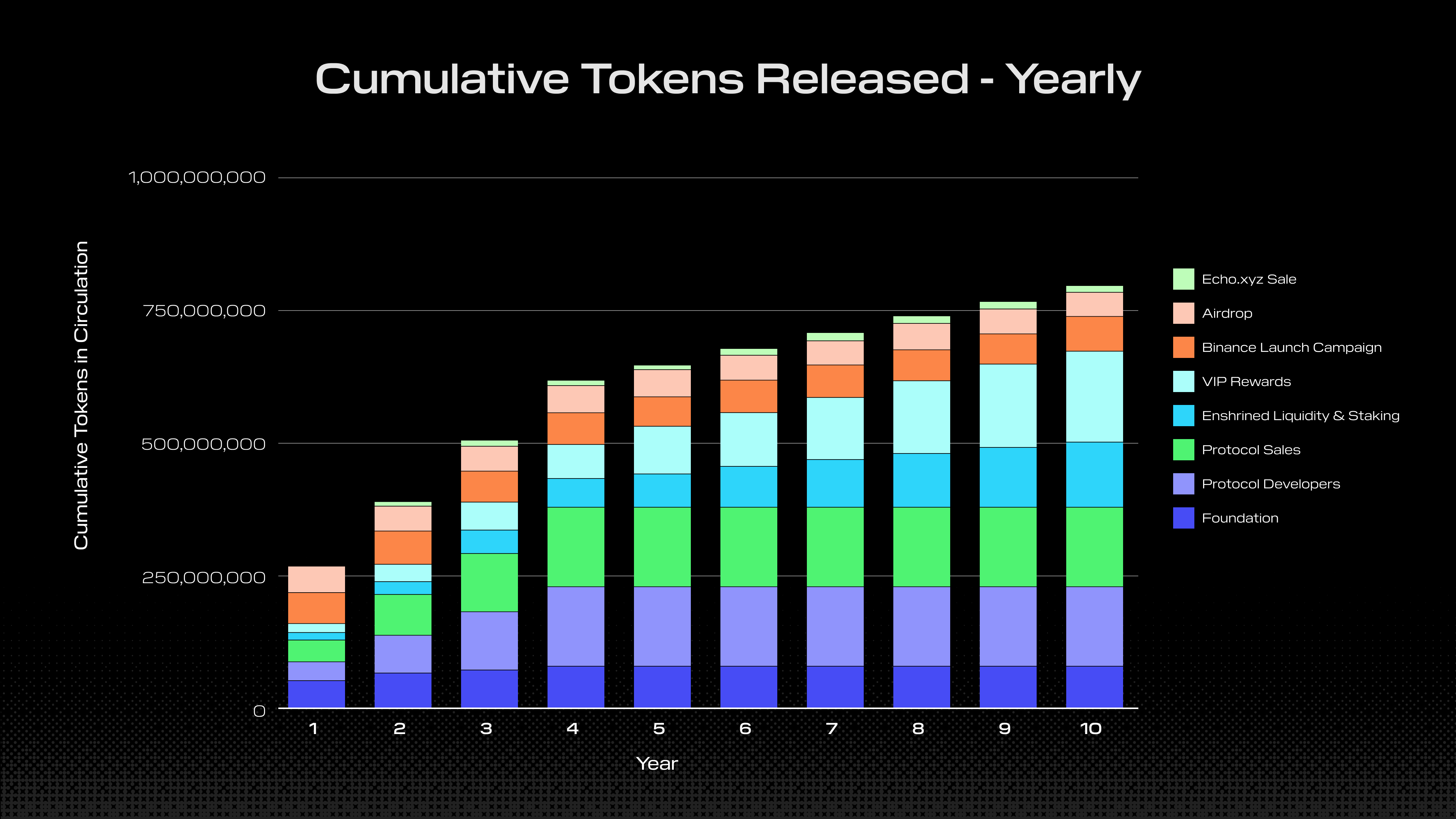
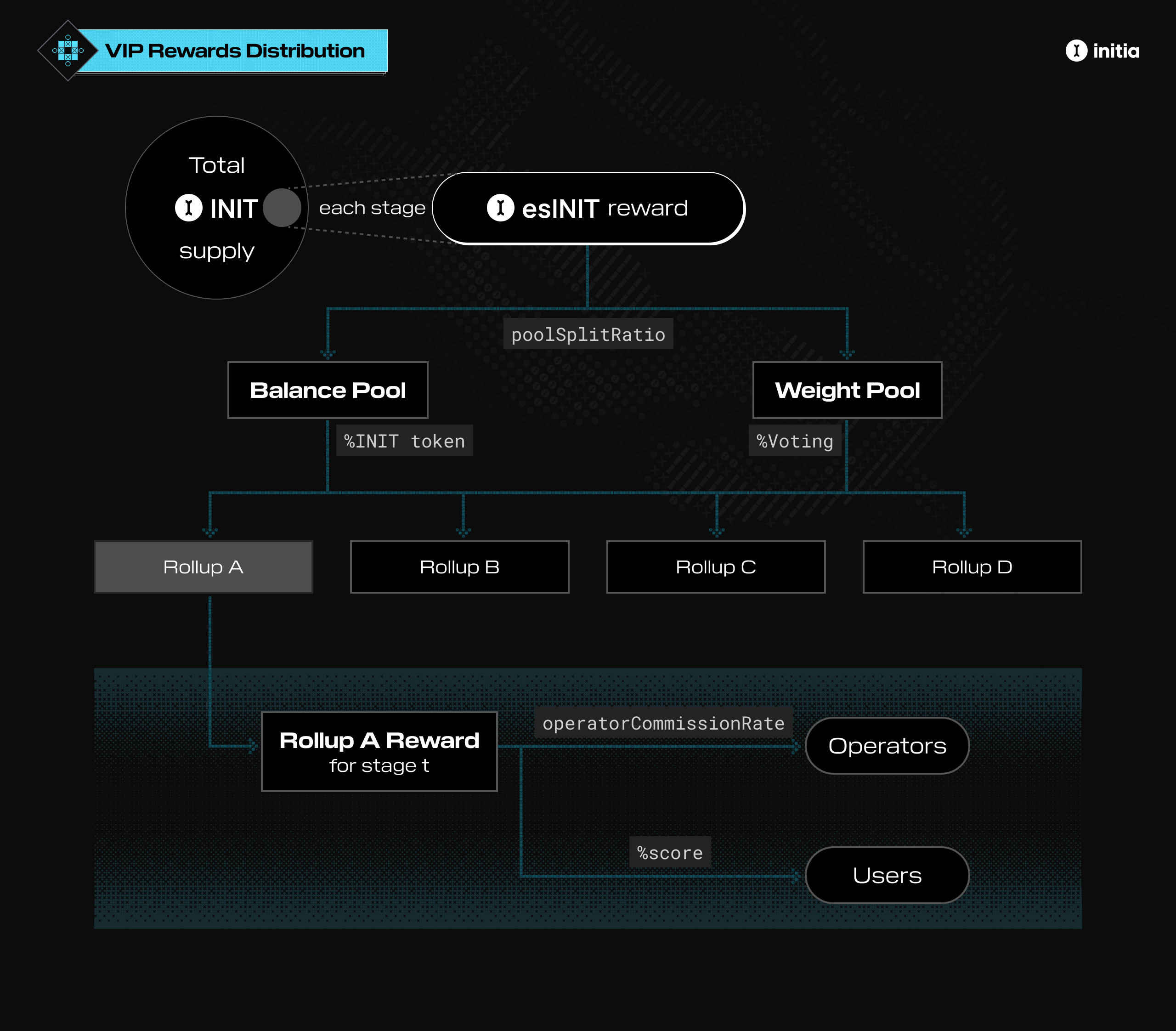
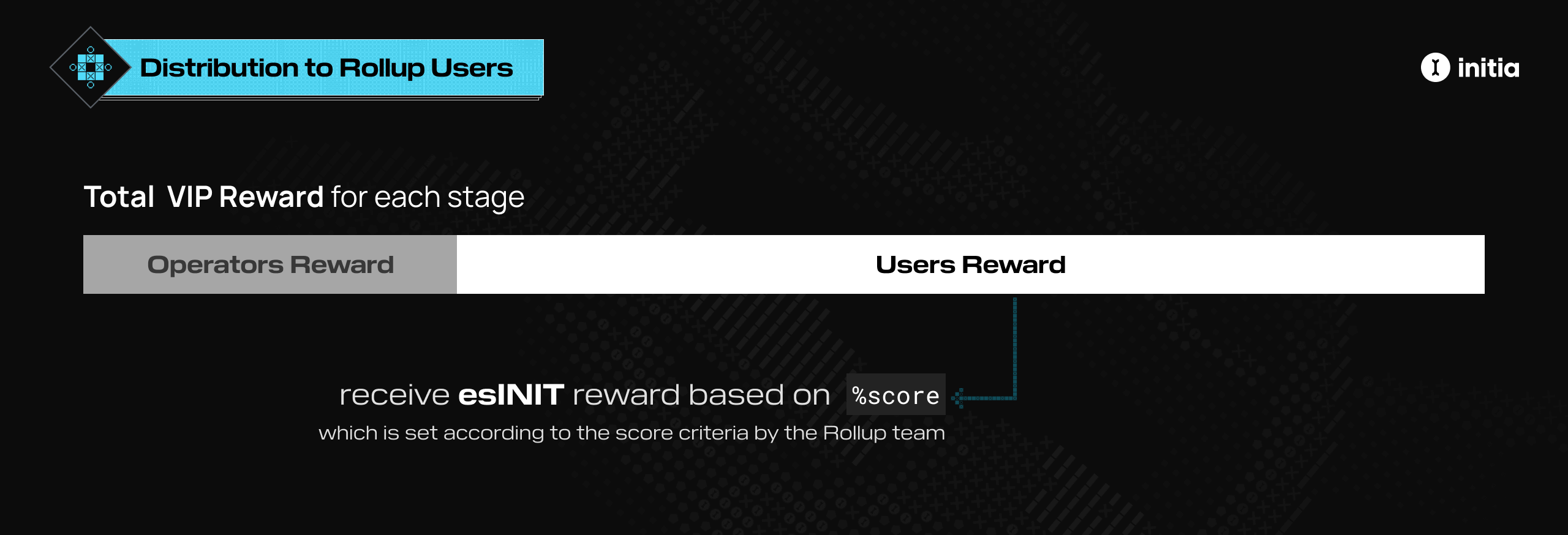
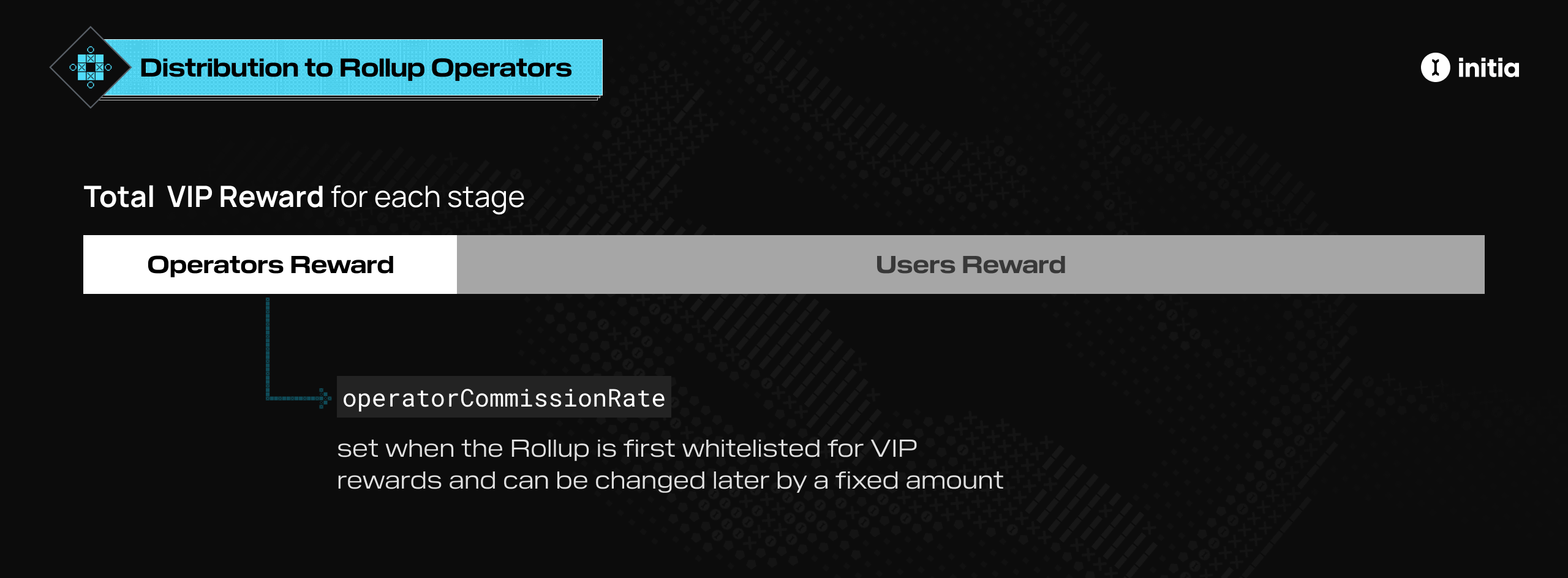
Distribution The rewards for an operator $o$ of rollup $m$ during a stage are: $$ R_{o,m,t} = R_{m,t} c_{m} $$ The commission rate is set when the rollup is first approved for VIP rewards and can be changed later, but only by a fixed amount each stage to prevent abuse. Taking into account the operator commissions, the total rewards distributed to a user on a rollup is then: $$ R_{u,m,t} = (1-c_{m}) R_{m,t} \frac{S_{u,m,t}}{\sum_{i=1}^{N_{u,m,t}} S_{i,m,t}} $$ ## Rewards Vesting Rewards from the VIP program are given in the form of escrowed INIT tokens (esINIT). These tokens are initially non-transferable and can be vested in multiple ways depending on whether the receiver is the user or rollup operator. ### User Vesting These tokens are initially non-transferable and can be vested in two ways: 1. **Maintain a VIP Score:** Keep a certain score over a number of `vestingPeriod`, with each period lasting `stageDuration`. 2. **Convert into LP Lock-Staked Position:** Convert the escrowed tokens into a whitelisted INIT:TOKEN staking position. VIP User Vesting #### Maintaining a VIP Score **Vesting Process** VIP esINIT rewards are converted into regular INIT tokens over multiple `vestingPeriod`, denoted as $p$, with each period lasting one stage. For instance, if the vesting period is 26 stages, the user will receive $\frac{1}{26}$ of their esINIT at each stage. **Achieving the Required Score** To fully convert their rewards into INIT tokens, users must maintain a certain score over the vesting periods, $p$, as determined by Initia L1 governance. The minimum required score is set by a `threshold` factor $f$, also determined by the L1 governance. The score calculation is as follows: $$ S_{\text{target},m,t} = S_{u,m,t} \cdot f $$ Where: * $S_{u,m,t}$ is the user's score on rollup $m$ during stage $t$. * $S_{\text{target},m,t}$ is the target score for rollup $m$ during stage $t$. **Calculating the Target Score** The target score $S_{\text{target},m,t}$ is the user's score for stage $t$ multiplied by the factor $f$. For example, if a user $u$ has a score of 100 at stage $t$, their target score to fully vest their esINIT after $p$ stages is $100 \cdot f$. **Failing to Meet Target Score** If a user fails to meet the target score at a certain stage $t$, they will only vest and receive a portion of their esINIT, calculated by the formula: $$ c_{\text{user}} = \frac{S_{u,m,t}}{S_{\text{target},m,t}} $$ For instance, if $f$ is 0.5, a user with a score of 100 must maintain a score of at least $S_{\text{target},m,t} = 100 \cdot 0.5 = 50$ for the next $p$ stages to fully vest their esINIT. If after $p$ stages, their score $S_{u,m,t}$ is only 30, their $c_{\text{user}}$ will be $\frac{30}{50} = 0.6$, and they will only be able to vest 60% of their esINIT. **Example Scenario** Parameters * **Vesting Period ((p))**: 50 stages * **Minimum Score Factor ((f))**: 0.5 Stage 1 ((t = 1)) * **User Score**: 100 * **esINIT Received for Stage 1**: 100 * **Vesting Rate**: $\frac{100 \text{ esINIT}}{50 \text{ stages}} = 2 \text{ INIT per stage}$ Stage 2 ((t = 2)) * **Minimum Score Needed from Stage 1**: $100 \times 0.5 = 50$ * **User Score**: 60 * **Vesting from Stage 1**: Since $60 \geq 50$, the user vests the full 2 INIT * **Vesting Rate for Stage 2**: $\frac{60 \text{ esINIT}}{50 \text{ stages}} = 1.2 \text{ INIT per stage}$ * **esINIT Received for Stage 2**: 60 Stage 3 ((t = 3)) * **Minimum Score Needed from Stage 1**: $100 \times 0.5 = 50$ * **Minimum Score Needed from Stage 2**: $60 \times 0.5 = 30$ * **User Score**: 40 * **Vesting from Stage 1**: Since $40 < 50$, the user vests $\frac{40}{50} \times 2 = 1.6 \text{ INIT}$ * **Vesting from Stage 2**: Since $40 \geq 30$, the user vests the full 1.2 INIT * **Total Vesting for Stage 3**: $1.6 \text{ INIT (from Stage 1)} + 1.2 \text{ INIT (from Stage 2)} = 2.8 \text{ INIT}$ Summary Table | Stage | User Score | esINIT Received | Vesting Rate (per stage) | Min Score Needed | Actual Vesting | | ----- | ---------- | --------------- | ------------------------ | -------------------------- | -------------------- | | 1 | 100 | 100 | 2 INIT | - | - | | 2 | 60 | 60 | 1.2 INIT | 50 (Stage 1) | 2 INIT | | 3 | 40 | - | - | 50 (Stage 1), 30 (Stage 2) | 1.6 + 1.2 = 2.8 INIT | Explanation 1. **Stage 1**: The user scores 100 and receives 100 esINIT, which will be unlocked at a rate of 2 INIT per stage over 50 stages. 2. **Stage 2**: The user needs to score at least 50 to unlock the full 2 INIT from Stage 1. They score 60, so they unlock the full 2 INIT and receive 60 esINIT for Stage 2, which will be unlocked at a rate of 1.2 INIT per stage. 3. **Stage 3**: The user needs to score at least 50 to unlock the full 2 INIT from Stage 1 and at least 30 to unlock the full 1.2 INIT from Stage 2. They score 40, so they unlock 1.6 INIT from Stage 1 and the full 1.2 INIT from Stage 2, totaling 2.8 INIT. #### Converting to LP Lock-Staked Position Maintaining the score over several periods can be challenging for some users. Therefore, VIP allows users to convert their esINIT into a locked, stake-locked INIT:TOKEN LP position on the InitiaDEX for pairs whitelisted on Enshrined Liquidity, with the user providing the TOKEN side of the pair. When creating a lock-staked position, users can choose the duration for locking their LP position. The length of this lock will determine their voting power on VIP gauge votes. However, when lock-staking through VIP, a minimum lock duration of 26 weeks is enforced. ### Operator Vesting VIP Operator Vesting Similarly, rollup operators' esINIT rewards are also vested, but the process is slightly different. Operator esINIT rewards are released linearly over a number of `operatorVestingStages`. For example, if the operator vesting period consists of 10 stages, the operator will receive $\frac{1}{10}$ of their esINIT at each stage. # VIP Eligibility Source: https://docs.initia.xyz/home/core-concepts/vip/eligibility For a rollup and its users to be eligible for VIP rewards, they first need to be whitelisted. The whitelisting process comprises 2 steps: 1. Reaching the minimum INIT TVL threshold 2. Whitelisting via Initia L1 governance ## Minimum INIT TVL Threshold To be considered for whitelisting on VIP, rollups must first meet a minimum INIT TVL (Total Value Locked) threshold. * Rollups that somehow manage to get whitelisted without reaching the minimum INIT TVL threshold will still not be eligible for rewards until they meet this requirement. * Rollups that have been whitelisted and successfully reached the minimum INIT TVL threshold will forfeit any VIP rewards if their TVL subsequently falls below this threshold. ## Governance Whitelisting Once the minimum INIT TVL threshold is reached, the rollup needs to then submit a whitelisting proposal to the Initia L1 governance. As with all governance proposals, the whitelisting proposal will be voted on by INIT and Enshrined Liquidity stakers. * Rollups that add little value to the ecosystem (e.g., rollups that only accumulate TVL with no productive use case) - Rollups that exist solely to allow the corresponding app to qualify for VIP rewards (e.g., rollups where the app is otherwise completely off-chain) # VIP Gauge Voting Source: https://docs.initia.xyz/home/core-concepts/vip/gauges To decide how much of the total [Weight Pool](/home/core-concepts/vip/architecture#weight-pool) rewards are distributed to each rollup in a given stage, a gauge weight voting process is used. This is similar to the one pioneered by Curve Finance for use with their liquidity pools. ### Voting Cycles Voting on VIP gauges occurs at regular intervals called **cycles**. Every VIP-whitelisted rollup has a "gauge" that determines the ratio of total Weight Pool rewards it can receive. INIT and Enshrined Liquidity stakers can then use their voting power to increase the weight of the gauges for their preferred rollups. They can allocate their entire voting power to a single rollup's gauge or distribute it across multiple gauges. All gauge voting occurs on Initia L1. ### Gauge Voting Power For VIP Gauge Votes, a user's voting power depends on their staking position. For INIT staking, their VIP voting power matches their voting power in the Initia L1 governance. However, for Enshrined Liquidity staking positions, an adjustment factor is applied to their voting power. This adjustment factor varies for each staked LP token pair. #### Example Scenario Consider a case with 3 users and 3 rollups: | User | Total Voting Power | | ------ | ------------------ | | User 1 | 30% | | User 2 | 50% | | User 3 | 20% | Each user decides to vote on the gauges as follows: | User | Rollup 1 Gauge | Rollup 2 Gauge | Rollup 3 Gauge | | ------ | -------------- | -------------- | -------------- | | User 1 | 10% | 15% | 5% | | User 2 | 25% | 25% | 0% | | User 3 | 20% | 0% | 0% | \*Percentages represent the portion of each user's total voting power allocated to each rollup. After the voting period ends, the final Weight Pool reward distribution is calculated as follows: | Rollup | Percentage of Total Rewards | | -------- | --------------------------- | | Rollup 1 | 55% | | Rollup 2 | 40% | | Rollup 3 | 5% | In this case, the Weight Pool rewards for the cycle will then be split 55:40:5. VIP Gauge Voting # VIP Introduction Source: https://docs.initia.xyz/home/core-concepts/vip/introduction In an ecosystem with a growing number of rollups, aligning the incentives of all participants is crucial. Although there have been attempts to achieve this, most encounter a few common core problems: * Misalignment of incentives for dApps that generate high levels of on-chain activity and value * Economic underutilization of the native token * Inefficient distribution of protocol-level grants and incentives to foster long-term value and alignment Initia aims to address these issues for Interwoven Rollups through a novel incentive alignment mechanism known as the Vested Interest Program (VIP). This is done by programmatically rewarding valuable economic activities: * Rollups receive reward allocations for creating innovative apps and new use cases for the INIT token * Users earn INIT tokens from performing beneficial actions or meeting criteria set by the L2s. Finally, by allocating a portion of the overall rewards directly to the rollups, the VIP program ensures that the rollup teams, the rollups' users, and INIT holders are long-term aligned with the success of the ecosystem. # VIP Scoring Source: https://docs.initia.xyz/home/core-concepts/vip/scoring ## Introduction The VIP Program employs a scoring system designed to allocate ⁠esINIT rewards to users. This system evaluates users based on their activities and contributions within a specific rollup. The specific scoring policy varies between each rollup, and the scoring process is conducted on-chain directly by the respective rollup team. ### Scoring Phase First, during each epoch, rollup teams score their users based on their activity through a `vip_score` contract. To score users, the rollup operator must first register the `deployer` account on the `vip_score` contract using their operator key. Once registered, the deployer can add and remove user scores based on the determined criteria. See [this page](/developers/developer-guides/integrating-initia-apps/vip) for more information on how scoring works. All future scoring actions can only be performed by the deployer until the deployer is changed or removed. Once the scoring for an epoch is complete, the scores must be finalized by calling a function on the `vip_score` contract. ### Snapshotting Phase Once finalized, the VIP Agent snapshots and submits the scores from all rollups, storing them in the Initia L1 VIP module. The Agent is an actor selected through Initia L1 governance. After all snapshots have been taken and stored, the esINIT rewards are distributed to the users. ### Claiming Phase Finally, the user can claim the distributed rewards. ### VIP Criteria & Scoring Policies #### Transparency 1. All scoring methodologies must be clearly listed and published in the rollup's VIP whitelisting proposal in full detail, both on the forums and in the on-chain proposal. 2. VIP scoring details outlined in the proposal must include all eligible user actions, criteria, distribution methodologies, and any calculations involved. 3. All scoring methodologies need to be transparent and verifiable by anyone. #### Scoring Criteria 4. Points may be allocated based on a user's usage of other chains within the Interwoven Economy, provided that the usage is relevant and beneficial to the rollup conducting the scoring. 5. VIP scores must only be allocated based on actions or metrics that are on-chain, such as users performing specific actions or transactions, holding assets, or other positions. 6. Actions performed off-chain, such as referrals and social media posts or engagements, cannot be used for scoring. This also includes incentivizing usage of specific tools, frontends, wallets, or other applications. #### Restrictions 7. VIP scores cannot be granted directly to rollup operators, team members, or their associated accounts. 8. Rollup teams cannot use VIP scores to incentivize users to vote for them on the VIP gauges. 9. Incentivizing users to hold naked assets such as BTC, ETH, USDC, and governance tokens, or to provide liquidity for any pair on any DEX, is prohibited. 10. If a rollup wants to incentivize holding specific assets, those assets must be ones where the underlying token is used productively (for example, LST, staking token variants, yield-bearing assets, etc.). All whitelisting proposals and scoring criteria are reviewed by the VIP Committee. This committee consists of stewards who uphold Initia VIP requirements and prioritize the sustainable success of the Interwoven Economy. Final approval for whitelisting rollups comes from Initia L1 governance through an on-chain vote. Any changes to a rollup's criteria must be submitted to the forums for review and approval by the VIP Committee before implementation. **Any attempts to bypass, circumvent, or abuse the VIP scoring system may result in the removal of the offending rollup from the VIP Program.** # VIP Timelines Source: https://docs.initia.xyz/home/core-concepts/vip/timelines ## Timelines ### Gauge Voting Cycles The Vested Interest Program always begins with a [gauge voting](/home/core-concepts/vip/gauges) cycle. During this cycle, Initia L1 stakers vote on the gauge weights that will determine the VIP [Weight Pool](/home/core-concepts/vip/architecture#weight-pool) rewards distribution for the next rewards stage. ### Reward Distribution Stages Reward Distribution Stages After the first gauge voting cycle concludes, the first reward distribution stage begins. During a stage, the individual rollup teams will begin to keep track of scores for all of their users based on their scoring criteria. During a stage, the snapshot of each rollup's INIT balance will also be taken and used to determine the VIP \[Balance Pool] rewards. There are two ways the snapshot is done: 1. **For Stage 1**: Two snapshots are taken: a single snapshot at the beginning of the stage to determine the VIP Balance Pool rewards for Stage 1, and multiple snapshots throughout the stage to determine the VIP Balance Pool rewards for Stage 2+. 2. **For Stage 2+**: Multiple snapshots are taken throughout the stage to determine the VIP Balance Pool rewards for the next stage. At the end of the stage, the scores for each user on each rollup are finalized, and the final rewards are distributed to the users. The combined timelines of the gauge voting cycle and rewards distribution stage are as follows: Gauge Voting and Rewards Distribution Timelines ### Challenge Period When a rollup finalizes its scores, it enters a **challenge period**. This period allows users and other parties to audit the scores submitted by the rollup, ensuring their accuracy and compliance with both the VIP scoring policy and the rollup's own scoring criteria. If someone finds an incorrect scoring, they can submit a challenge through an expedited or emergency governance proposal on Initia L1. If a challenge succeeds, the following changes occur: 1. The system replaces the VIP scoring agent and transfers authority to a new agent. 2. The system recalculates rewards for the stage. Note that the challenge period happens alongside the start of the next stage and does not delay its commencement, as seen in the timeline above. # Welcome to Initia Source: https://docs.initia.xyz/home/general/welcome Hero Initia's core philosophy is to make opinionated decisions on the underlying infrastructure such as data availability, interoperability, and oracles. By reducing decision fatigue, the Interwoven Stack empowers developers with the tools to craft application-specific environments while maintaining unfragmented accessibility to the application ecosystem. ## Learn More About Initia Discover the framework that powers all of Initia's rollups. Initia's solution to bootstrapping cross-chain liquidity while maintaining network security. Initia's incentive program that aims to foster long-term ecosystem-wide alignment. ## Start Developing Learn how to easily deploy your own rollup on your own computer. Deploy and interact with contracts on Interwoven Rollups on the various VMs. The set of components for building on the Interwoven Stack # Bridge Source: https://docs.initia.xyz/home/tools/bridge The Initia Bridge allows users to transfer tokens between the Initia L1, all Interwoven Rollups, and other ecosystems. The Initia Bridge is directly accessible from the Initia Wallet through its Bridge/Swap page, and across all Interwoven Rollups that have deployed the Wallet. Utilizing Skip Go API's routing, the Bridge aggregates various bridging protocols such as LayerZero, CCTP, IBC, and the Interwoven Stack's native optimistic bridge to provide the best price and the fastest route for users. By further combining this with various DEXs including Initia DEX, the Bridge enables users to also perform swaps as part of their bridging process, all in 1 user action. This enables various use cases and flows, including: 1. Bridging and swapping from USDC on Ethereum to INIT on Initia L1 (via [CCTP](https://www.circle.com/cross-chain-transfer-protocol), [IBC](https://cosmos.network/ibc), and Initia DEX) 2. Bridging and swapping from ETH on Optimism to Kamigotchi (via [LayerZero](https://layerzero.network/) and IBC) 3. Instantly bridging INIT from an Interwoven Rollup to Initia L1 (via IBC and Minitswap) # Wallet Source: https://docs.initia.xyz/home/tools/wallet One barrier for users onboarding into a new ecosystem has always been the need to download, install, and use a new wallet. With the Initia Wallet, users can sign in to an application using their existing EVM-compatible wallet, regardless of the VM or smart contract language the application uses.. For those without an existing wallet, the Initia Wallet also allows users to create a new wallet using their email address or Google or Twitter account, protected by [Privy](https://privy.io/). # API Reference Source: https://docs.initia.xyz/interwovenkit/features/autosign/api-reference Complete API documentation for the autosign feature ## Overview The `autoSign` object provides methods and properties for managing autosign functionality. It is available via the `useInterwovenKit()` hook. ## Accessing the API ```tsx theme={null} import { useInterwovenKit } from '@initia/interwovenkit-react' function MyComponent() { const { autoSign } = useInterwovenKit() // Use autoSign methods and properties } ``` ## Type Definitions ### AutoSign Object ```tsx theme={null} interface AutoSign { isLoading: boolean enable: (chainId?: string) => Promise disable: (chainId?: string) => Promise expiration: Date | null expirations: Record } ``` ## Properties ### isLoading Indicates whether autosign status is currently being checked. Returns `true` when autosign status is being initialized or checked, `false` otherwise. Use this to show loading indicators in your UI. **Example:** ```tsx theme={null} function AutosignButton() { const { autoSign } = useInterwovenKit() if (autoSign.isLoading) { return } return } ``` ### expiration Expiration date for autosign on the default chain. Returns a `Date` object representing when autosign expires on the default chain, or `null` if autosign is not enabled. Use this to display expiration information and check if autosign is currently active. **Example:** ```tsx theme={null} function ExpirationDisplay() { const { autoSign } = useInterwovenKit() if (autoSign.expiration && autoSign.expiration > new Date()) { return
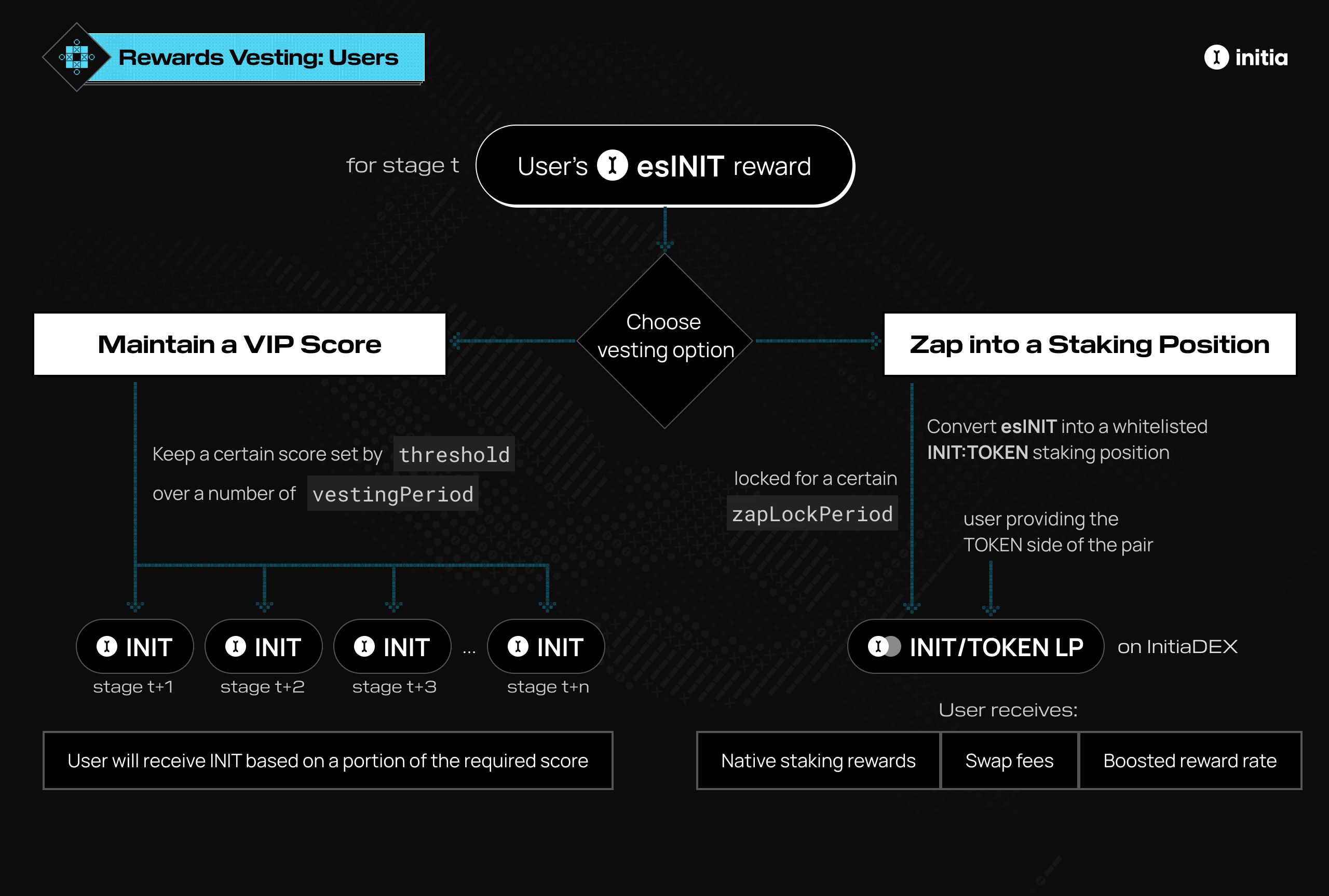
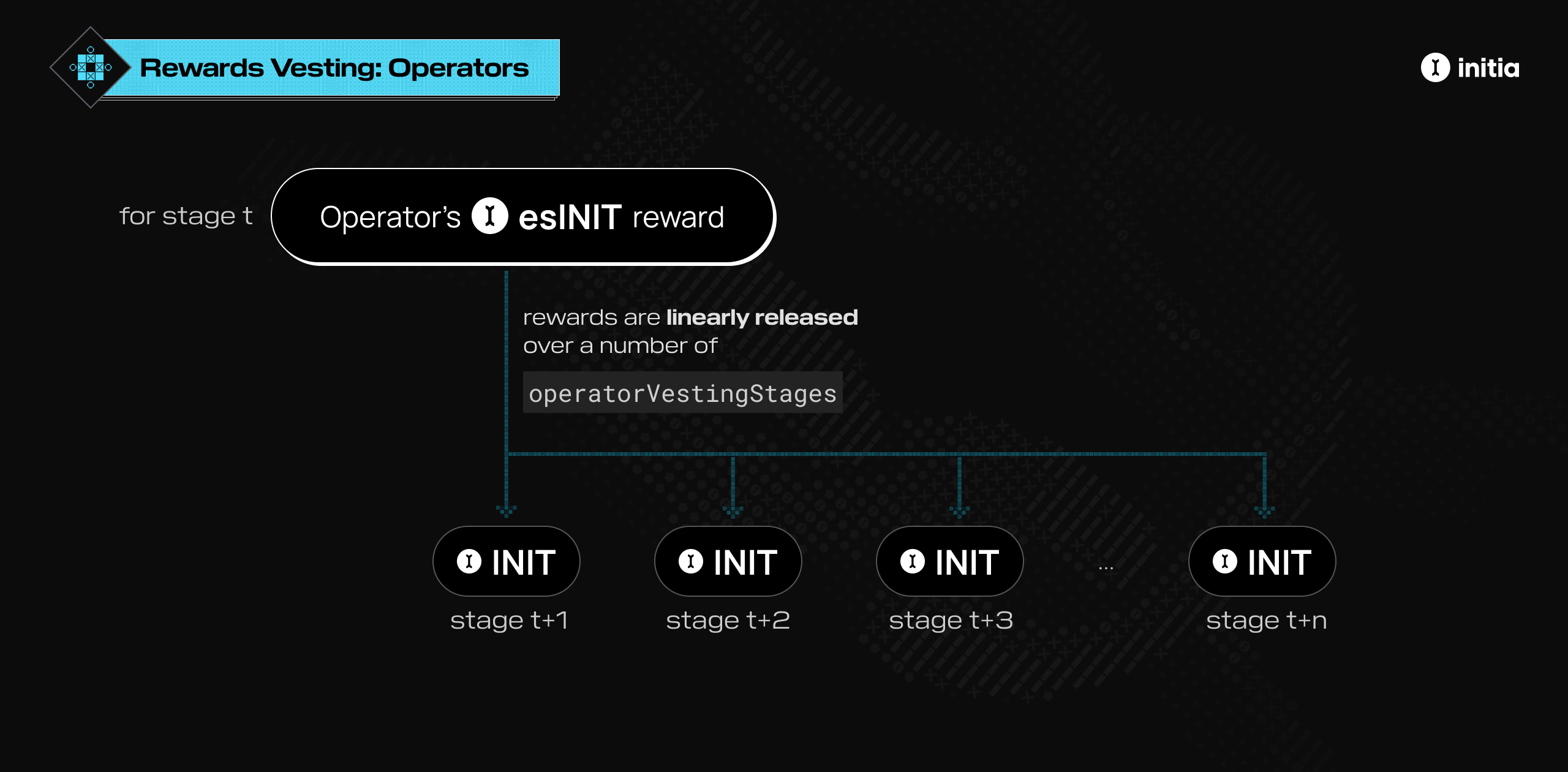
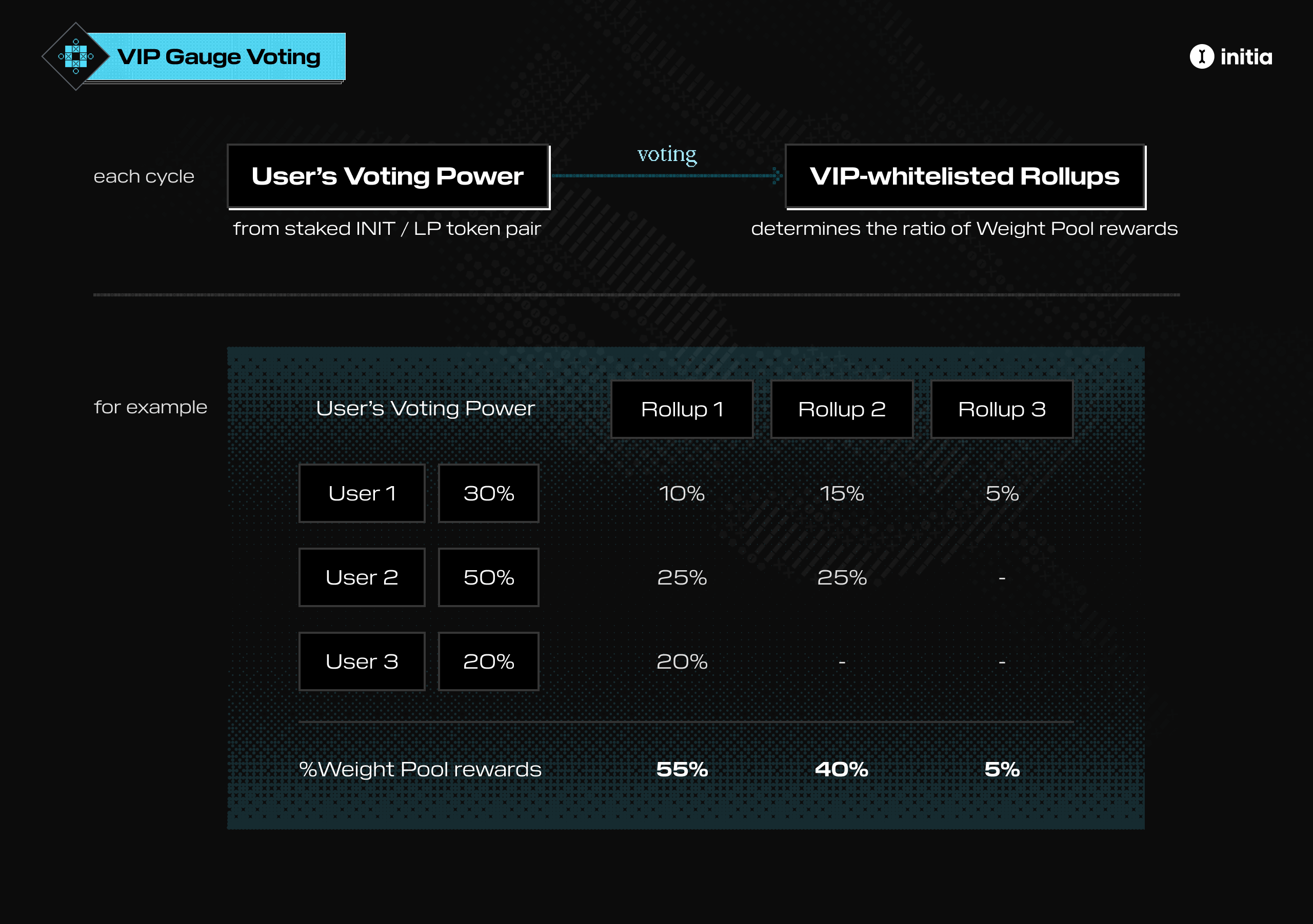
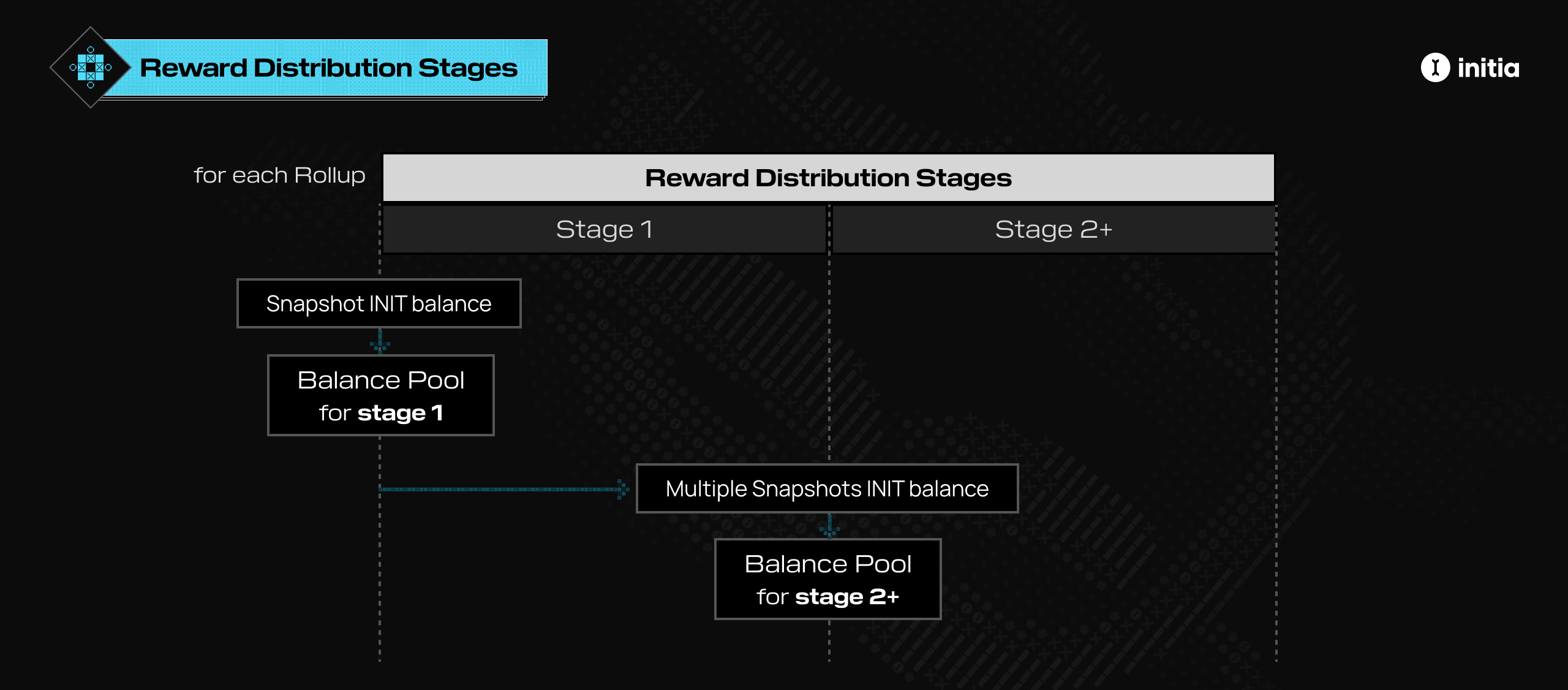
Autosign expires: {autoSign.expiration.toLocaleString()}

} return

Autosign is not enabled

} ``` ### expirations Map of chain IDs to expiration timestamps for all configured chains. Returns an object mapping chain IDs to expiration timestamps (in milliseconds since epoch). Use this for multi-chain applications to check autosign status across multiple chains. Returns `null` for chains where autosign is not enabled. **Example:** ```tsx theme={null} function MultiChainStatus() { const { autoSign } = useInterwovenKit() return (
{Object.entries(autoSign.expirations).map(([chainId, timestamp]) => { if (!timestamp) return null const expiration = new Date(timestamp) const isActive = expiration > new Date() return (
{chainId}: {isActive ? 'Active' : 'Expired'} {isActive && ` (until ${expiration.toLocaleString()})`}
) })}
) } ``` ## Methods ### enable() Enables autosign for a specific chain or the default chain. Opens a drawer for user confirmation and creates the necessary authz and feegrant permissions. Returns a Promise that resolves when autosign is successfully enabled or rejects if the user cancels or an error occurs. **Parameters:** - `chainId` (optional): Chain ID to enable autosign for. If not provided, uses the default chain ID from `InterwovenKitProvider`. **Returns:** Promise that resolves when autosign is enabled **Throws:** Error if user rejects, permissions are not configured, or autosign is already enabled **Example:** ```tsx theme={null} async function enableAutosign() { try { await autoSign.enable() console.log('Autosign enabled for default chain') } catch (error) { console.error('Failed to enable autosign:', error) } } async function enableForChain() { try { await autoSign.enable('minievm-2') console.log('Autosign enabled for minievm-2') } catch (error) { console.error('Failed to enable autosign:', error) } } ``` **Error Cases:** * `"User rejected auto sign setup"`: User canceled the confirmation dialog * `"Auto sign permissions are not configured"`: `enableAutoSign` is not configured in the provider * `"Auto sign is already enabled"`: Autosign is already active for the specified chain ID ### disable() Disables autosign for a specific chain or the default chain. Revokes all authz and feegrant permissions for the specified chain, preventing further automatic signing. Returns a Promise that resolves when autosign is successfully disabled. **Parameters:** - `chainId` (optional): Chain ID to disable autosign for. If not provided, uses the default chain ID from `InterwovenKitProvider`. **Returns:** Promise that resolves when autosign is disabled **Throws:** Error if permissions are not configured or autosign is not enabled **Example:** ```tsx theme={null} async function disableAutosign() { try { await autoSign.disable() console.log('Autosign disabled for default chain') } catch (error) { console.error('Failed to disable autosign:', error) } } async function disableForChain() { try { await autoSign.disable('minievm-2') console.log('Autosign disabled for minievm-2') } catch (error) { console.error('Failed to disable autosign:', error) } } ``` # Configuration Source: https://docs.initia.xyz/interwovenkit/features/autosign/configuration ## Overview Configuring autosign requires two main steps: setting up Privy for embedded wallet management and configuring autosign permissions in your `InterwovenKitProvider`. This guide walks you through both processes. ## Prerequisites Before configuring autosign, ensure you have: * A Privy account and application ID * InterwovenKit already integrated into your application * An understanding of which transaction types you need to auto-sign ## Setting Up Privy Autosign requires Privy to manage embedded wallets. Privy provides secure key management and wallet creation for ghost wallets. 1. Visit [Privy's website](https://privy.io) and create an account 2. Create a new application in the Privy dashboard 3. Copy your application ID from the dashboard Install the required Privy packages in your application. This guide assumes InterwovenKit is already installed: ```bash npm theme={null} npm install @privy-io/react-auth ``` ```bash yarn theme={null} yarn add @privy-io/react-auth ``` ```bash pnpm theme={null} pnpm add @privy-io/react-auth ``` ```bash bun theme={null} bun add @privy-io/react-auth ``` Before configuring your application, set up allowed domains in the Privy dashboard to ensure security and proper functionality: 1. **Access Privy Dashboard**: Log in to your Privy account 2. **Click Into Application**: Click into the application you would like Privy to work with 3. **Navigate to Allowed Domains**: Click **App settings** on the left sidebar and then click on the **Domains** tab 4. **Add Domains**: Under **Allowed Origins**, add: * Your production domain (e.g., `app.example.com`) * Your development domain (e.g., `localhost:3000`) * Any staging domains you use Privy services will only work on domains you've explicitly allowed. Add all domains where your application will run, including localhost for development. The following configuration wires Privy into InterwovenKit to enable embedded wallets and autosign: 1. Wrap your app with `PrivyProvider` to enable authentication and embedded wallet management. 2. Use Privy hooks (`usePrivy`, `useLoginWithSiwe`, `useCreateWallet`, `useWallets`) to access wallet and auth state. 3. Pass those hooks into `InterwovenKitProvider` via `privyContext`. 4. Enable autosign for supported message types using `enableAutoSign`. **Required Configuration for Autosign:** * `appId`: Your Privy application ID * `embeddedWallets.ethereum.createOnLogin: "all-users"`: **Required for autosign**. Ensures an embedded (ghost) wallet is created at login. Privy’s default behavior may not create an embedded wallet automatically, which will prevent autosign from working. ```tsx providers.tsx theme={null} import { PrivyProvider, useCreateWallet, useLoginWithSiwe, usePrivy, useWallets, } from '@privy-io/react-auth' import { InterwovenKitProvider, PRIVY_APP_ID, } from '@initia/interwovenkit-react' function InterwovenKitWrapper({ children }) { const privy = usePrivy() const siwe = useLoginWithSiwe() const { createWallet } = useCreateWallet() const { wallets } = useWallets() return ( {children} ) } export default function Providers() { return ( {/* Your app */} ) } ``` ## Configuring Autosign Permissions ### Choose Your Autosign Mode Before enabling autosign, decide which mode fits your application: * **Boolean (`enableAutoSign`)** * Best for simple, single-chain apps * Automatically allows default contract execution messages for the chain * Does **not** allow token transfers, staking, or other non-default messages * **Per-Chain Configuration (`enableAutoSign: { "chain-id": ["msg.type.Url", ...] }`)** * Required if your app sends tokens, delegates, or uses multiple chains * You must explicitly list every allowed message type If your app does more than basic contract execution calls, you should skip the boolean option and use the per-chain permissions in the [Advanced Configuration](#advanced-configuration-explicit-permissions) section. Most production applications will eventually require the per-chain configuration. ### Simple Configuration (Limited) This option only enables autosign for default contract execution messages and is intentionally restrictive. ```tsx theme={null} {children} ``` If you later need to support token transfers, staking, or multiple chains, you must switch from the boolean configuration to the per-chain configuration in the [Advanced Configuration](#advanced-configuration-explicit-permissions) section. When using boolean configuration, InterwovenKit automatically: * Detects your chain's VM type * Grants permission for the appropriate message type: * **MiniEVM**: `/minievm.evm.v1.MsgCall` * **MiniWasm**: `/cosmwasm.wasm.v1.MsgExecuteContract` * **MiniMove**: `/initia.move.v1.MsgExecute` ### Advanced Configuration (Explicit Permissions) For multi-chain applications or when you need custom message types, specify autosign permissions per chain: ```tsx theme={null} {children} ``` **Configuration Format:** The `enableAutoSign` prop accepts an object where: * **Keys**: Chain IDs (strings) * **Values**: Arrays of message type URLs (strings) **Common Message Types:** * **EVM Chains**: `/minievm.evm.v1.MsgCall` * **Wasm Chains**: `/cosmwasm.wasm.v1.MsgExecuteContract` * **Move Chains**: `/initia.move.v1.MsgExecute` * **Bank Module**: `/cosmos.bank.v1beta1.MsgSend` * **Staking**: `/cosmos.staking.v1beta1.MsgDelegate` Only grant permissions for message types that your application actually needs. Granting overly broad permissions increases security risk. # Introduction Source: https://docs.initia.xyz/interwovenkit/features/autosign/introduction Learn about autosign and ghost wallets for seamless transaction signing. ## Overview Autosign enables your application to send transactions automatically without requiring user confirmation for each transaction. This feature uses an embedded wallet (also known as a ghost wallet) to sign specific transactions on behalf of users, providing a seamless user experience while maintaining security through granular permission controls. Autosign is built on the Cosmos SDK's `authz` and `feegrant` modules, allowing fine-grained control over which transaction types can be automatically signed and when permissions expire. ## What Are Ghost Wallets? Ghost wallets are Privy-managed embedded wallets that act as authorized signers for your application. When autosign is enabled, Privy creates a ghost wallet that receives permission from the user's main wallet to sign specific transaction types automatically. Key characteristics of ghost wallets: * **Separate Address**: Each ghost wallet has its own blockchain address * **Managed by Privy**: Privy handles key management and wallet lifecycle * **Scoped Permissions**: Can only sign transactions you've explicitly authorized * **Time-Limited**: Permissions expire after a set duration * **Revocable**: Users can revoke permissions at any time ## How Autosign Works When autosign is enabled, the following process occurs: Your application requests permission to automatically sign specific transaction types on specific chains. This is configured through the `enableAutoSign` prop in `InterwovenKitProvider`. Privy creates an embedded wallet (ghost wallet) that signs transactions on the user's behalf. This wallet is created automatically when the user enables autosign. The user's main wallet grants permission to the ghost wallet via Cosmos SDK's `authz` and `feegrant` modules: * **Authz grants**: Authorize the ghost wallet to execute specific message types * **Feegrant**: Allows the ghost wallet to pay transaction fees on behalf of the user The user signs a single transaction to create these grants. When transactions match the granted permissions: 1. InterwovenKit validates that the transaction message types match the grants 2. InterwovenKit checks that permissions haven't expired 3. The ghost wallet automatically signs the transaction 4. The transaction is broadcast without user interaction ## Benefits Autosign provides several key benefits for both users and developers: For users: * **Seamless Experience**: No need to approve every transaction manually * **Reduced Friction**: Faster interactions, especially for frequent operations * **Security**: Permissions are scoped, time-limited, and revocable * **Control**: Users can see and manage all autosign permissions For developers: * **Better UX**: Reduce transaction approval fatigue * **Flexible Permissions**: Configure exactly which transaction types can be auto-signed * **Multi-Chain Support**: Configure different permissions per chain * **Trust Indicators**: Works with domain trust verification ## Security Autosign maintains security through several mechanisms: * **Scoped Permissions**: Only specific message types can be auto-signed. For example, you might grant permission for `/minievm.evm.v1.MsgCall` but not for `/cosmos.bank.v1beta1.MsgSend`, ensuring the ghost wallet can only execute the exact operations you've authorized. * **Time-Limited Grants**: All autosign permissions have expiration dates. Users can set expiration times when enabling autosign, and permissions automatically expire, requiring re-authorization. * **Domain Trust**: InterwovenKit shows security warnings for untrusted domains. Applications listed in the Initia registry are automatically trusted, while others show warnings that users can acknowledge or dismiss. * **Revocable Permissions**: Users can revoke autosign permissions at any time through their wallet settings. When revoked, all grants are immediately invalidated. # Usage Source: https://docs.initia.xyz/interwovenkit/features/autosign/usage Learn how to enable, disable, and manage autosign in your application ## Overview Once autosign is configured, you can enable and manage it in your application using the `autoSign` object from `useInterwovenKit()`. This guide covers how to use autosign in your code. ## Accessing Autosign The `autoSign` object is available via the `useInterwovenKit()` hook: ```tsx theme={null} import { useInterwovenKit } from '@initia/interwovenkit-react' function MyComponent() { const { autoSign } = useInterwovenKit() // Use autoSign.enable(), autoSign.disable(), etc. } ``` ## Enabling Autosign To enable autosign, call the `enable()` method. This opens a drawer where users confirm the autosign setup and select an expiration duration. The following examples show client components for enabling and disabling autosign. You can adapt this logic to your own UI or component structure. ### Example: EnableAutosignButton ```tsx theme={null} 'use client' import { useState } from 'react' import { useInterwovenKit } from '@initia/interwovenkit-react' export default function EnableAutosignButton() { const { autoSign } = useInterwovenKit() const [isEnabling, setIsEnabling] = useState(false) const handleEnable = async () => { try { setIsEnabling(true) await autoSign.enable() // Uses defaultChainId console.log('Autosign enabled successfully!') } catch (error) { console.error('Failed to enable autosign:', error) } finally { setIsEnabling(false) } } return ( ) } ``` ### Enabling for a Specific Chain Specify a chain ID to enable autosign for a particular chain: ```tsx theme={null} await autoSign.enable('interwoven-1') ``` ### What Happens When Enabled When `autoSign.enable()` is called: A drawer appears asking the user to confirm autosign setup, showing which permissions will be granted. The user can select an expiration duration from available defaults or use a custom duration. Privy creates an embedded wallet if one does not exist. This happens automatically in the background. The user signs a single transaction to grant `authz` and `feegrant` permissions to the ghost wallet. Autosign becomes active for the specified chain and message types. The Promise resolves on success. The method returns a Promise that resolves when autosign is successfully enabled or rejects if the user cancels or an error occurs. ## Disabling Autosign Users can disable autosign at any time. This revokes all grants for the selected chain and prevents further automatic signing. ### Example: DisableAutosignButton ```tsx theme={null} 'use client' import { useInterwovenKit } from '@initia/interwovenkit-react' export default function DisableAutosignButton() { const { autoSign } = useInterwovenKit() const handleDisable = async () => { try { await autoSign.disable() // Uses defaultChainId console.log('Autosign disabled successfully!') } catch (error) { console.error('Failed to disable autosign:', error) } } return } ``` ### Disabling for a Specific Chain Specify a chain ID to disable autosign for a particular chain: ```tsx theme={null} await autoSign.disable('interwoven-1') ``` # Deposit and Withdraw Source: https://docs.initia.xyz/interwovenkit/features/transfers/deposit-withdraw Open deposit and withdraw modals for cross-chain transfers. ## Overview Use `openDeposit` and `openWithdraw` from `useInterwovenKit()` to launch the built-in deposit and withdraw flows. These modals guide users through moving assets between chains without you rebuilding the UI. ## Basic usage ```tsx theme={null} import { useInterwovenKit } from '@initia/interwovenkit-react' function TransferButtons() { const { openDeposit, openWithdraw } = useInterwovenKit() return ( <> ) } ``` ## Defaults and requirements * `chainId` defaults to the current chain. * `recipientAddress` defaults to the connected user address. * `srcOptions` and `dstOptions` default to assets that match the selected symbol across supported chains. * A wallet must be connected, or the call throws an error. * `denoms` must be a non-empty array. ## Optional asset options Use `srcOptions` or `dstOptions` to limit the asset list shown in the modal. ## Full example ```tsx theme={null} import { useInterwovenKit } from '@initia/interwovenkit-react' function ScopedTransferButtons() { const { address, openDeposit, openWithdraw } = useInterwovenKit() const assetOptions = [ { denom: 'uinit', chainId: 'interwoven-1', }, { denom: 'uinit', chainId: 'my-rollup-1', }, ] if (!address) return null return ( <> ) } ``` ## Related reference See [`useInterwovenKit`](../../references/hooks/use-interwovenkit) for parameter signatures and types. # Getting Started Source: https://docs.initia.xyz/interwovenkit/getting-started Integrate Initia Wallet into your React application with InterwovenKit ## Overview InterwovenKit is a React library that provides seamless integration with Initia Wallet, enabling users to connect their wallets, manage accounts, and interact with the Initia blockchain directly from your React applications. It offers a complete wallet connection experience with built-in support for transactions, bridging, and account management. ## New Projects The fastest way to get started is by cloning our example project: ```bash theme={null} git clone https://github.com/initia-labs/examples.git cd examples/frontend/interwovenkit-react ``` ```bash npm theme={null} npm install npm run dev ``` ```bash yarn theme={null} yarn install yarn dev ``` ```bash pnpm theme={null} pnpm install pnpm dev ``` ```bash bun theme={null} bun install bun dev ``` The app will be available at [http://localhost:3000](http://localhost:3000/). This example demonstrates all core InterwovenKit features and serves as a reference implementation. ## Existing Projects Set up InterwovenKit as the default wallet connection option for your application Integrate InterwovenKit with an existing EVM application Integrate InterwovenKit with an existing RainbowKit application # EVM Integration Source: https://docs.initia.xyz/interwovenkit/integrations/evm ## Overview When working with EVM-based chains, you can configure [wagmi](https://wagmi.sh/) to connect directly to your custom EVM network instead of Ethereum mainnet. This approach allows you to: * Use wagmi for direct interaction with your EVM chain * Leverage Initia Wallet for interwoven rollup balance viewing and bridging * Maintain seamless connectivity between different blockchain environments **Non-EVM chains**: If your chain is not EVM-based, you can leave the default chain set to mainnet. Initia Wallet won't actually connect to Ethereum—it only uses an arbitrary signer to sign amino messages. ## Setup Guide Set up your providers to connect wagmi to your custom EVM chain. This configuration includes your chain details, wagmi config, and the InterwovenKit provider. ```tsx theme={null} // providers.tsx 'use client' import { PropsWithChildren, useEffect } from 'react' import { createConfig, http, WagmiProvider } from 'wagmi' import { QueryClient, QueryClientProvider } from '@tanstack/react-query' import { initiaPrivyWalletConnector, injectStyles, InterwovenKitProvider, TESTNET, } from '@initia/interwovenkit-react' import interwovenKitStyles from '@initia/interwovenkit-react/styles.js' const minievm = { id: 4303131403034904, name: 'Minievm', nativeCurrency: { name: 'GAS', symbol: 'GAS', decimals: 18 }, rpcUrls: { default: { http: ['https://jsonrpc-evm-1.anvil.asia-southeast.initia.xyz'], }, }, } const wagmiConfig = createConfig({ connectors: [initiaPrivyWalletConnector], chains: [minievm], transports: { [minievm.id]: http() }, }) const queryClient = new QueryClient() export default function Providers({ children }: PropsWithChildren) { useEffect(() => { // Inject styles into the shadow DOM used by Initia Wallet injectStyles(interwovenKitStyles) }, []) return ( {children} ) } ``` **Key Configuration Elements:** * **Chain Definition**: Define your custom EVM chain with its ID, name, native currency, and RPC endpoints * **Wagmi Config**: Set up wagmi to use your custom chain and the Initia Privy wallet connector * **Style Injection**: Use `injectStyles()` to ensure proper styling within Initia Wallet's shadow DOM * **Provider Hierarchy**: Wrap your app with QueryClient, WagmiProvider, and InterwovenKitProvider * **Default Chain ID**: Set to your target rollup chain ID (e.g., `"minievm-2"` for Minievm testnet) **Chain ID Configuration**: The `defaultChainId` parameter sets the primary blockchain for Initia Wallet operations. For EVM rollups, use your rollup's chain ID (like `"minievm-2"`), not the EVM chain ID. This ensures proper balance display and bridging functionality. See [InterwovenKitProvider reference](/interwovenkit/references/components/interwovenkit-provider) for more details. To follow the implementation example, install `viem` for Ethereum utilities: `sh npm npm install viem ` `sh yarn yarn add viem ` `sh pnpm pnpm add viem ` `sh bun bun add viem ` The following React component demonstrates a complete integration that combines wagmi's EVM functionality with InterwovenKit features. This example shows how to: * Send transactions on your custom EVM chain using wagmi * Access Initia Wallet features for bridging and account management * Handle wallet connection states and user interactions ```tsx theme={null} // page.tsx 'use client' import { parseEther } from 'viem' import { useAccount, useChainId, useSendTransaction, useSwitchChain, } from 'wagmi' import { truncate } from '@initia/utils' import { useInterwovenKit } from '@initia/interwovenkit-react' export default function Home() { const chainId = useChainId() const { address } = useAccount() const { switchChainAsync } = useSwitchChain() const { sendTransactionAsync } = useSendTransaction() const { username, openConnect, openWallet, openBridge } = useInterwovenKit() const send = async () => { await switchChainAsync({ chainId }) const transactionHash = await sendTransactionAsync({ to: address, value: parseEther('0.01'), chainId: chainId, }) console.log('Transaction sent:', transactionHash) } const bridgeTransferDetails = { srcChainId: 'SOURCE_CHAIN_ID', srcDenom: 'SOURCE_ASSET_DENOM', dstChainId: 'DESTINATION_CHAIN_ID', dstDenom: 'DESTINATION_ASSET_DENOM', } if (!address) { return } return ( <> ) } ``` **Component Features:** * **Transaction Handling**: The `send()` function switches to the correct chain and sends a value transfer using wagmi's `useSendTransaction` * **Bridge Integration**: The `bridgeTransferDetails` object defines parameters for cross-chain bridging operations * **Wallet Management**: Conditional rendering based on connection status, with buttons for connecting, sending transactions, bridging, and accessing the wallet interface * **User Experience**: Displays truncated usernames or addresses for connected users # Native Integration Source: https://docs.initia.xyz/interwovenkit/integrations/native InterwovenKit provides a native React integration for connecting and interacting with Initia wallets. This guide covers everything from basic setup to advanced features like transaction handling and cross-chain bridging. ## Prerequisites Before integrating InterwovenKit, ensure you have: * A React application (Next.js or Vite) * Node.js 22+ installed * Basic familiarity with React hooks and TypeScript ## Installation & Setup Follow these steps to set up InterwovenKit in your application: Install the core InterwovenKit package and its peer dependencies: ```bash npm theme={null} npm install @initia/interwovenkit-react wagmi viem @tanstack/react-query ``` ```bash yarn theme={null} yarn add @initia/interwovenkit-react wagmi viem @tanstack/react-query ``` ```bash pnpm theme={null} pnpm add @initia/interwovenkit-react wagmi viem @tanstack/react-query ``` ```bash bun theme={null} bun add @initia/interwovenkit-react wagmi viem @tanstack/react-query ``` These packages provide: * **@initia/interwovenkit-react**: React hooks and components for Initia wallet integration * **wagmi**: Ethereum wallet infrastructure (required for cross-chain compatibility) * **viem**: Low-level Ethereum interaction library * **@tanstack/react-query**: Data fetching and state management Create a providers component to set up the required React contexts. This component wraps your app with the necessary providers for wallet functionality: ```tsx providers.tsx theme={null} 'use client' import { PropsWithChildren, useEffect } from 'react' import { createConfig, http, WagmiProvider } from 'wagmi' import { mainnet } from 'wagmi/chains' import { QueryClient, QueryClientProvider } from '@tanstack/react-query' import { initiaPrivyWalletConnector, injectStyles, InterwovenKitProvider, } from '@initia/interwovenkit-react' import interwovenKitStyles from '@initia/interwovenkit-react/styles.js' const wagmiConfig = createConfig({ connectors: [initiaPrivyWalletConnector], chains: [mainnet], transports: { [mainnet.id]: http() }, }) const queryClient = new QueryClient() export default function Providers({ children }: PropsWithChildren) { useEffect(() => { // Inject styles into the shadow DOM used by Initia Wallet injectStyles(interwovenKitStyles) }, []) return ( {children} ) } ``` **Chain Configuration**: Replace `YOUR_CHAIN_ID` with your target blockchain network: - `"interwoven-1"` for Initia mainnet (default) - `"initiation-2"` for Initia testnet - Or any valid chain ID from the [initia-registry](https://registry.initia.xyz) This sets the primary network for transactions, balance queries, and serves as the default for all operations. See the [InterwovenKitProvider reference](/interwovenkit/references/components/interwovenkit-provider) for details. Import and use the providers in your application root: ```tsx layout.tsx theme={null} import Providers from './providers' export default function RootLayout({ children, }: Readonly<{ children: React.ReactNode }>) { return ( {children} ) } ``` For other React frameworks, wrap your app component with the `Providers` component at the highest level possible. Create a basic component that demonstrates wallet connection. This component showcases the core wallet connection functionality using InterwovenKit's hooks: ```tsx components/WalletConnection.tsx theme={null} 'use client' import { truncate } from '@initia/utils' import { useInterwovenKit } from '@initia/interwovenkit-react' export default function WalletConnection() { const { address, username, isConnected, openConnect, openWallet } = useInterwovenKit() if (!isConnected) { return (

Connect Your Wallet

Connect your Initia wallet to get started

) } return (

Wallet Connected

Address: {address}

{username &&

Username: {username}

}
) } ```
Extend your component to handle transactions. This example demonstrates how to send a basic token transfer: ```tsx components/TransactionExample.tsx theme={null} 'use client' import { useState } from 'react' import { MsgSend } from 'cosmjs-types/cosmos/bank/v1beta1/tx' import { useInterwovenKit } from '@initia/interwovenkit-react' export default function TransactionExample() { const { address, requestTxBlock } = useInterwovenKit() const [isLoading, setIsLoading] = useState(false) const [lastTxHash, setLastTxHash] = useState('') const sendTransaction = async () => { if (!address) return setIsLoading(true) try { // Create a simple send transaction to yourself const messages = [ { typeUrl: '/cosmos.bank.v1beta1.MsgSend', value: MsgSend.fromPartial({ fromAddress: address, toAddress: address, amount: [{ amount: '1000000', denom: 'uinit' }], // 1 INIT }), }, ] const { transactionHash } = await requestTxBlock({ messages }) setLastTxHash(transactionHash) console.log('Transaction successful:', transactionHash) } catch (error) { console.error('Transaction failed:', error) } finally { setIsLoading(false) } } if (!address) { return

Please connect your wallet first

} return (

Send Transaction

{lastTxHash &&

Last transaction: {lastTxHash}

}
) } ```
The custom fee handling feature allows you to bypass the "Confirm tx" modal and provide pre-calculated fees directly, giving you more control over transaction speed and UX. The requestTx functions are still available, so you can choose the workflow that fits your app best. You can provide fees in two ways: * `Pre-calculated`: Provide a fixed fee if you are confident. * `Estimated`: Use estimateGas to simulate the required fee. Since this skips the standard fee selection UI, ensure the fee is displayed somewhere else in your app to maintain transparency for users. ```tsx components/TransactionExampleWithFee.tsx theme={null} 'use client' import { useState } from 'react' import { MsgSend } from 'cosmjs-types/cosmos/bank/v1beta1/tx' import { calculateFee, GasPrice } from '@cosmjs/stargate' import { useInterwovenKit } from '@initia/interwovenkit-react' export default function TransactionExample() { const { address, estimateGas, submitTxBlock } = useInterwovenKit() const [isLoading, setIsLoading] = useState(false) const [lastTxHash, setLastTxHash] = useState('') const sendTransaction = async () => { if (!address) return setIsLoading(true) try { // Create a simple send transaction to yourself const messages = [ { typeUrl: '/cosmos.bank.v1beta1.MsgSend', value: MsgSend.fromPartial({ fromAddress: address, toAddress: address, amount: [{ amount: '1000000', denom: 'uinit' }], // 1 INIT }), }, ] // Estimate gas and calculate fee const gas = await estimateGas({ messages }) const fee = calculateFee(gas, GasPrice.fromString('0.015uinit')) const { transactionHash } = await submitTxBlock({ messages, fee }) setLastTxHash(transactionHash) console.log('Transaction successful:', transactionHash) } catch (error) { console.error('Transaction failed:', error) } finally { setIsLoading(false) } } if (!address) { return

Please connect your wallet first

} return (

Send Transaction

{lastTxHash &&

Last transaction: {lastTxHash}

}
) } ```
# RainbowKit Integration Source: https://docs.initia.xyz/interwovenkit/integrations/rainbowkit Replace InterwovenKit's default connect UI with [RainbowKit](https://rainbowkit.com) while preserving all Initia functionality. Since InterwovenKit uses wagmi connectors internally, integrating RainbowKit only changes the wallet connection interface—all other features remain identical. This integration is perfect if you're already using RainbowKit in your application or prefer its UI components over the default InterwovenKit interface. ## Overview RainbowKit integration with InterwovenKit provides: * **Familiar UI**: Keep using RainbowKit's polished wallet connection interface * **Full Compatibility**: All InterwovenKit hooks and features work exactly the same * **Easy Migration**: Drop-in replacement for the default connect UI * **Customization**: Full access to RainbowKit's theming and customization options ## Integration Steps Add RainbowKit to your project dependencies: ```sh npm theme={null} npm install @rainbow-me/rainbowkit ``` ```sh yarn theme={null} yarn add @rainbow-me/rainbowkit ``` ```sh pnpm theme={null} pnpm add @rainbow-me/rainbowkit ``` ```sh bun theme={null} bun add @rainbow-me/rainbowkit ``` Update your provider configuration to include RainbowKit: ```tsx theme={null} // providers.tsx "use client" import { PropsWithChildren, useEffect } from "react" import { createConfig, http, WagmiProvider } from "wagmi" import { mainnet } from "wagmi/chains" import { QueryClient, QueryClientProvider } from "@tanstack/react-query" import { connectorsForWallets, RainbowKitProvider } from "@rainbow-me/rainbowkit" import "@rainbow-me/rainbowkit/styles.css" import { initiaPrivyWallet, injectStyles, InterwovenKitProvider } from "@initia/interwovenkit-react" import interwovenKitStyles from "@initia/interwovenkit-react/styles.js" const connectors = connectorsForWallets( [ { groupName: "Recommended", wallets: [initiaPrivyWallet], }, ], { appName: "Your App Name", projectId: "your-project-id", } ) const wagmiConfig = createConfig({ connectors, chains: [mainnet], transports: { [mainnet.id]: http() }, }) const queryClient = new QueryClient() export default function Providers({ children }: PropsWithChildren) { useEffect(() => { // Inject styles into the shadow DOM used by Initia Wallet injectStyles(interwovenKitStyles) }, []) return ( {children} ) } ``` **Configuration Requirements:** * Replace `YOUR_CHAIN_ID` with your target blockchain network: * `"interwoven-1"` for Initia mainnet (default) * `"initiation-2"` for Initia testnet * Or any valid chain ID from the [initia-registry](https://registry.initia.xyz) * Update `appName` and `projectId` to match your application details The `defaultChainId` sets the primary network for all Initia Wallet operations. See [InterwovenKitProvider reference](/interwovenkit/references/components/interwovenkit-provider) for details. Replace InterwovenKit's connect UI with RainbowKit's `ConnectButton`: ```tsx theme={null} // page.tsx "use client" import { MsgSend } from "cosmjs-types/cosmos/bank/v1beta1/tx" import { ConnectButton } from "@rainbow-me/rainbowkit" import { truncate } from "@initia/utils" import { useInterwovenKit } from "@initia/interwovenkit-react" export default function Home() { const { address, username, openWallet, openBridge, requestTxBlock } = useInterwovenKit() const send = async () => { const messages = [ { typeUrl: "/cosmos.bank.v1beta1.MsgSend", value: MsgSend.fromPartial({ fromAddress: address, toAddress: address, amount: [{ amount: "1000000", denom: "uinit" }], }), }, ] const { transactionHash } = await requestTxBlock({ messages }) console.log("Transaction sent:", transactionHash) } const bridgeTransferDetails = { srcChainId: "SOURCE_CHAIN_ID", srcDenom: "SOURCE_ASSET_DENOM", dstChainId: "DESTINATION_CHAIN_ID", dstDenom: "DESTINATION_ASSET_DENOM", } if (!address) { return } return ( <> ) } ``` The custom fee handling feature allows you to bypass the "Confirm tx" modal and provide pre-calculated fees directly, giving you more control over transaction speed and UX. The requestTx functions are still available, so you can choose the workflow that fits your app best. ```tsx theme={null} // page.tsx "use client" import { MsgSend } from "cosmjs-types/cosmos/bank/v1beta1/tx" import { ConnectButton } from "@rainbow-me/rainbowkit" import { truncate } from "@initia/utils" import { calculateFee, GasPrice } from "@cosmjs/stargate" import { useInterwovenKit } from "@initia/interwovenkit-react" export default function Home() { const { address, username, openWallet, openBridge, estimateGas, submitTxBlock } = useInterwovenKit() const send = async () => { const messages = [ { typeUrl: "/cosmos.bank.v1beta1.MsgSend", value: MsgSend.fromPartial({ fromAddress: address, toAddress: address, amount: [{ amount: "1000000", denom: "uinit" }], }), }, ] // Estimate gas and calculate fee const gas = await estimateGas({ messages }) const fee = calculateFee(gas, GasPrice.fromString("0.015uinit")) const { transactionHash } = await submitTxBlock({ messages, fee }) console.log("Transaction sent:", transactionHash) } const bridgeTransferDetails = { srcChainId: "SOURCE_CHAIN_ID", srcDenom: "SOURCE_ASSET_DENOM", dstChainId: "DESTINATION_CHAIN_ID", dstDenom: "DESTINATION_ASSET_DENOM", } if (!address) { return } return ( <> ) } ``` # Introduction Source: https://docs.initia.xyz/interwovenkit/introduction InterwovenKit is the go-to library for building applications on the Interwoven Stack. # Migrating from Wallet Widget Source: https://docs.initia.xyz/interwovenkit/migration Complete guide for upgrading from the legacy Wallet Widget to InterwovenKit v2 This comprehensive guide will help you migrate from the legacy `@initia/react-wallet-widget` to the new and improved `@initia/interwovenkit-react`. InterwovenKit v2 offers better performance, improved TypeScript support, and a more intuitive API. **Migration Benefits** - No more SSR configuration required - Better TypeScript support - Improved performance and bundle size - Simplified API with consistent naming - Enhanced error handling ## Step-by-Step Migration Replace the legacy wallet widget package with InterwovenKit. ```bash npm theme={null} # Remove old package npm uninstall @initia/react-wallet-widget # Install new package npm install @initia/interwovenkit-react ``` ```bash yarn theme={null} # Remove old package yarn remove @initia/react-wallet-widget # Install new package yarn add @initia/interwovenkit-react ``` ```bash pnpm theme={null} # Remove old package pnpm remove @initia/react-wallet-widget # Install new package pnpm add @initia/interwovenkit-react ``` ```bash bun theme={null} # Remove old package bun remove @initia/react-wallet-widget # Install new package bun add @initia/interwovenkit-react ``` Update all imports from `@initia/react-wallet-widget` to `@initia/interwovenkit-react` throughout your codebase. Remove SSR-related imports and configuration that are no longer needed. ```diff theme={null} - import { ... } from "@initia/react-wallet-widget/ssr" ``` ```diff theme={null} // next.config.js module.exports = { - swcMinify: false, } ``` ```diff theme={null} - ``` InterwovenKit requires specific peer dependencies for proper functionality. ```bash npm theme={null} npm install wagmi viem @tanstack/react-query ``` ```bash yarn theme={null} yarn add wagmi viem @tanstack/react-query ``` ```bash pnpm theme={null} pnpm add wagmi viem @tanstack/react-query ``` ```bash bun theme={null} bun add wagmi viem @tanstack/react-query ``` These dependencies enable advanced wallet functionality and improved chain interaction capabilities. Replace the legacy provider setup with the new InterwovenKit configuration. ```tsx providers.tsx theme={null} "use client" import { PropsWithChildren, useEffect } from "react" import { createConfig, http, WagmiProvider } from "wagmi" import { mainnet } from "wagmi/chains" import { QueryClient, QueryClientProvider } from "@tanstack/react-query" import { initiaPrivyWalletConnector, injectStyles, InterwovenKitProvider } from "@initia/interwovenkit-react" import interwovenKitStyles from "@initia/interwovenkit-react/styles.js" // Configure Wagmi for wallet connections const wagmiConfig = createConfig({ connectors: [initiaPrivyWalletConnector], chains: [mainnet], transports: { [mainnet.id]: http() }, }) const queryClient = new QueryClient() export default function Providers({ children }: PropsWithChildren) { useEffect(() => { // Inject styles into the shadow DOM used by Initia Wallet injectStyles(interwovenKitStyles) }, []) return ( {children} ) } ``` The new provider structure separates concerns better and provides more flexibility for wallet configuration. ## API Migration Guide ### Provider Configuration Changes ```tsx Legacy (v1) theme={null} ``` ```tsx New (v2) theme={null} ``` ```tsx Legacy (v1) theme={null} ``` ```tsx New (v2) theme={null} ``` #### Bridge Configuration Migration ```tsx Legacy (v1) - Provider Level theme={null} export default function Providers() { return ( ) } ``` ```tsx New (v2) - Method Level theme={null} import { useInterwovenKit } from '@initia/interwovenkit-react' export default function Home() { const { openBridge } = useInterwovenKit() return ( ) } ``` Bridge configuration has moved from the provider level to individual method calls, providing more flexibility and better user experience. #### Removed Provider Props The following props are no longer supported: ```diff theme={null} - - ``` To customize wallet options, use [wagmi connectors](https://wagmi.sh/react/api/connectors) in your wagmi configuration instead. ### Hook and Method Changes #### Wallet Connection Interface ```tsx Legacy (v1) theme={null} import { truncate } from "@initia/utils" import { useWallet } from "@initia/react-wallet-widget" export default function WalletButton() { const { address, onboard, view, bridge, isLoading } = useWallet() if (!address) { return ( ) } return (
) } ``` ```tsx New (v2) theme={null} import { truncate } from "@initia/utils" import { useInterwovenKit } from "@initia/interwovenkit-react" export default function WalletButton() { const { address, openConnect, openWallet, openBridge } = useInterwovenKit() if (!address) { return } return (
) } ```
Ensure your entire application is wrapped with `` at the root level for the hooks to function properly. #### Transaction Handling ```tsx Legacy (v1) theme={null} import { useWallet } from "@initia/react-wallet-widget" export default function TransactionComponent() { const { requestTx } = useWallet() const handleSubmit = async () => { try { const transactionHash = await requestTx( { messages: [] }, { chainId: "YOUR_CHAIN_ID" } ) console.log("Transaction submitted:", transactionHash) } catch (error) { console.error("Transaction failed:", error) } } return } ``` ```tsx New (v2) theme={null} import { useInterwovenKit } from "@initia/interwovenkit-react" export default function TransactionComponent() { const { requestTxBlock } = useInterwovenKit() const handleSubmit = async () => { try { const { transactionHash } = await requestTxBlock({ messages: [], chainId: "YOUR_CHAIN_ID" // optional, default to InterwovenKit's `defaultChainId` }) console.log("Transaction confirmed:", transactionHash) } catch (error) { console.error("Transaction failed:", error) } } return } ``` For more granular control over transaction states, use `requestTxSync()` to get the transaction hash immediately, then `waitForTxConfirmation()` to wait for blockchain confirmation. See the [useInterwovenKit reference](./references/hooks/use-interwovenkit#transaction-methods) for details. ## Advanced Integration ### Working with @initia/initia.js For complex transaction building, InterwovenKit seamlessly integrates with `@initia/initia.js`: ```tsx example-usage.tsx theme={null} import { MsgSend, Msg } from '@initia/initia.js' import { useInterwovenKit } from '@initia/interwovenkit-react' // Helper function to convert Initia.js messages to InterwovenKit format function toEncodeObject(msg: Msg) { const data = msg.toData() return { typeUrl: data['@type'], value: msg.toProto(), } } export default function SendTransaction() { const { initiaAddress, requestTxBlock } = useInterwovenKit() const handleSend = async () => { // Build messages using initia.js const msgs = [ MsgSend.fromPartial({ fromAddress: initiaAddress, toAddress: 'recipient_address_here', amount: [{ amount: '1000000', denom: 'uinit' }], }), ] // Convert to InterwovenKit format const messages = msgs.map(toEncodeObject) try { const { transactionHash } = await requestTxBlock({ messages, chainId: 'YOUR_CHAIN_ID', }) console.log('Transfer successful:', transactionHash) } catch (error) { console.error('Transfer failed:', error) } } return ( ) } ``` ## Migration Checklist * [ ] Uninstalled `@initia/react-wallet-widget` * [ ] Installed `@initia/interwovenkit-react` * [ ] Installed peer dependencies (`wagmi`, `viem`, `@tanstack/react-query`) * [ ] Updated all import statements * [ ] Removed SSR-related imports - \[ ] Removed build configuration changes - \[ ] Removed CDN scripts - \[ ] Updated provider configuration * [ ] Replaced `WalletWidgetProvider` with `InterwovenKitProvider` - \[ ] Updated `useWallet` to `useInterwovenKit` - \[ ] Migrated method calls (`onboard` → `openConnect`, etc.) - \[ ] Updated transaction handling (`requestTx` → `requestTxBlock`) * [ ] Wallet connection works correctly * [ ] Bridge functionality works * [ ] Transaction submission works * [ ] No console errors or warnings Need help with migration? Check out the [Getting Started guide](./getting-started) for complete implementation examples, or refer to the [API Reference](./references/index) for detailed method documentation. # InterwovenKitProvider Source: https://docs.initia.xyz/interwovenkit/references/components/interwovenkit-provider ## Overview * React provider that configures and renders the InterwovenKit widget shell (drawer, routes, and supporting providers). * Mount once near the top of your app, wrapping your root component. * Privy and AutoSign are optional. Configure `privyContext` and `enableAutoSign` only if needed. AutoSign requires Privy (`PrivyProvider` and `privyContext`). ## Prerequisites * Must be used within a React Query `QueryClientProvider`. * Must be used within a wagmi `WagmiProvider` if using wallet-related APIs. * Client-only (no SSR): Put this in a `use client` provider tree, or use a dynamic import in Next.js. ## Styles * CSS styles must be injected manually using [`injectStyles`](../utilities/inject-styles) once at app startup. Otherwise the UI will be unstyled. ## Quickstart ```tsx theme={null} 'use client' import { useEffect } from 'react' import { QueryClient, QueryClientProvider } from '@tanstack/react-query' import { createConfig, http, WagmiProvider } from 'wagmi' import { mainnet } from 'wagmi/chains' import { initiaPrivyWalletConnector, injectStyles, InterwovenKitProvider, MAINNET, } from '@initia/interwovenkit-react' import interwovenKitStyles from '@initia/interwovenkit-react/styles.js' const queryClient = new QueryClient() const wagmiConfig = createConfig({ connectors: [initiaPrivyWalletConnector], chains: [mainnet], transports: { [mainnet.id]: http() }, }) export function AppProviders({ children }: { children: React.ReactNode }) { useEffect(() => { injectStyles(interwovenKitStyles) }, []) return ( {children} ) } ``` This example shows the provider structure. For complete setup configurations, see [Provider Setup](../setup/providers). ## Props | Prop | Type | Default | Description | | ------------------------ | ------------------------------------- | ----------------------------------- | ----------------------------------------------------------------------------------------------------------------------------------------------------------------------------------------------------------------------------------------------------------------------------------------------------------------------------- | | `defaultChainId` | `string` | From preset | Initia or rollup chain ID that InterwovenKit should treat as the "home" chain | | `registryUrl` | `string` | From preset | Base URL for the Initia registry API used to resolve chains and assets | | `routerApiUrl` | `string` | From preset | Base URL for the router API used by the bridge and swap flows | | `glyphUrl` | `string` | From preset | Base URL for Glyph profile data (user avatars and related metadata) | | `usernamesModuleAddress` | `string` | From preset | On‑chain module address of the Initia (`.init`) username contract | | `theme` | `"light" \| "dark"` | From preset (typically dark) | Visual theme for the widget | | `customChain` | `Chain` | `undefined` | Adds or overrides a chain definition in the Initia registry. Use when you run a private rollup or need to inject a chain that is not yet in the public registry | | `protoTypes` | `Iterable<[string, GeneratedType]>` | `undefined` | Additional protobuf type mappings used when encoding Cosmos transactions. Only needed if you use custom message types | | `aminoConverters` | `AminoConverters` | `undefined` | Custom Amino converters for legacy signing. Only needed for advanced integrations | | `container` | `HTMLElement` | `undefined` | Optional element the widget should render into instead of the default Shadow DOM host | | `disableAnalytics` | `boolean` | `false` (mainnet), `true` (testnet) | When `true`, disables InterwovenKit's built‑in analytics events | | `enableAutoSign` | `boolean \| Record` | `undefined` | Enables AutoSign and optionally whitelists chains and message types. `true` enables for supported chains and messages. `Record` is a per-chain allowlist of message type URLs. **Requires Privy** (`PrivyProvider` and `privyContext`). Required at runtime only if you want AutoSign flows to be available | | `privyContext` | `PrivyContext` | `undefined` | Passes Privy authentication and wallet helpers into InterwovenKit. **Required for AutoSign and embedded wallet features**, otherwise optional | ## Return value Renders `children` and mounts the InterwovenKit UI shell. ## Examples ### Custom chain configuration ```tsx theme={null} import type { Chain } from '@initia/initia-registry-types' import { InterwovenKitProvider, MAINNET } from '@initia/interwovenkit-react' const MY_ROLLUP: Chain = { chain_id: 'my-rollup-1', chain_name: 'my-rollup', pretty_name: 'My Rollup', network_type: 'mainnet', bech32_prefix: 'init', fees: { fee_tokens: [ { denom: 'uinit', fixed_min_gas_price: 0.1, }, ], }, apis: { rpc: [{ address: 'https://rpc.my-rollup.com' }], rest: [{ address: 'https://api.my-rollup.com' }], indexer: [{ address: 'https://indexer.my-rollup.com' }], }, } as Chain export function Providers({ children }: { children: React.ReactNode }) { return ( {children} ) } ``` This example shows only the `InterwovenKitProvider` configuration. For complete provider setup including `QueryClientProvider`, `WagmiProvider`, and `injectStyles`, see [Provider Setup](../setup/providers). ## Notes * For AutoSign and Privy integration setup, see [Provider Setup](../setup/providers). ## Type reference (advanced) ```ts theme={null} type InterwovenKitProviderProps = React.PropsWithChildren> type Config = { defaultChainId: string customChain?: Chain protoTypes?: Iterable<[string, GeneratedType]> aminoConverters?: AminoConverters registryUrl: string routerApiUrl: string glyphUrl: string usernamesModuleAddress: string theme: 'light' | 'dark' container?: HTMLElement disableAnalytics?: boolean enableAutoSign?: boolean | Record privyContext?: PrivyContext } type PrivyContext = { privy: ReturnType createWallet: ReturnType['createWallet'] wallets: ReturnType['wallets'] siwe: ReturnType } ``` Types `Chain`, `GeneratedType`, and `AminoConverters` are from external packages. See `@initia/initia-registry-types`, `@cosmjs/proto-signing`, and `@cosmjs/stargate` for details. `PrivyContext` members are derived from Privy hooks: `usePrivy`, `useCreateWallet`, `useWallets`, and `useLoginWithSiwe` from `@privy-io/react-auth`. # DEFAULT_GAS_ADJUSTMENT Source: https://docs.initia.xyz/interwovenkit/references/constants/default-gas-adjustment ## Overview * Default gas adjustment multiplier used when `gasAdjustment` is not provided in transaction requests. * Reference only if you need to match InterwovenKit's default in custom logic. ## Quickstart ```ts theme={null} import { DEFAULT_GAS_ADJUSTMENT } from "@initia/interwovenkit-react" // Pass explicit gasAdjustment to match InterwovenKit's default const { requestTxBlock } = useInterwovenKit() await requestTxBlock({ messages: [...], gasAdjustment: DEFAULT_GAS_ADJUSTMENT, // Optional: defaults to this value if omitted }) ``` ## Value ```ts theme={null} const DEFAULT_GAS_ADJUSTMENT: number // 1.4 ``` ## Notes * InterwovenKit uses this automatically when `gasAdjustment` is omitted. * Reference only if you need to match the default in custom logic. # DEFAULT_GAS_PRICE_MULTIPLIER Source: https://docs.initia.xyz/interwovenkit/references/constants/default-gas-price-multiplier ## Overview * Default gas price multiplier used for non-INIT fee tokens on Layer 1 chains. * Reference only if you need to reproduce InterwovenKit's fee calculation logic. ## Quickstart ```ts theme={null} import { DEFAULT_GAS_PRICE_MULTIPLIER } from '@initia/interwovenkit-react' // Reproduce InterwovenKit's fee calculation logic const adjustedPrice = baseGasPrice * DEFAULT_GAS_PRICE_MULTIPLIER ``` ## Value ```ts theme={null} const DEFAULT_GAS_PRICE_MULTIPLIER: number // 1.05 ``` ## Notes * InterwovenKit applies this automatically when suggesting fees. * Reference only if building custom fee calculation logic that needs to match InterwovenKit's behavior. # MAINNET Source: https://docs.initia.xyz/interwovenkit/references/constants/mainnet ## Overview * Configuration preset for Initia mainnet with defaults for registry, router, glyph, and username services. * Use as a starting point for production apps. ## Quickstart ```tsx theme={null} import { InterwovenKitProvider, MAINNET } from '@initia/interwovenkit-react' export function Providers({ children }: { children: React.ReactNode }) { return {children} } ``` ## Value ```ts theme={null} const MAINNET: { defaultChainId: 'interwoven-1' registryUrl: 'https://registry.initia.xyz' routerApiUrl: 'https://router-api.initia.xyz' glyphUrl: 'https://glyph.initia.xyz' usernamesModuleAddress: '0x72ed9b26ecdcd6a21d304df50f19abfdbe31d2c02f60c84627844620a45940ef' theme: 'dark' } ``` **Property descriptions:** * `usernamesModuleAddress`: On-chain module address of the Initia (`.init`) username contract. This is the same for all apps using mainnet and it represents the deployed contract address that handles username lookups (e.g., resolving `alice.init` to an address) * `theme`: Default theme is `"dark"`, but can be overridden to `"light"` when using the preset ## Notes * Most apps should start with `{...MAINNET}` and override only what they need (for example `defaultChainId` or `theme`). # PRIVY_APP_ID Source: https://docs.initia.xyz/interwovenkit/references/constants/privy-app-id ## Overview * Initia's shared Privy application ID used by bundled wallet helpers. * NOT your app's Privy ID. References Initia's shared Privy app (bundled social/embedded wallet). * Use when configuring login methods that include the Initia Privy wallet alongside your own Privy app. ## Prerequisites * Relevant only if you are using Privy. * Privy must be set up separately (see Privy documentation for setup). ## Quickstart ```tsx theme={null} import { PRIVY_APP_ID } from '@initia/interwovenkit-react' import { PrivyProvider } from '@privy-io/react-auth' export function Providers({ children }: { children: React.ReactNode }) { return ( {children} ) } ``` This example shows only `PrivyProvider` configuration. For complete provider setup including `InterwovenKitProvider`, `WagmiProvider`, `QueryClientProvider`, and `injectStyles`, see [Provider Setup](../setup/providers). ## Value ```ts theme={null} const PRIVY_APP_ID: string ``` ## Notes * Do not pass this value as your `PrivyProvider` `appId`. It is only for referencing Initia's bundled wallet in login method configuration. * Your own Privy app ID must be set separately as shown in the example above. # TESTNET Source: https://docs.initia.xyz/interwovenkit/references/constants/testnet ## Overview * Configuration preset for Initia testnet with testnet registry, router, glyph, and username services. * Use for development or staging apps. ## Quickstart ```tsx theme={null} import { InterwovenKitProvider, TESTNET } from '@initia/interwovenkit-react' export function Providers({ children }: { children: React.ReactNode }) { return {children} } ``` ## Value ```ts theme={null} const TESTNET: { defaultChainId: 'initiation-2' registryUrl: 'https://registry.testnet.initia.xyz' routerApiUrl: 'https://router-api.initiation-2.initia.xyz' glyphUrl: 'https://glyph.initiation-2.initia.xyz' usernamesModuleAddress: '0x42cd8467b1c86e59bf319e5664a09b6b5840bb3fac64f5ce690b5041c530565a' theme: 'dark' disableAnalytics: true } ``` **Property descriptions:** * `usernamesModuleAddress`: On-chain module address of the Initia (`.init`) username contract. This is the same for all apps using testnet and it represents the deployed contract address that handles username lookups (e.g., resolving `alice.init` to an address) * `theme`: Default theme is `"dark"`, but can be overridden to `"light"` when using the preset ## Notes * Analytics are disabled by default on testnet via `disableAnalytics: true`. * Most apps should start with `{...TESTNET}` in non‑production environments and override only what they need. # MoveError Source: https://docs.initia.xyz/interwovenkit/references/errors/move-error ## Overview * Error type that carries parsed Move VM error metadata. * Thrown by transaction helpers on Move VM failures. * Use `instanceof MoveError` to identify and handle Move VM errors separately. ## Quickstart ```tsx theme={null} import { MoveError, useInterwovenKit } from '@initia/interwovenkit-react' import type { EncodeObject, StdFee } from '@cosmjs/stargate' function isMoveError(error: unknown): error is MoveError { return error instanceof MoveError } function MyComponent() { const { submitTxBlock } = useInterwovenKit() const handleSubmit = async (messages: EncodeObject[], fee: StdFee) => { try { await submitTxBlock({ messages, fee }) } catch (error) { if (isMoveError(error)) { console.error( `Move error in ${error.moduleName} at ${error.moduleAddress}: ${error.errorCode}`, error.originalError, ) } } } } ``` ## Properties ```ts theme={null} class MoveError extends Error { originalError: Error moduleAddress: string moduleName: string errorCode: string errorCodeHex: string isFromRegistry: boolean } ``` ## Notes * Use `instanceof MoveError` to branch UI or logging based on Move-specific metadata (`moduleAddress`, `moduleName`, `errorCode`). * `originalError` contains the original error with full message and stack trace. * `isFromRegistry` indicates whether the error message was resolved from the Initia error registry (more user-friendly when `true`). # useAddress Source: https://docs.initia.xyz/interwovenkit/references/hooks/use-address ## Overview * Returns the connected wallet address, adapting to the default chain's format (hex for `minievm`, bech32 for others). * Use when you need a single address that matches the default chain's format. ## Prerequisites * Must be rendered within `InterwovenKitProvider`. * Must be used within a React Query `QueryClientProvider`. * Must be used within a wagmi `WagmiProvider`. * Client-only (no SSR): Put this in a `use client` provider tree, or use a dynamic import in Next.js. ## Quickstart ```tsx theme={null} 'use client' import { useAddress } from '@initia/interwovenkit-react' function Address() { const address = useAddress() return {address || 'Not connected'} } ``` This example assumes providers are already set up. For complete setup configurations, see [Provider Setup](../setup/providers). ## Return value ```ts theme={null} function useAddress(): string ``` Returns a hex address when the default chain is `minievm`, or an Initia bech32 address for other chain types. Returns an empty string when there is no connected address. ## Notes * Prefer this hook over chain-specific address hooks (`useHexAddress`, `useInitiaAddress`) when you need a single address that automatically adapts to the default chain's format. * Returns hex format for `minievm` chains, bech32 format for other chain types. # useHexAddress Source: https://docs.initia.xyz/interwovenkit/references/hooks/use-hex-address ## Overview * Returns the connected wallet address in hex format (always hex, regardless of chain type). * Use when you need a hex address for EVM-style tooling or a consistent hex format. ## Prerequisites * Must be rendered within `InterwovenKitProvider`. * Must be used within a React Query `QueryClientProvider`. * Must be used within a wagmi `WagmiProvider`. * Client-only (no SSR): Put this in a `use client` provider tree, or use a dynamic import in Next.js. ## Quickstart ```tsx theme={null} 'use client' import { useHexAddress } from '@initia/interwovenkit-react' function Address() { const address = useHexAddress() return {address || 'Not connected'} } ``` This example assumes providers are already set up. For complete setup configurations, see [Provider Setup](../setup/providers). ## Return value ```ts theme={null} function useHexAddress(): string ``` Returns the Initia account address in hex format when a wallet is connected. Returns an empty string when there is no connected address. ## Notes * Always returns hex format, unlike `useAddress` which adapts to the default chain's format. * Use for EVM-style integrations or when you need a consistent hex format regardless of chain type. # useInitiaAddress Source: https://docs.initia.xyz/interwovenkit/references/hooks/use-initia-address ## Overview * Returns the connected wallet address in Initia bech32 format (always bech32, regardless of chain type). * Use when you always need a bech32 address, regardless of the default chain type. ## Prerequisites * Must be rendered within `InterwovenKitProvider`. * Must be used within a React Query `QueryClientProvider`. * Must be used within a wagmi `WagmiProvider`. * Client-only (no SSR): Put this in a `use client` provider tree, or use a dynamic import in Next.js. ## Quickstart ```tsx theme={null} 'use client' import { useInitiaAddress } from '@initia/interwovenkit-react' function Address() { const address = useInitiaAddress() return {address || 'Not connected'} } ``` This example assumes providers are already set up. For complete setup configurations, see [Provider Setup](../setup/providers). ## Return value ```ts theme={null} function useInitiaAddress(): string ``` Converts the connected hex wallet address into an Initia bech32 address. Returns an empty string when there is no connected address. ## Notes * Always returns bech32 format, unlike `useAddress` which adapts to the default chain's format. * Use for Initia-specific integrations or when you need a consistent bech32 format regardless of chain type. # useInterwovenKit Source: https://docs.initia.xyz/interwovenkit/references/hooks/use-interwovenkit ## Overview The `useInterwovenKit` hook provides access to wallet connection state, account information, UI controls, transaction utilities, and AutoSign functionality for interacting with the Initia blockchain. This hook must be used within a component wrapped by `InterwovenKitProvider` to access wallet functionality. For simple reads, prefer smaller hooks (`useAddress`, `useUsernameQuery`) to avoid overhead. ## Prerequisites * Must be rendered within `InterwovenKitProvider`. * Must be used within a React Query `QueryClientProvider`. * Must be used within a wagmi `WagmiProvider`. * Client-only (no SSR): Put this in a `use client` provider tree, or use a dynamic import in Next.js. ## Quickstart ```tsx theme={null} 'use client' import { useInterwovenKit } from '@initia/interwovenkit-react' function ConnectButton() { const { isConnected, openConnect, openWallet } = useInterwovenKit() return ( ) } ``` This example assumes providers are already set up. For complete setup configurations, see [Provider Setup](../setup/providers). ## Account Information The hook provides multiple address formats and account details for the currently connected wallet: Current address in either Bech32 or hex format, depending on the configured chain type (hex for `minievm`, bech32 for others). Returns an empty string when not connected. Bech32-formatted Initia wallet address of the connected account. Returns an empty string when not connected. Hex-encoded Ethereum-compatible address of the connected account. Returns an empty string when not connected. Optional username linked to the account. Returns `null` if no username is associated, or `undefined` before the query has produced a value. Offline signer for Cosmos transactions. Whether a wallet is currently connected. Whether the InterwovenKit drawer/modal is currently open. ```tsx theme={null} function AccountInfo() { const { address, initiaAddress, hexAddress, username, isConnected } = useInterwovenKit() if (!isConnected) return
Not connected
return (
Address: {address}
Initia Address: {initiaAddress}
Hex Address: {hexAddress}
{username &&
Username: {username}
}
) } ``` ## UI Controls The hook provides methods for controlling wallet-related UI components: Opens a drawer for connecting an external wallet. Opens the main wallet drawer showing balances for the connected account. Opens the bridge drawer to onboard assets with optional pre-populated values. Opens a modal to deposit assets from another chain to the current chain. Opens a modal to withdraw assets from the current chain to another chain. Disconnects the current wallet connection. ### Bridge Form Values The `openBridge` method accepts optional `FormValues` to pre-populate the bridge form: Source chain ID for the bridge transaction. Source token denomination to bridge from. Destination chain ID for the bridge transaction. Destination token denomination to bridge to. Initial bridge amount (use human-readable values, e.g., "1" for 1 INIT). Sender address. Recipient address. Slippage tolerance percentage. Optional Cosmos wallet name. All bridge form values are optional. You can pre-populate any subset of fields to improve the user experience. ```tsx theme={null} function BridgeButton() { const { openBridge } = useInterwovenKit() return ( ) } ``` ### Deposit and Withdraw example ```tsx theme={null} import { useInterwovenKit } from '@initia/interwovenkit-react' function DepositWithdrawButtons() { const { openDeposit, openWithdraw } = useInterwovenKit() return ( <> ) } ``` For a full walkthrough, see [Deposit and Withdraw](../../features/transfers/deposit-withdraw). ## Transaction Methods The hook provides utilities for estimating, simulating, signing, and sending transactions on the blockchain: Estimates the gas required for a transaction before execution. Simulates a transaction without broadcasting, returning the transaction result. Signs and broadcasts a transaction, returning the transaction hash immediately without waiting for block inclusion. Shows transaction approval UI before signing. Signs, broadcasts, and waits for block inclusion, returning the complete transaction response. Shows transaction approval UI before signing. Defaults to `timeoutMs: 30000` (30 seconds) and `intervalMs: 500` (0.5 seconds). Signs and broadcasts a transaction with pre-calculated fee, returning the transaction hash immediately without waiting for block inclusion. Does not show UI. Signs, broadcasts, and waits for block inclusion with pre-calculated fee, returning the complete transaction response. Does not show UI. Defaults to `timeoutMs: 30000` (30 seconds) and `intervalMs: 500` (0.5 seconds). Polls for transaction confirmation on-chain using a transaction hash. Use `requestTxSync` for better UX when you want to show immediate feedback, then use `waitForTxConfirmation` to track the final transaction status. Use `requestTxBlock` when you need the complete transaction result immediately. ### Transaction Request Interface The `TxRequest` interface defines parameters for transaction operations that include gas estimation: Array of encoded transaction messages to include in the transaction. Optional memo to attach to the transaction. Target chain ID for the transaction. Defaults to the provider's `defaultChainId`. Multiplier applied to the estimated gas amount for safety margin. Explicit gas limit for the transaction. If provided, skips gas estimation. Explicit gas prices. If provided, skips the fee denomination selection UI. Coins to spend for the transaction fee. ### Transaction Params Interface The `TxParams` interface defines parameters for transactions with pre-calculated fees: Array of encoded transaction messages to include in the transaction. Optional memo to attach to the transaction. Target chain ID for the transaction. Defaults to the provider's `defaultChainId`. Pre-calculated fee for the transaction. ### Transaction Confirmation Options The `WaitForTxOptions` interface defines parameters for tracking transaction confirmation: Hash of the transaction to track for confirmation. Chain ID where the transaction was broadcast. Maximum time in milliseconds to wait for transaction confirmation before failing. Defaults to 30000 (30 seconds). Polling interval in milliseconds for checking transaction status. Defaults to 500 (0.5 seconds). ### Transaction Examples ```tsx theme={null} import { useInterwovenKit } from '@initia/interwovenkit-react' import type { EncodeObject, StdFee } from '@cosmjs/stargate' function SendTransaction() { const { requestTxBlock, submitTxSync, waitForTxConfirmation } = useInterwovenKit() // Example: Request transaction with UI approval const handleRequestTx = async (messages: EncodeObject[]) => { try { const response = await requestTxBlock({ messages }) console.log('Transaction confirmed:', response.transactionHash) } catch (error) { console.error('Transaction failed:', error) } } // Example: Submit transaction directly without UI const handleSubmitTx = async (messages: EncodeObject[], fee: StdFee) => { try { const txHash = await submitTxSync({ messages, fee }) console.log('Transaction hash:', txHash) // Optionally wait for confirmation const confirmed = await waitForTxConfirmation({ txHash }) console.log('Transaction confirmed:', confirmed) } catch (error) { console.error('Transaction failed:', error) } } return (
) } ``` ## AutoSign The hook provides AutoSign state and control methods for automatic transaction signing: Expiration dates for AutoSign permissions by chain ID. Whether AutoSign is enabled for each chain. Whether AutoSign status is being loaded. Opens UI to enable AutoSign for a chain. Optionally specify a chain ID, or defaults to the provider's `defaultChainId` if omitted. Disables AutoSign for a chain. Optionally specify a chain ID, or defaults to the provider's `defaultChainId` if omitted. AutoSign requires Privy integration. See [AutoSign setup](../setup/providers#autosign-setup-requires-privy) for complete AutoSign configuration. ```tsx theme={null} function AutoSignControls() { const { autoSign } = useInterwovenKit() const chainId = 'interwoven-1' return (
{autoSign.isLoading ? (
Loading AutoSign status...
) : ( <>
AutoSign enabled:{' '} {autoSign.isEnabledByChain[chainId] ? 'Yes' : 'No'}
{autoSign.expiredAtByChain[chainId] && (
Expires: {autoSign.expiredAtByChain[chainId]?.toLocaleString()}
)} )}
) } ``` ## Notes * Transaction helpers throw `MoveError` on Move VM errors (see [MoveError](../errors/move-error)). * `requestTx*` methods show a transaction approval UI before signing. * `submitTx*` methods sign and broadcast directly without UI. * `waitForTxConfirmation` polls until confirmed or timeout. ## Type reference (advanced) ```ts theme={null} function useInterwovenKit(): InterwovenKitResult type InterwovenKitResult = { address: string initiaAddress: string hexAddress: string username: string | null | undefined offlineSigner: OfflineAminoSigner isConnected: boolean isOpen: boolean openConnect: () => void openWallet: () => void openBridge: (defaultValues?: Partial) => void disconnect: () => void autoSign: AutoSignState estimateGas: ( tx: Pick, ) => Promise simulateTx: ( tx: Pick, ) => Promise requestTxSync: (tx: TxRequest) => Promise requestTxBlock: ( tx: TxRequest, timeoutMs?: number, intervalMs?: number, ) => Promise submitTxSync: (tx: TxParams) => Promise submitTxBlock: ( tx: TxParams, timeoutMs?: number, intervalMs?: number, ) => Promise waitForTxConfirmation: (options: WaitForTxOptions) => Promise } type FormValues = { srcChainId: string srcDenom: string dstChainId: string dstDenom: string quantity: string sender: string cosmosWalletName?: string recipient: string slippagePercent: string } type TxRequest = { messages: EncodeObject[] memo?: string chainId?: string gas?: number gasAdjustment?: number gasPrices?: Coin[] | null spendCoins?: Coin[] } type TxParams = { messages: EncodeObject[] memo?: string chainId?: string fee: StdFee } type WaitForTxOptions = { txHash: string chainId?: string timeoutMs?: number intervalMs?: number } type AutoSignState = { expiredAtByChain: Record isEnabledByChain: Record isLoading: boolean enable: (chainId?: string) => Promise disable: (chainId?: string) => Promise } ``` Types `OfflineAminoSigner`, `EncodeObject`, `Coin`, `StdFee`, `DeliverTxResponse`, and `IndexedTx` are from external packages. See `@cosmjs/amino`, `@cosmjs/proto-signing`, `cosmjs-types`, `@cosmjs/stargate` for details. # usePortfolio Source: https://docs.initia.xyz/interwovenkit/references/hooks/use-portfolio ## Overview * Aggregates balances, asset metadata, and prices across all chains in the Initia registry into a single portfolio view. * Groups assets by symbol and computes per-chain and total portfolio value. * Tracks loading state and provides manual refetching for all underlying queries. ## Prerequisites * Must be rendered within `InterwovenKitProvider`. * Must be used within a React Query `QueryClientProvider`. * Must be used within a wagmi `WagmiProvider`. * Client-only (no SSR): Put this in a `use client` provider tree, or use a dynamic import in Next.js. ## Quickstart ```tsx theme={null} 'use client' import { usePortfolio } from '@initia/interwovenkit-react' function PortfolioValue() { const { totalValue, isLoading } = usePortfolio() if (isLoading) return Loading… return ${totalValue.toFixed(2)} } ``` This example assumes providers are already set up. For complete setup configurations, see [Provider Setup](../setup/providers). ## Return value The hook returns an object with aggregated portfolio data, grouped assets, and control methods: **Aggregated values:** Estimated total USD value across all chains. List of chains sorted by portfolio value on each chain. **Grouped assets:** Aggregated assets grouped by symbol across chains. Assets without registry metadata, kept separate from grouped assets. **Loading and control:** `true` while any underlying query is loading. Manually refetches all balances, assets, and prices. ## Notes * The portfolio view only includes chains and assets that have non‑zero balances. ## Type reference (advanced) ```ts theme={null} function usePortfolio(): PortfolioResult type PortfolioResult = { chainsByValue: PortfolioChainItem[] assetGroups: PortfolioAssetGroup[] unlistedAssets: PortfolioAssetItem[] totalValue: number isLoading: boolean refetch: () => void } type PortfolioChainItem = { chainId: string name: string logoUrl: string value: number } type PortfolioAssetGroup = { symbol: string logoUrl: string assets: PortfolioAssetItem[] } type PortfolioAssetItem = { symbol: string logoUrl: string amount: string denom: string decimals: number quantity: string price?: number value?: number address?: string unlisted?: boolean chain: PortfolioChainInfo } type PortfolioChainInfo = { chainId: string name: string logoUrl: string } ``` # useUsernameQuery Source: https://docs.initia.xyz/interwovenkit/references/hooks/use-username-query ## Overview * React Query hook that fetches the Initia (`.init`) username for the connected address. * Automatically re-runs when the address changes. * Exposes standard React Query state (`isLoading`, `error`, etc.). ## Prerequisites * Must be rendered within `InterwovenKitProvider`. * Must be used within a React Query `QueryClientProvider`. * Must be used within a wagmi `WagmiProvider`. * Client-only (no SSR): Put this in a `use client` provider tree, or use a dynamic import in Next.js. ## Quickstart ```tsx theme={null} 'use client' import { useUsernameQuery } from '@initia/interwovenkit-react' function Username() { const { data, isLoading } = useUsernameQuery() if (isLoading) return Loading… return {data ?? 'No username'} } ``` This example assumes providers are already set up. For complete setup configurations, see [Provider Setup](../setup/providers). ## Return value ```ts theme={null} function useUsernameQuery(): UseQueryResult ``` Returns a React Query `UseQueryResult` object. The `data` property is: * `string` when a username exists (ends with `.init`) * `null` when no username exists or the address is invalid * `undefined` before the query has produced a value or when the query is disabled (e.g., when no address is connected) Type `UseQueryResult` is from `@tanstack/react-query`. ## Notes * The query is disabled until a non‑empty address is available from `useAddress()`. # Overview Source: https://docs.initia.xyz/interwovenkit/references/index The InterwovenKit React API provides components, hooks, and utilities for integrating Initia wallet connections, transaction signing, and UI flows into React applications. InterwovenKit is designed around a single provider (`InterwovenKitProvider`) that configures network and UI behavior, with hooks layered on top for state, UI control, and transactions. Most users start by configuring `InterwovenKitProvider` with a preset (`MAINNET` or `TESTNET`), then use hooks like `useInterwovenKit` or `useAddress` to read connection state and trigger UI flows. The API is organized into: * **Components**: React providers and UI components (`InterwovenKitProvider`) * **Hooks**: React hooks for connection state, transactions, and data (`useInterwovenKit`, `useAddress`, `usePortfolio`, etc.) * **Utilities**: Helper functions (`injectStyles`) * **Errors**: Error types thrown by the API (`MoveError`) * **Constants**: Configuration presets and default values (`MAINNET`, `TESTNET`, gas constants, `PRIVY_APP_ID`) * **Social Login**: Wagmi and RainbowKit helpers for social login (`initiaPrivyWalletConnector`, `initiaPrivyWallet`) ## Common starting points * **Provider setup**: See [Provider Setup](./setup/providers) for complete configuration (basic setup or AutoSign with Privy) * **Initial setup**: [`InterwovenKitProvider`](./components/interwovenkit-provider) with [`MAINNET`](./constants/mainnet) or [`TESTNET`](./constants/testnet) * **Inject styles**: Call [`injectStyles`](./utilities/inject-styles) before rendering InterwovenKit UI components * **Read connection state**: [`useAddress`](./hooks/use-address) or [`useInterwovenKit`](./hooks/use-interwovenkit) * **Open UI flows**: [`useInterwovenKit`](./hooks/use-interwovenkit) (`openConnect`, `openWallet`, `openBridge`) * **Send transactions**: [`useInterwovenKit`](./hooks/use-interwovenkit) (`requestTxBlock`, `submitTxBlock`) If you are new to InterwovenKit, start with [`InterwovenKitProvider`](./components/interwovenkit-provider) and [`useInterwovenKit`](./hooks/use-interwovenkit). Everything else builds on top of those two APIs. # Provider Setup Source: https://docs.initia.xyz/interwovenkit/references/setup/providers ## Overview * Complete provider setup for InterwovenKit with all required dependencies. * Two variants: basic setup (no Privy/AutoSign) and AutoSign setup (requires Privy). * Use the basic setup unless you need AutoSign or embedded wallet features. ## Basic setup For apps that don't need AutoSign or embedded wallets. This setup uses `initiaPrivyWalletConnector` as a wagmi connector option, but does not require `PrivyProvider` at runtime. ```tsx theme={null} 'use client' import { PropsWithChildren, useEffect } from 'react' import { createConfig, http, WagmiProvider } from 'wagmi' import { mainnet } from 'wagmi/chains' import { QueryClient, QueryClientProvider } from '@tanstack/react-query' import { initiaPrivyWalletConnector, injectStyles, InterwovenKitProvider, MAINNET, } from '@initia/interwovenkit-react' import interwovenKitStyles from '@initia/interwovenkit-react/styles.js' const wagmiConfig = createConfig({ connectors: [initiaPrivyWalletConnector], chains: [mainnet], transports: { [mainnet.id]: http() }, }) const queryClient = new QueryClient() export default function Providers({ children }: PropsWithChildren) { useEffect(() => { injectStyles(interwovenKitStyles) }, []) return ( {children} ) } ``` ## AutoSign setup (requires Privy) For apps that need AutoSign or embedded wallet features. **Privy is required** for AutoSign to work: ```tsx theme={null} 'use client' import { PropsWithChildren, useEffect } from 'react' import { createConfig, http, WagmiProvider } from 'wagmi' import { mainnet } from 'wagmi/chains' import { QueryClient, QueryClientProvider } from '@tanstack/react-query' import { initiaPrivyWalletConnector, injectStyles, InterwovenKitProvider, PRIVY_APP_ID, } from '@initia/interwovenkit-react' import interwovenKitStyles from '@initia/interwovenkit-react/styles.js' import { PrivyProvider, useCreateWallet, useLoginWithSiwe, usePrivy, useWallets, } from '@privy-io/react-auth' const wagmiConfig = createConfig({ connectors: [initiaPrivyWalletConnector], chains: [mainnet], transports: { [mainnet.id]: http() }, }) const queryClient = new QueryClient() function InterwovenKitWrapper({ children }: PropsWithChildren) { const privy = usePrivy() const siwe = useLoginWithSiwe() const { createWallet } = useCreateWallet() const { wallets } = useWallets() return ( {children} ) } export default function Providers({ children }: PropsWithChildren) { useEffect(() => { injectStyles(interwovenKitStyles) }, []) return ( {children} ) } ``` ## Notes * Call `injectStyles()` once at app startup to avoid duplicate style tags. * Privy is **required** for AutoSign. AutoSign will not work without `PrivyProvider` and `privyContext`. * Replace `YOUR_PRIVY_APP_ID` with your own Privy app ID. This is distinct from the imported `PRIVY_APP_ID` (which is Initia's shared Privy app ID). * The `privyContext` prop must be passed from within a component that has access to Privy hooks (`usePrivy`, `useLoginWithSiwe`, `useCreateWallet`, `useWallets`). * **`enableAutoSign` configuration**: * **Boolean (`true`)**: Enables AutoSign with default message types based on chain type: * `minievm`: `/minievm.evm.v1.MsgCall` * `miniwasm`: `/cosmwasm.wasm.v1.MsgExecuteContract` * `default`: `/initia.move.v1.MsgExecute` * **Record (`Record`)**: Per-chain allowlist of specific message type URLs. Use this to control exactly which message types can be auto-signed (e.g., `MsgSend`, `MsgDelegate`, `MsgExecute`). * **Config vs runtime**: Both setups use `initiaPrivyWalletConnector` in wagmi config (config-time), but only the AutoSign setup requires `PrivyProvider` at runtime. The connector itself does not require Privy runtime unless you need AutoSign or embedded wallet features. # initiaPrivyWallet Source: https://docs.initia.xyz/interwovenkit/references/social-login/initia-privy-wallet ## Overview * RainbowKit wallet that enables social login (email, Google, X) in your RainbowKit wallets list. * Social logins only. Does not require `PrivyProvider`. ## Prerequisites * Must be used with RainbowKit `getDefaultConfig` or `createConfig`. * If you need AutoSign or embedded wallet features, use `initiaPrivyWallet` with `PrivyProvider` (see [Provider Setup](../setup/providers)). ## Quickstart ```tsx theme={null} 'use client' import { PropsWithChildren } from 'react' import { QueryClient, QueryClientProvider } from '@tanstack/react-query' import { WagmiProvider } from 'wagmi' import { mainnet } from 'wagmi/chains' import { getDefaultConfig, RainbowKitProvider } from '@rainbow-me/rainbowkit' import { metaMaskWallet } from '@rainbow-me/rainbowkit/wallets' import { initiaPrivyWallet } from '@initia/interwovenkit-react' import '@rainbow-me/rainbowkit/styles.css' const projectId = 'YOUR_WALLETCONNECT_PROJECT_ID' // Required: Get from https://cloud.walletconnect.com const rainbowConfig = getDefaultConfig({ appName: 'My dApp', projectId, chains: [mainnet], wallets: [ { groupName: 'Social', wallets: [initiaPrivyWallet], // Social logins - shows as "Socials" }, { groupName: 'Popular', wallets: [(params) => metaMaskWallet({ ...params, projectId })], // External wallets }, ], }) const queryClient = new QueryClient() export function Providers({ children }: PropsWithChildren) { return ( {children} ) } ``` ## Return value ```ts theme={null} const initiaPrivyWallet: Wallet ``` Type `Wallet` is from `@rainbow-me/rainbowkit`. ## Notes * Enables social login options without requiring `PrivyProvider`. * Use alongside other RainbowKit wallets (MetaMask, WalletConnect, etc.). * Display name: "Socials". # initiaPrivyWalletConnector Source: https://docs.initia.xyz/interwovenkit/references/social-login/initia-privy-wallet-connector ## Overview * Wagmi connector that enables social login (email, Google, X) in your wagmi connector list. * Social logins only. Does not require `PrivyProvider`. ## Prerequisites * Must be used with wagmi `createConfig`. * If you need AutoSign or embedded wallet features, use `initiaPrivyWalletConnector` with `PrivyProvider` (see [Provider Setup](../setup/providers)). ## Quickstart ```tsx theme={null} 'use client' import { PropsWithChildren } from 'react' import { QueryClient, QueryClientProvider } from '@tanstack/react-query' import { createConfig, http, WagmiProvider } from 'wagmi' import { mainnet } from 'wagmi/chains' import { initiaPrivyWalletConnector } from '@initia/interwovenkit-react' const wagmiConfig = createConfig({ connectors: [ initiaPrivyWalletConnector, // Social logins - shows as "Connect Socials" ], chains: [mainnet], transports: { [mainnet.id]: http() }, }) const queryClient = new QueryClient() export function Providers({ children }: PropsWithChildren) { return ( {children} ) } ``` ## Return value ```ts theme={null} const initiaPrivyWalletConnector: Connector ``` Type `Connector` is from `wagmi`. ## Notes * Enables social login options without requiring `PrivyProvider`. * Use alongside other wagmi connectors (MetaMask, WalletConnect, etc.). * Display name: "Connect Socials". # injectStyles Source: https://docs.initia.xyz/interwovenkit/references/utilities/inject-styles ## Overview * Injects CSS into InterwovenKit's Shadow DOM by appending a `